
How To Use AI To Write a Resume in 2026?

You found this article because you want interviews, not just a prettier document.
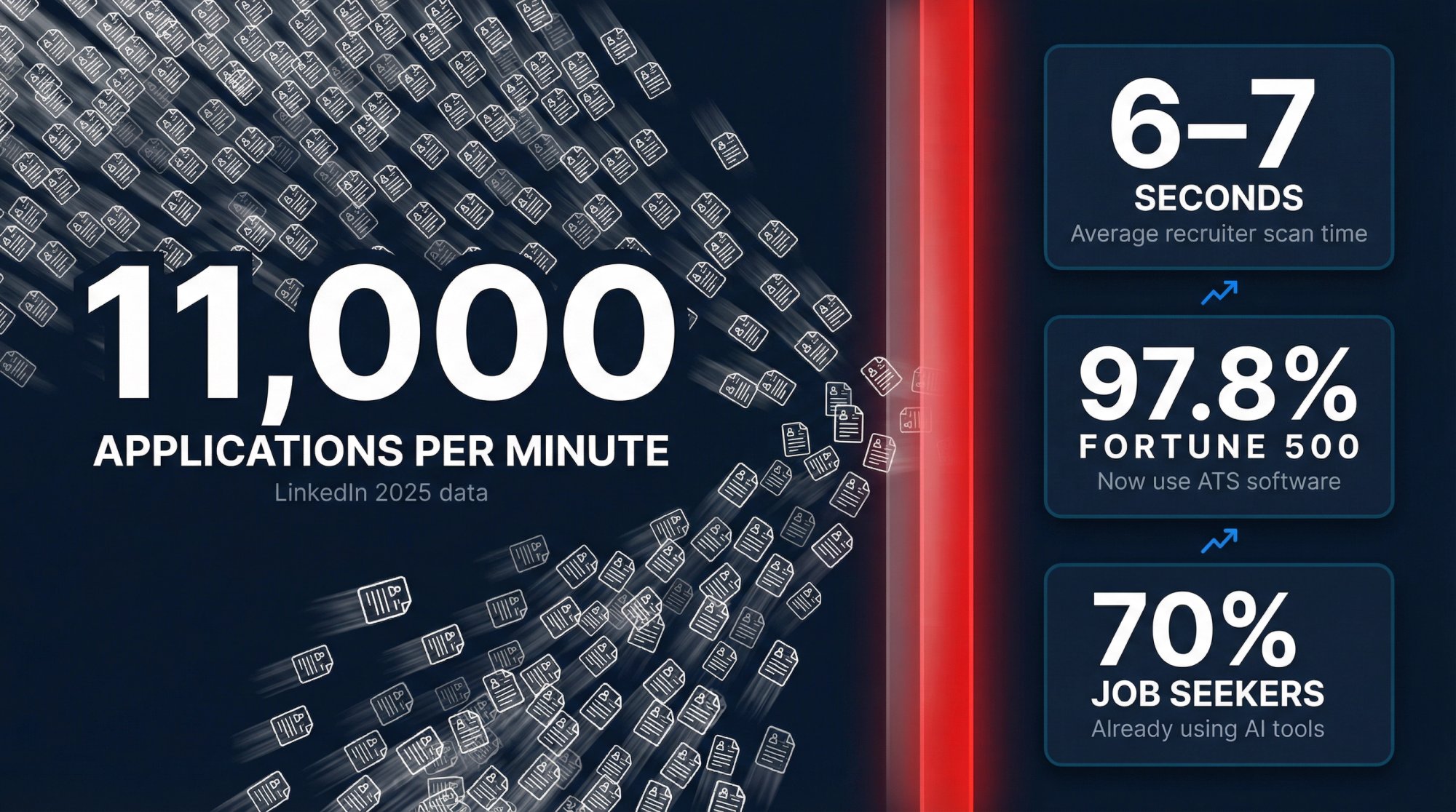
Here's what you're up against: applications are flooding the market (LinkedIn reported a 45% year-over-year increase, averaging 11,000 applications per minute), recruiters spend about 6-7 seconds scanning your resume, and research shows that 97.8% of Fortune 500 companies now use ATS software to filter candidates before a human ever sees your application.
Meanwhile, 70% of job seekers are already using AI for their job search.
The question isn't whether to use AI. It's how to use it like a strategist instead of letting it turn your resume into generic, detectable fluff that gets rejected.
This guide gives you the exact workflow we use at AIApply (800,000+ job seekers trust our platform), complete with copy-paste prompts, ATS optimization rules, and a quality control system that keeps your resume truthful, targeted, and unmistakably human.
Why AI Should Edit Your Resume, Not Write It
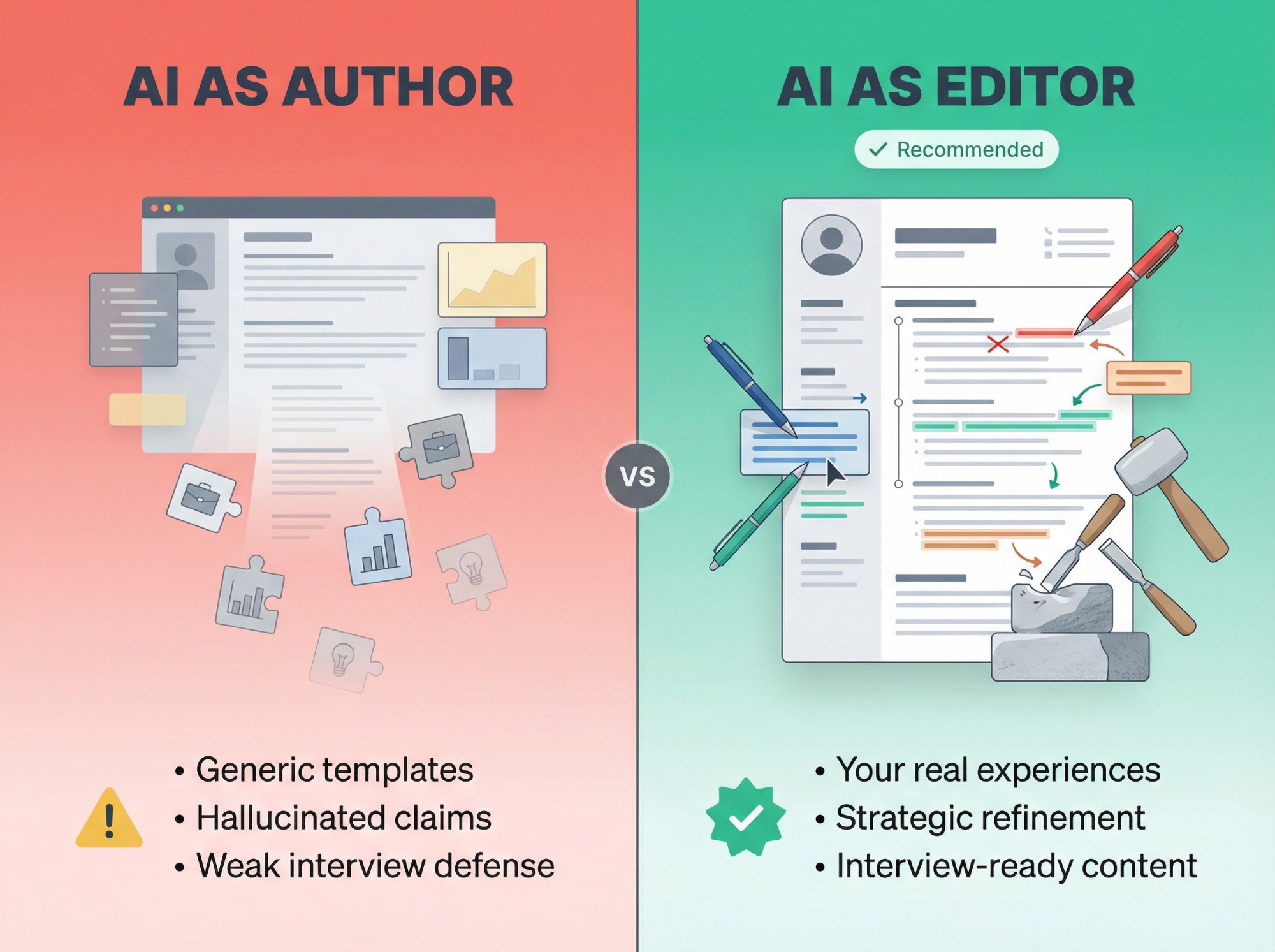
The smartest career offices and employers are converging on one principle: AI should refine your story, not invent it.
Harvard's career services puts it plainly: generative AI can help with editing and keyword integration, but shouldn't be the primary author because output is often generic and must remain authentic.
Anthropic's candidate guidance (updated July 10, 2025) is even more explicit: write your first draft yourself, then use AI to refine. Don't use AI to create experiences you haven't actually had.
The Core Principle: Start with your real experience. Use AI to sharpen language, align keywords, tighten bullets, and make your achievements scannable. But every claim on that resume needs to be something you can defend in an interview.
Think of AI as your resume operations team, not your identity.
8 Steps To Write an AI Resume That Gets Interviews
Step 1: How To Create Your Resume Truth Bank
AI is only as good as your inputs. Your Truth Bank is a single document containing:
→ Roles, dates, titles (exact)
→ Tools and tech you've actually used (and your proficiency level)
→ Projects you built or led (what you delivered, for whom, with what impact)
→ Achievements with evidence: revenue generated, time saved, costs reduced, quality improvements, growth metrics, throughput gains, SLA improvements, NPS scores, cycle time reductions, adoption rates, churn reductions, risk mitigation
→ Awards, certifications, publications (if relevant)
→ 5-10 STAR stories (Situation, Task, Action, Result) you can discuss in interviews
The iron-clad rule: If you can't explain it in an interview without stumbling, it doesn't belong on your resume.
This is your evidence vault. Everything on your final resume must trace back here.
Quick prompt to build your Truth Bank:
"Act as a career strategist. Ask me 12 questions to extract measurable achievements from my last 2 roles. For each question, tell me what type of metric would strengthen the resume bullet (time, cost, revenue, quality, risk, adoption)."
Step 2: How To Extract Keywords From Job Descriptions
Your resume must mirror the employer's language truthfully because ATS tools scan for role-specific keywords and standard resume essentials.
Don't just skim the job posting. Extract everything.
Copy-paste prompt:
"Here is a job description. Extract: (1) Must-have requirements, (2) Nice-to-haves, (3) Hard skills/tools, (4) Soft skills, (5) Core outcomes this role is accountable for, (6) Keywords and keyword variants (acronyms + full forms). Then rank the top 12 items by importance."
Step 3: How To Match Your Experience To Job Requirements
Most AI resumes fail because they're technically aligned but not strategically matched.
This is where you separate yourself from the 70% using AI carelessly.
Your Match Plan is simple:
Requirement → Proof from your Truth Bank → Where it appears (summary, bullets, or skills section)
Prompt:
"Using the Requirements Map and my Truth Bank, create a Match Plan. For each must-have requirement, pick 1-2 proof points from my experience. If I'm missing proof, suggest ethical substitutes: adjacent experience, a project, coursework, or a measurable proxy (without inventing anything)."
This step is what separates resumes that get interviews from resumes that get auto-rejected.
Step 4: How To Format Your Resume For ATS Systems
ATS systems struggle with text boxes, columns, headers/footers, images, and complex layouts.
Indeed specifically advises avoiding headers, tables, and graphics. Use clear section headings and readable fonts.
ATS-safe defaults:
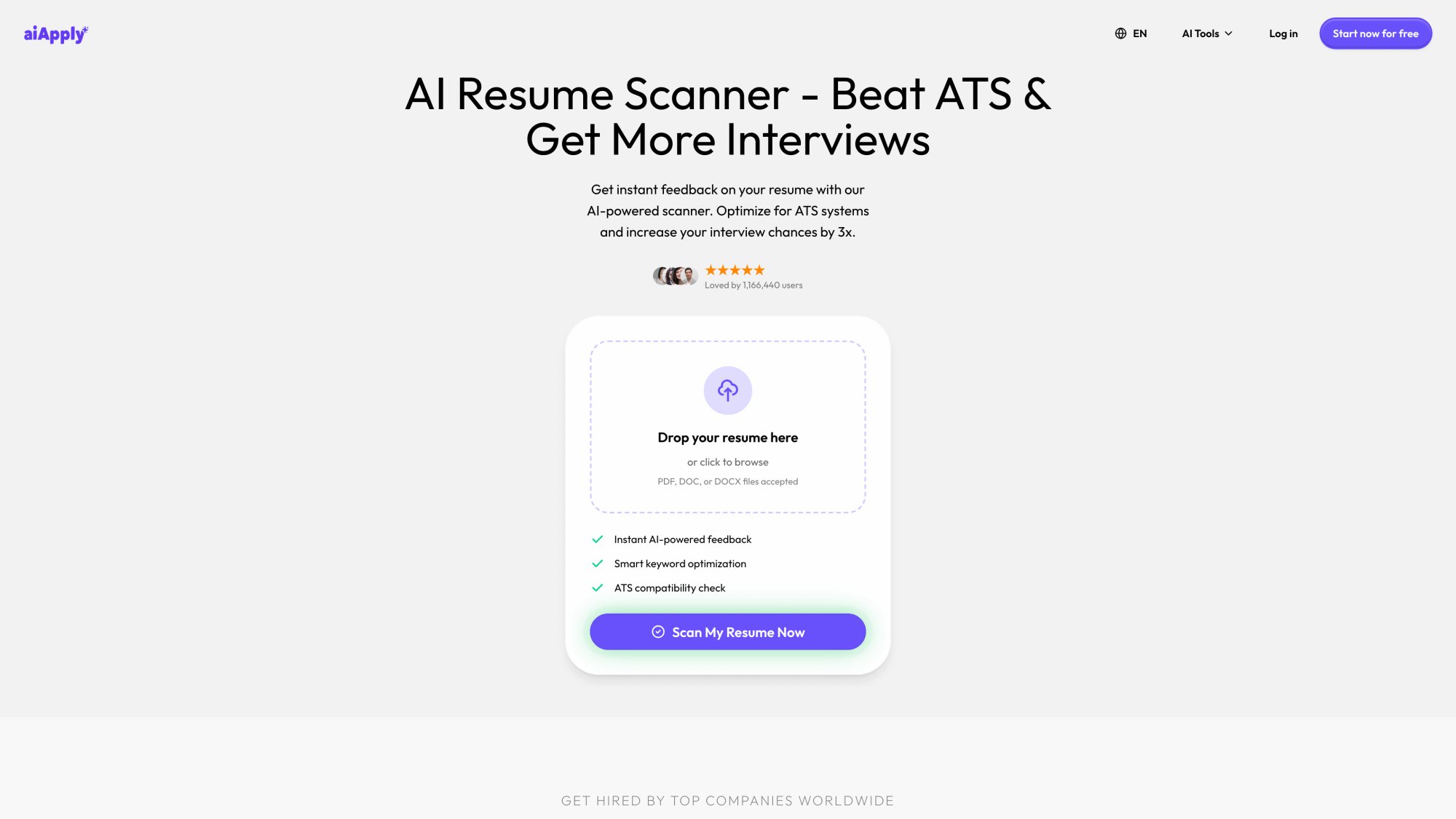
Need help checking your resume for ATS compatibility? Use AIApply's Resume Scanner to get instant feedback on formatting issues, keyword gaps, and ATS readiness.
Step 5: How To Write Resume Bullets That Show Impact
Recruiters scan resumes fast. Your bullets must communicate value instantly.
Use one of these formulas (mix them up):
A) Impact → How → With What → Result
"Reduced invoice processing time 34% by automating validation rules in Python/SQL, cutting month-end close by 2 days."
B) Action → Scope → Outcome Metric
*"Led migration of 12 services to Kubernetes, improving deployment frequency 3× and reducing incident rate 18%."*
C) The "Proof Stack" Bullet
Action + metric + constraint + credibility signal
"Built churn model (AUC 0.82) on 1.2M rows; deployed to production; adopted by Sales Ops for weekly retention playbooks."
Prompt (bullet generator):
"Rewrite these resume bullets for [target role].
Constraints:
Keep each bullet ≤ 2 lines
Start with a strong verb
Include a metric where possible (use placeholders like [X%] if I didn't provide a number)
Use terminology from the job description only if accurate
Avoid buzzwords and clichés
Output 3 versions per bullet: (1) ATS-heavy, (2) recruiter-friendly, (3) executive-style."
Step 6: How To Add Keywords Without Looking Like AI
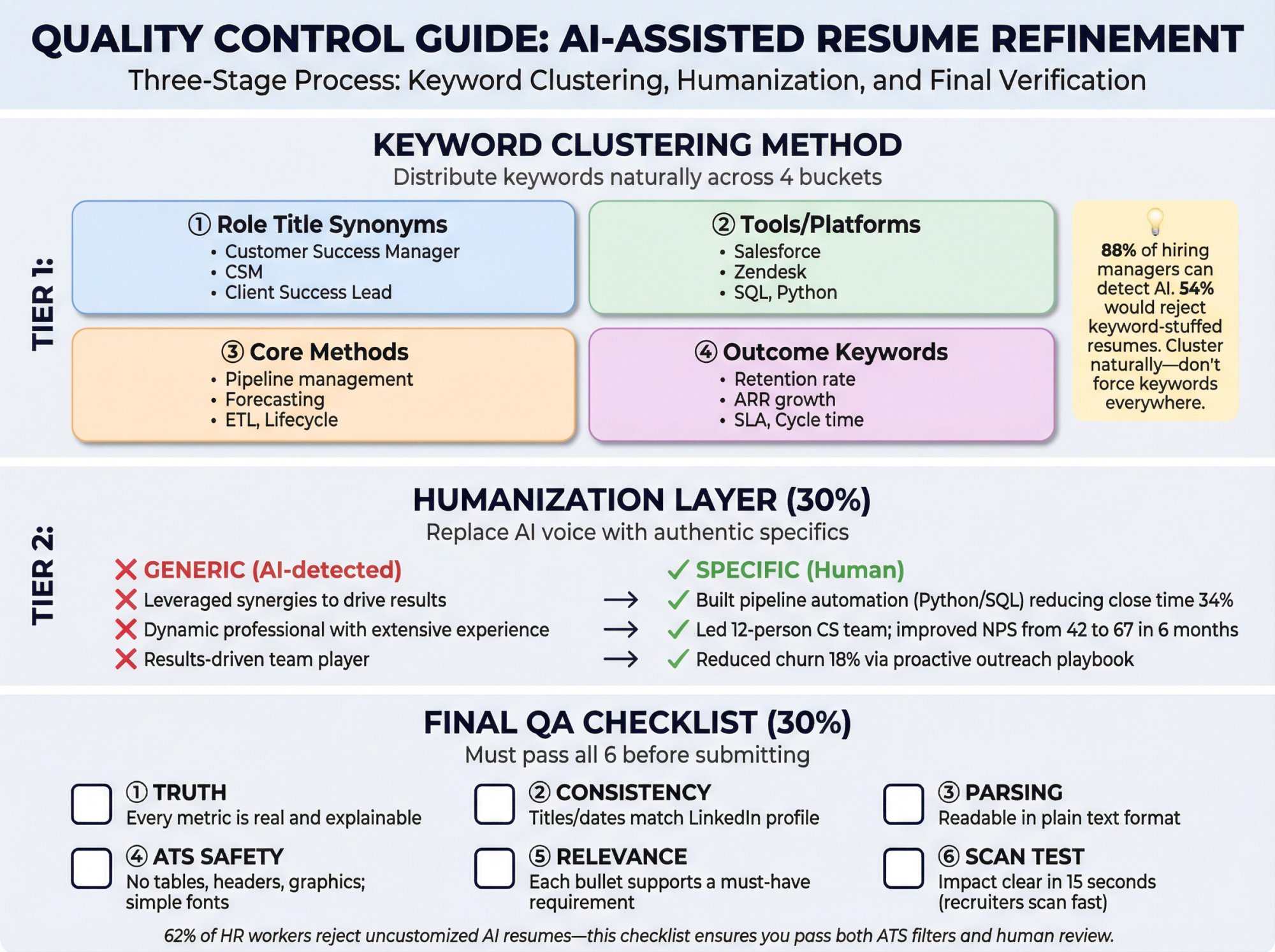
ATS tools scan for keywords tied to the job listing and may rank or filter applicants based on fit.
But keyword stuffing is now a red flag because hiring teams are overwhelmed with low-effort AI applications.
Evidence of the backlash:
• 62% of HR workers say AI-generated resumes without customization are more likely to be rejected
• 88% of hiring managers say they can tell when candidates use AI
• 54% say they would care
The fix: Use keyword clustering, not repetition.
Keyword Philosophy: Keywords are proof signals, not decoration. Cluster them naturally across sections instead of stuffing them everywhere.
Keyword Clustering Method
Put keywords into 4 buckets:
① Role title synonyms (e.g., "Customer Success Manager", "CSM")
② Tools/platforms (Salesforce, Zendesk, SQL, etc.)
③ Core methods (pipeline, forecasting, lifecycle, ETL, etc.)
④ Outcome keywords (retention, ARR, SLA, cycle time, etc.)
Then ensure each bucket appears naturally in your summary, skills section, and 2-4 bullets where it's genuinely relevant.
Don't force keywords everywhere. Sprinkle them where they actually belong.
Want to see how well your keywords match a job description? AIApply's Resume Scanner analyzes keyword alignment and shows you exactly what's missing.
Step 7: How To Make AI Resume Content Sound Human
A resume that reads like a template can get you filtered out by humans, even if the ATS passes it.
This is the most overlooked step.
Your humanization checklist:
→ Replace vague claims ("results-driven", "team player") with specifics
→ Add domain nouns: products, users, industries, constraints
→ Add credible context: scale, stakeholders, environment
→ Remove "AI voice" phrases: "used extensively" instead of "leveraged", "led" instead of "spearheaded", avoid "synergy", "dynamic professional"
Prompt (anti-fluff editor):
"Edit my resume for human authenticity.
Rules:
Remove clichés and generic phrases
Replace them with concrete details from my content
Keep a confident but natural tone
Flag any line that sounds like it could belong to anyone
Output: (1) revised version, (2) list of lines you changed and why."
Step 8: How To Verify Your Resume Before Submitting
AI can create polished nonsense. Your final QA must verify:
① Truth: Every metric is real, explainable, and consistent
② Consistency: Titles and dates align with your LinkedIn profile
③ Parsing: Copy/paste your resume into plain text; headings and bullets should remain readable
④ ATS safety: No tables/headers/graphics; standard headings; simple fonts
⑤ Relevance: Each bullet supports a must-have requirement
⑥ Scan test: Can a stranger understand your role impact in 15 seconds? (Remember, recruiters scan in seconds.)
If you can't check YES to all six, fix it before hitting submit.
AI Resume Prompts You Can Copy and Use Today
Prompt A: "Write My Resume, But Ethically"
"You are a resume strategist. You must not invent experience, employers, degrees, titles, certifications, or metrics. If I don't provide a metric, use [METRIC NEEDED] and ask me what the real number is. First, ask me only the questions required to write a high-quality resume for this job description. Then draft the resume in ATS-friendly format."
Prompt B: "Transform Responsibilities Into Achievements"
"Here are my responsibilities. Convert them into achievement bullets using: Action + Scope + Tool/Method + Result. If a metric is missing, propose 3 plausible metric categories and ask me to choose and provide the real number."
Prompt C: "Skills Section That Matches the Job Description"
"Create a Skills section tailored to this job. Output: 3 subcategories (Tools, Methods, Domain). Only include skills that are true for me. If you're unsure, ask."
Prompt D: "Career Changer Translation"
"I'm moving from [old field] to [new role]. Rewrite my experience bullets to highlight transferable skills and adjacent outcomes. Do not rename my titles. Add a 3-line summary that explains my fit without sounding defensive."
Prompt E: "Executive Summary"
"Write a 4-line executive summary for a [target level] candidate. Include: years, scope, signature wins, and leadership style (using only my provided details)."
What ATS Systems Actually Do (And How To Beat Them)
What ATS Does (In Plain English)
ATS software scans resumes for essentials (titles, education, skills) and looks for keywords tied to the job listing. Resumes lacking key terms can be filtered out.
ATS is everywhere:
• 97.8% of Fortune 500 companies have ATS on their career sites
• More than 98% of Fortune 500 companies use ATS to filter applications
This isn't optional anymore. Your resume must pass ATS or it never reaches a human.
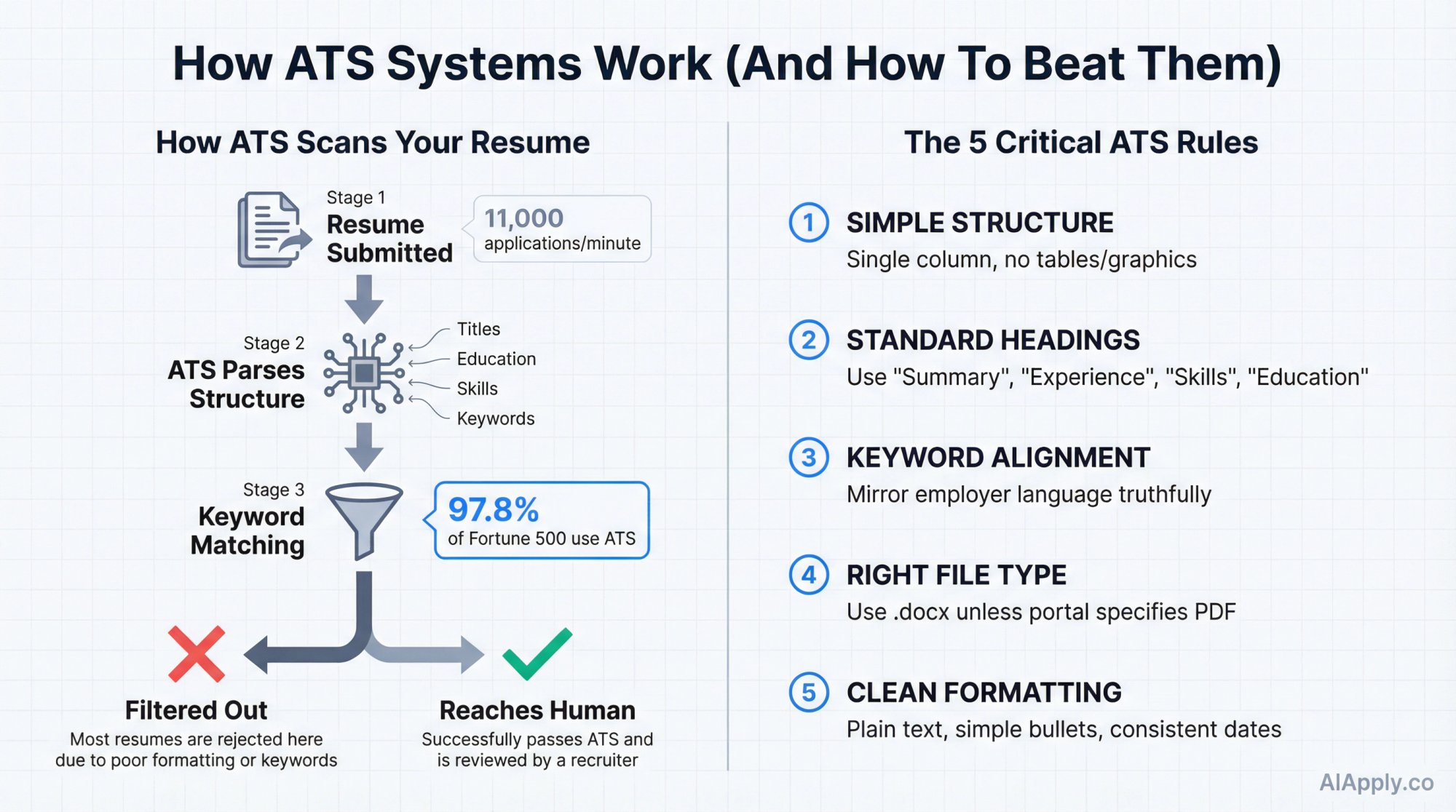
The ATS Rules That Matter Most
Want to know if your resume will pass ATS filters? AIApply's Resume Scanner runs a comprehensive ATS compatibility check and tells you exactly what to fix.
3 Biggest AI Resume Risks (And How To Avoid Them)
The 3 Biggest Risks of AI Resumes (And How To Eliminate Them)
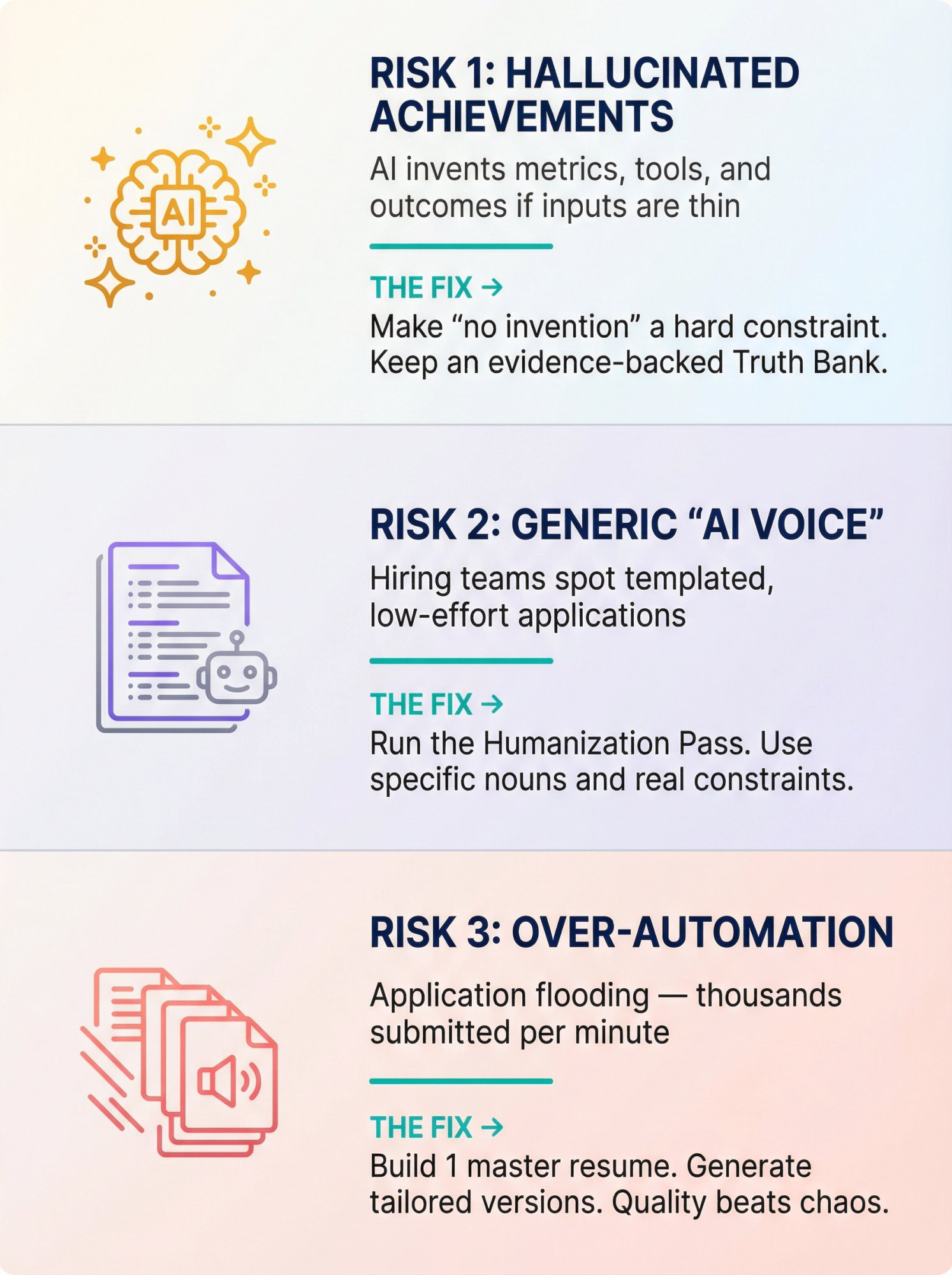
Risk 1: Hallucinated Achievements
AI will confidently invent metrics, tools, and outcomes if your inputs are thin.
The Fix: Make "no invention" a hard constraint in your prompt. Keep an evidence-backed Truth Bank. Never let AI fill gaps with fabrications.
Risk 2: Generic "AI Voice"
Hiring teams are increasingly sensitive to templated applications. Research shows skepticism when AI use is heavy or unpersonalized.
The Fix: Run the Humanization Pass. Use specific nouns and real constraints. Replace corporate buzzwords with plain language.
Risk 3: Over-Automation
The job market is experiencing application flooding. LinkedIn applications surged to thousands per minute. Low-effort volume can backfire.
Recruiters can tell when you're carpet-bombing job boards.
The Fix: Build 1 master resume. Generate tailored versions for roles you'd actually accept. Quality beats chaos.
Instead of manually customizing each application, use AIApply's Auto Apply to submit high-quality, tailored applications at scale (scanning over 1 million job postings and maintaining personalization for each role).
How To Write a Resume For Special Situations
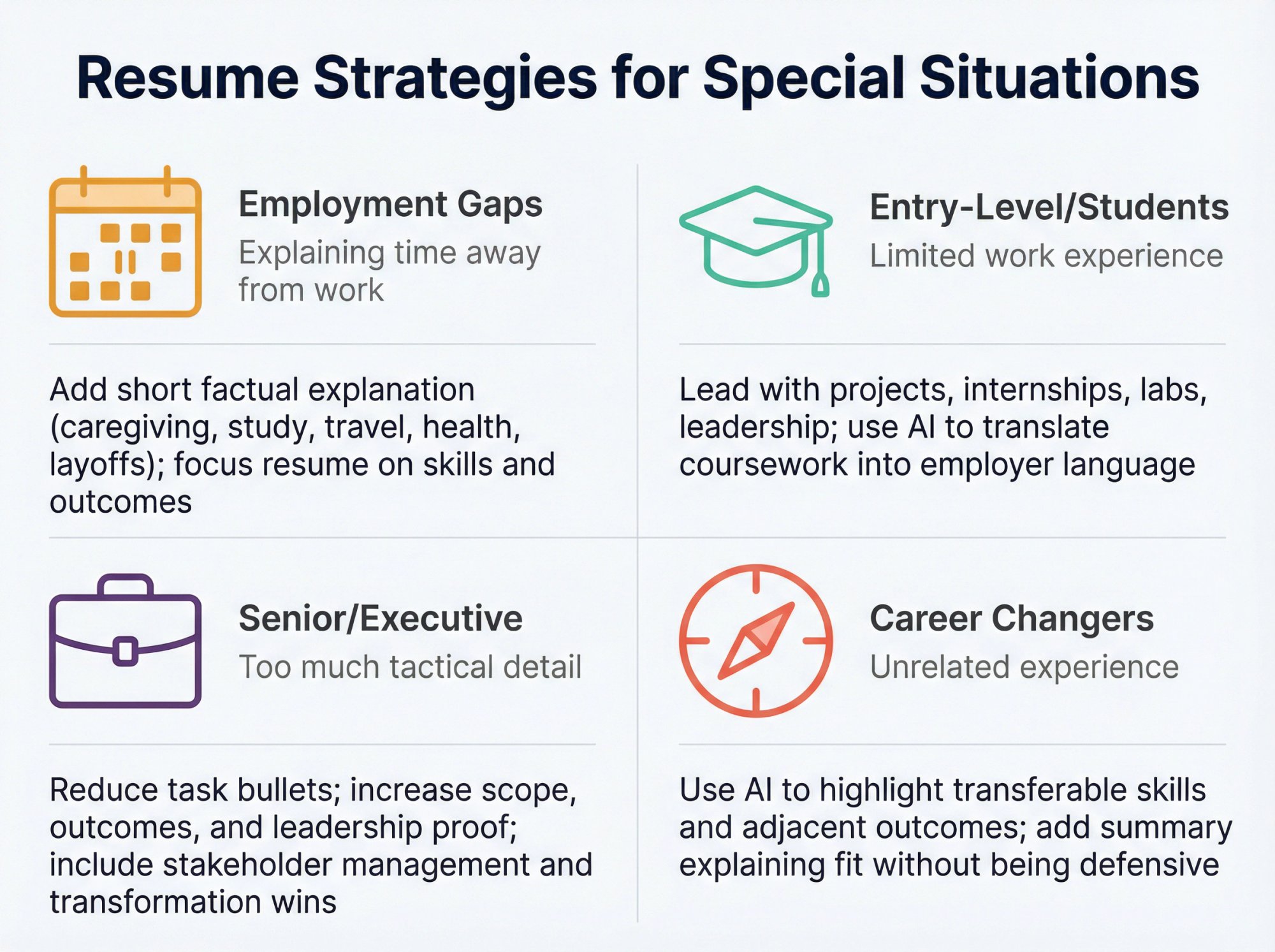
Check out our guide for students to learn how to build a compelling resume even without traditional work experience.
How To Use AIApply To Build Your Resume Fast
If you want the workflow above without juggling tools, AIApply is built for exactly this.
800,000+ job seekers use our platform to land interviews faster.
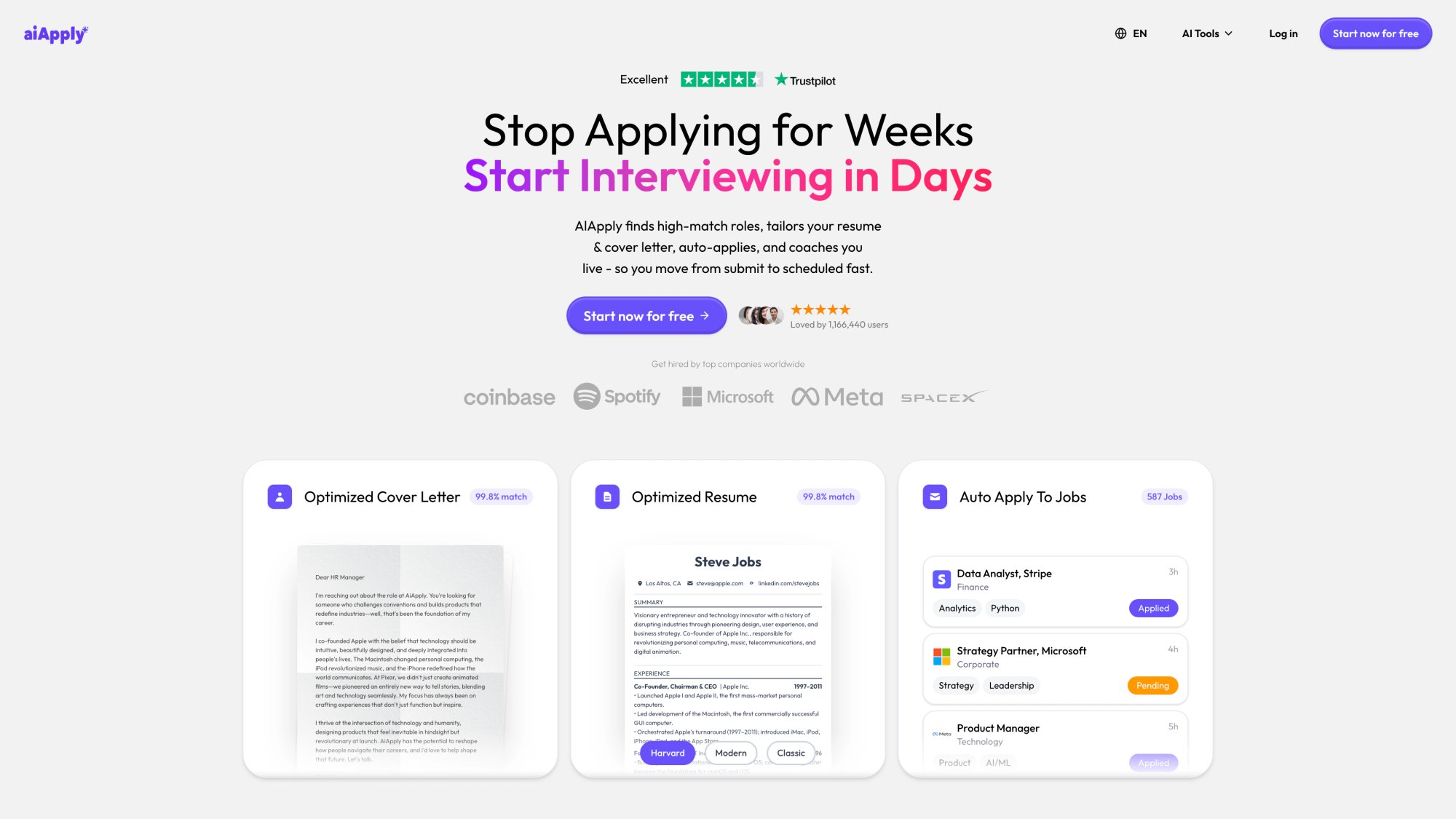
(Above: Real AIApply product dashboard replacing the AI-generated ecosystem diagram)
A) Generate a Tailored Resume Quickly
Use AIApply's AI Resume Builder to produce a role-aligned resume from your inputs with an ATS-friendly approach.
You can also build your resume from LinkedIn to automatically import your experience and generate a polished, ATS-optimized resume in minutes.
B) Upgrade an Existing Resume Instead of Starting Over
Use AIApply's Resume Rewriter to refresh language and align terminology to a job description (without changing your facts).
Or try our Resume Editor for more granular control over specific sections and formatting.
C) Run an ATS + Keyword Audit
Use AIApply's Resume Scanner to get actionable feedback on ATS compatibility, keywords, and formatting.
You can also check your Resume Checker for grammar, clarity, and impact scores.
D) Apply Globally (Without Breaking ATS)
Use AIApply's Resume Translator to translate your resume while preserving professional tone and ATS-readability across supported languages.
E) Create Perfect Cover Letters
Once your resume is optimized, generate tailored cover letters with our AI Cover Letter Generator that match each job's requirements and maintain consistency with your resume.
F) Prepare for Interviews
Don't stop at the resume. Use AIApply's Interview Buddy to practice common interview questions and get AI-powered feedback on your answers.
Or try our AI Job Interview simulator to rehearse realistic interview scenarios before the real thing.
G) Complete the Pipeline (Optional)
Once the resume is strong, AIApply can also support the next steps: cover letters, interview prep, and automation from the same workflow.
Why 800,000+ job seekers trust AIApply:
→ 80% more likely to get hired faster with our AI-powered tools
→ 1,000,000+ active users landing interviews within the first month
→ 4.8/5 star rating from 500,000+ reviews
→ Built on GPT-4 via Azure OpenAI for intelligent resume optimization
→ ATS-friendly templates that get past the filters
FREQUENTLY ASKED QUESTIONS
Is it okay to use AI to write a resume?
Yes, in most cases, if you use it as an editor and strategist rather than a ghostwriter.
Harvard specifically recommends AI for editing and keyword integration while warning against AI as the primary author.
Some employers explicitly encourage "draft yourself, then refine with AI." Anthropic's guidance is a clear example.
Will ATS detect that my resume was written by AI?
ATS tools are primarily designed to parse structure and match keywords/requirements, not to judge authorship.
The bigger risk is that humans spot generic language and assume low effort. That's why the Humanization Pass matters.
Use AIApply's Resume Scanner to ensure your resume passes both ATS filters and human review.
Should I disclose I used AI?
Unless an employer asks for disclosure, it's usually more important that your resume is accurate and interview-proof. Indeed's employer interviews mention some employers may ask candidates to be transparent, and organizations are still forming norms.
Always follow the application instructions if they specify rules.
PDF or DOCX?
Follow the portal. If it doesn't specify, .docx is often safest for ATS parsing, per Indeed's ATS resume guidance.
How do I know if my AI resume is good?
Use this pass/fail test:
✓ Can you defend every bullet in an interview?
✓ Does it map to the job's must-haves?
✓ Does it read cleanly in plain text?
✓ Would a recruiter understand your impact in 10-15 seconds?
If yes to all four, you're ready to submit.
Or better yet, run it through AIApply's Resume Scanner for an objective quality score and specific improvement recommendations.
Can I use AIApply for free?
AIApply offers multiple tools with different access levels. Our AI Resume Builder and other core features are available through our subscription plans, with student discounts available. Check our pricing page for current options.
Does AIApply work with all job boards?
Yes. AIApply's Auto Apply scans over 1 million job postings and can submit applications to most major job boards and company career sites. Our system is designed to work with the most common application formats.
How long does it take to create a resume with AI?
With AIApply's Resume Builder, you can generate a tailored, ATS-optimized resume in under 2 minutes. The key is having your Truth Bank ready (Step 1 above). Most users spend 10-15 minutes on initial setup, then can create role-specific versions in minutes.
What if I need help with specific sections?
Use our Resume Summary Generator to create compelling professional summaries that grab recruiter attention in seconds.
Can AIApply help with job search emails?
Yes! Our AI Email Generator helps you craft professional follow-up emails, networking messages, and application inquiries.
Final Checklist (Save This)
Before you submit, confirm:
✓ Every claim is true and explainable
✓ ATS-safe formatting (no tables, graphics, headers)
✓ Keywords match the job description without stuffing
✓ You customized the top third (summary + top bullets)
✓ You removed clichés and "AI voice"
✓ You exported in the right file type
✓ You ran an ATS scan (or at least a plain-text parse test)
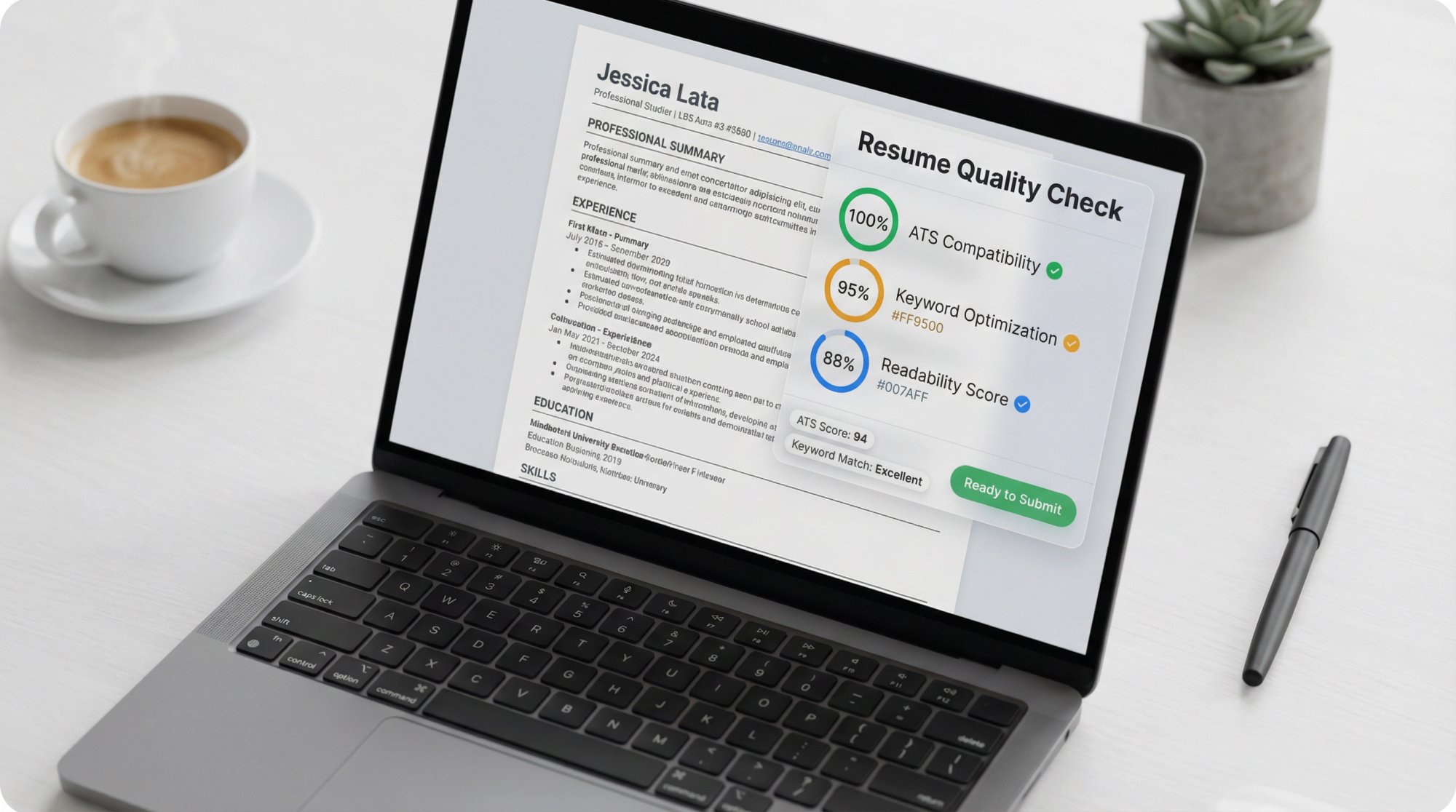
Run AIApply's Resume Scanner to automatically check all these criteria and get a detailed quality report.
Want the Fastest Way To Do This?
If you want the workflow above packaged into one pipeline, start with:
AIApply Resume Builder (generate tailored drafts)
AIApply Resume Scanner (ATS + keyword + formatting feedback)
Then complete the job search pipeline with AIApply's full suite of tools: cover letter generation, interview prep with our Interview Buddy, and automated applications through Auto Apply.
Over 800,000 job seekers trust AIApply to land interviews faster. Join them today.
You found this article because you want interviews, not just a prettier document.
Here's what you're up against: applications are flooding the market (LinkedIn reported a 45% year-over-year increase, averaging 11,000 applications per minute), recruiters spend about 6-7 seconds scanning your resume, and research shows that 97.8% of Fortune 500 companies now use ATS software to filter candidates before a human ever sees your application.
Meanwhile, 70% of job seekers are already using AI for their job search.
The question isn't whether to use AI. It's how to use it like a strategist instead of letting it turn your resume into generic, detectable fluff that gets rejected.
This guide gives you the exact workflow we use at AIApply (800,000+ job seekers trust our platform), complete with copy-paste prompts, ATS optimization rules, and a quality control system that keeps your resume truthful, targeted, and unmistakably human.
Why AI Should Edit Your Resume, Not Write It
The smartest career offices and employers are converging on one principle: AI should refine your story, not invent it.
Harvard's career services puts it plainly: generative AI can help with editing and keyword integration, but shouldn't be the primary author because output is often generic and must remain authentic.
Anthropic's candidate guidance (updated July 10, 2025) is even more explicit: write your first draft yourself, then use AI to refine. Don't use AI to create experiences you haven't actually had.
The Core Principle: Start with your real experience. Use AI to sharpen language, align keywords, tighten bullets, and make your achievements scannable. But every claim on that resume needs to be something you can defend in an interview.
Think of AI as your resume operations team, not your identity.
8 Steps To Write an AI Resume That Gets Interviews
Step 1: How To Create Your Resume Truth Bank
AI is only as good as your inputs. Your Truth Bank is a single document containing:
→ Roles, dates, titles (exact)
→ Tools and tech you've actually used (and your proficiency level)
→ Projects you built or led (what you delivered, for whom, with what impact)
→ Achievements with evidence: revenue generated, time saved, costs reduced, quality improvements, growth metrics, throughput gains, SLA improvements, NPS scores, cycle time reductions, adoption rates, churn reductions, risk mitigation
→ Awards, certifications, publications (if relevant)
→ 5-10 STAR stories (Situation, Task, Action, Result) you can discuss in interviews
The iron-clad rule: If you can't explain it in an interview without stumbling, it doesn't belong on your resume.
This is your evidence vault. Everything on your final resume must trace back here.
Quick prompt to build your Truth Bank:
"Act as a career strategist. Ask me 12 questions to extract measurable achievements from my last 2 roles. For each question, tell me what type of metric would strengthen the resume bullet (time, cost, revenue, quality, risk, adoption)."
Step 2: How To Extract Keywords From Job Descriptions
Your resume must mirror the employer's language truthfully because ATS tools scan for role-specific keywords and standard resume essentials.
Don't just skim the job posting. Extract everything.
Copy-paste prompt:
"Here is a job description. Extract: (1) Must-have requirements, (2) Nice-to-haves, (3) Hard skills/tools, (4) Soft skills, (5) Core outcomes this role is accountable for, (6) Keywords and keyword variants (acronyms + full forms). Then rank the top 12 items by importance."
Step 3: How To Match Your Experience To Job Requirements
Most AI resumes fail because they're technically aligned but not strategically matched.
This is where you separate yourself from the 70% using AI carelessly.
Your Match Plan is simple:
Requirement → Proof from your Truth Bank → Where it appears (summary, bullets, or skills section)
Prompt:
"Using the Requirements Map and my Truth Bank, create a Match Plan. For each must-have requirement, pick 1-2 proof points from my experience. If I'm missing proof, suggest ethical substitutes: adjacent experience, a project, coursework, or a measurable proxy (without inventing anything)."
This step is what separates resumes that get interviews from resumes that get auto-rejected.
Step 4: How To Format Your Resume For ATS Systems
ATS systems struggle with text boxes, columns, headers/footers, images, and complex layouts.
Indeed specifically advises avoiding headers, tables, and graphics. Use clear section headings and readable fonts.
ATS-safe defaults:
Need help checking your resume for ATS compatibility? Use AIApply's Resume Scanner to get instant feedback on formatting issues, keyword gaps, and ATS readiness.
Step 5: How To Write Resume Bullets That Show Impact
Recruiters scan resumes fast. Your bullets must communicate value instantly.
Use one of these formulas (mix them up):
A) Impact → How → With What → Result
"Reduced invoice processing time 34% by automating validation rules in Python/SQL, cutting month-end close by 2 days."
B) Action → Scope → Outcome Metric
*"Led migration of 12 services to Kubernetes, improving deployment frequency 3× and reducing incident rate 18%."*
C) The "Proof Stack" Bullet
Action + metric + constraint + credibility signal
"Built churn model (AUC 0.82) on 1.2M rows; deployed to production; adopted by Sales Ops for weekly retention playbooks."
Prompt (bullet generator):
"Rewrite these resume bullets for [target role].
Constraints:
Keep each bullet ≤ 2 lines
Start with a strong verb
Include a metric where possible (use placeholders like [X%] if I didn't provide a number)
Use terminology from the job description only if accurate
Avoid buzzwords and clichés
Output 3 versions per bullet: (1) ATS-heavy, (2) recruiter-friendly, (3) executive-style."
Step 6: How To Add Keywords Without Looking Like AI
ATS tools scan for keywords tied to the job listing and may rank or filter applicants based on fit.
But keyword stuffing is now a red flag because hiring teams are overwhelmed with low-effort AI applications.
Evidence of the backlash:
• 62% of HR workers say AI-generated resumes without customization are more likely to be rejected
• 88% of hiring managers say they can tell when candidates use AI
• 54% say they would care
The fix: Use keyword clustering, not repetition.
Keyword Philosophy: Keywords are proof signals, not decoration. Cluster them naturally across sections instead of stuffing them everywhere.
Keyword Clustering Method
Put keywords into 4 buckets:
① Role title synonyms (e.g., "Customer Success Manager", "CSM")
② Tools/platforms (Salesforce, Zendesk, SQL, etc.)
③ Core methods (pipeline, forecasting, lifecycle, ETL, etc.)
④ Outcome keywords (retention, ARR, SLA, cycle time, etc.)
Then ensure each bucket appears naturally in your summary, skills section, and 2-4 bullets where it's genuinely relevant.
Don't force keywords everywhere. Sprinkle them where they actually belong.
Want to see how well your keywords match a job description? AIApply's Resume Scanner analyzes keyword alignment and shows you exactly what's missing.
Step 7: How To Make AI Resume Content Sound Human
A resume that reads like a template can get you filtered out by humans, even if the ATS passes it.
This is the most overlooked step.
Your humanization checklist:
→ Replace vague claims ("results-driven", "team player") with specifics
→ Add domain nouns: products, users, industries, constraints
→ Add credible context: scale, stakeholders, environment
→ Remove "AI voice" phrases: "used extensively" instead of "leveraged", "led" instead of "spearheaded", avoid "synergy", "dynamic professional"
Prompt (anti-fluff editor):
"Edit my resume for human authenticity.
Rules:
Remove clichés and generic phrases
Replace them with concrete details from my content
Keep a confident but natural tone
Flag any line that sounds like it could belong to anyone
Output: (1) revised version, (2) list of lines you changed and why."
Step 8: How To Verify Your Resume Before Submitting
AI can create polished nonsense. Your final QA must verify:
① Truth: Every metric is real, explainable, and consistent
② Consistency: Titles and dates align with your LinkedIn profile
③ Parsing: Copy/paste your resume into plain text; headings and bullets should remain readable
④ ATS safety: No tables/headers/graphics; standard headings; simple fonts
⑤ Relevance: Each bullet supports a must-have requirement
⑥ Scan test: Can a stranger understand your role impact in 15 seconds? (Remember, recruiters scan in seconds.)
If you can't check YES to all six, fix it before hitting submit.
AI Resume Prompts You Can Copy and Use Today
Prompt A: "Write My Resume, But Ethically"
"You are a resume strategist. You must not invent experience, employers, degrees, titles, certifications, or metrics. If I don't provide a metric, use [METRIC NEEDED] and ask me what the real number is. First, ask me only the questions required to write a high-quality resume for this job description. Then draft the resume in ATS-friendly format."
Prompt B: "Transform Responsibilities Into Achievements"
"Here are my responsibilities. Convert them into achievement bullets using: Action + Scope + Tool/Method + Result. If a metric is missing, propose 3 plausible metric categories and ask me to choose and provide the real number."
Prompt C: "Skills Section That Matches the Job Description"
"Create a Skills section tailored to this job. Output: 3 subcategories (Tools, Methods, Domain). Only include skills that are true for me. If you're unsure, ask."
Prompt D: "Career Changer Translation"
"I'm moving from [old field] to [new role]. Rewrite my experience bullets to highlight transferable skills and adjacent outcomes. Do not rename my titles. Add a 3-line summary that explains my fit without sounding defensive."
Prompt E: "Executive Summary"
"Write a 4-line executive summary for a [target level] candidate. Include: years, scope, signature wins, and leadership style (using only my provided details)."
What ATS Systems Actually Do (And How To Beat Them)
What ATS Does (In Plain English)
ATS software scans resumes for essentials (titles, education, skills) and looks for keywords tied to the job listing. Resumes lacking key terms can be filtered out.
ATS is everywhere:
• 97.8% of Fortune 500 companies have ATS on their career sites
• More than 98% of Fortune 500 companies use ATS to filter applications
This isn't optional anymore. Your resume must pass ATS or it never reaches a human.
The ATS Rules That Matter Most
Want to know if your resume will pass ATS filters? AIApply's Resume Scanner runs a comprehensive ATS compatibility check and tells you exactly what to fix.
3 Biggest AI Resume Risks (And How To Avoid Them)
The 3 Biggest Risks of AI Resumes (And How To Eliminate Them)
Risk 1: Hallucinated Achievements
AI will confidently invent metrics, tools, and outcomes if your inputs are thin.
The Fix: Make "no invention" a hard constraint in your prompt. Keep an evidence-backed Truth Bank. Never let AI fill gaps with fabrications.
Risk 2: Generic "AI Voice"
Hiring teams are increasingly sensitive to templated applications. Research shows skepticism when AI use is heavy or unpersonalized.
The Fix: Run the Humanization Pass. Use specific nouns and real constraints. Replace corporate buzzwords with plain language.
Risk 3: Over-Automation
The job market is experiencing application flooding. LinkedIn applications surged to thousands per minute. Low-effort volume can backfire.
Recruiters can tell when you're carpet-bombing job boards.
The Fix: Build 1 master resume. Generate tailored versions for roles you'd actually accept. Quality beats chaos.
Instead of manually customizing each application, use AIApply's Auto Apply to submit high-quality, tailored applications at scale (scanning over 1 million job postings and maintaining personalization for each role).
How To Write a Resume For Special Situations
Check out our guide for students to learn how to build a compelling resume even without traditional work experience.
How To Use AIApply To Build Your Resume Fast
If you want the workflow above without juggling tools, AIApply is built for exactly this.
800,000+ job seekers use our platform to land interviews faster.
(Above: Real AIApply product dashboard replacing the AI-generated ecosystem diagram)
A) Generate a Tailored Resume Quickly
Use AIApply's AI Resume Builder to produce a role-aligned resume from your inputs with an ATS-friendly approach.
You can also build your resume from LinkedIn to automatically import your experience and generate a polished, ATS-optimized resume in minutes.
B) Upgrade an Existing Resume Instead of Starting Over
Use AIApply's Resume Rewriter to refresh language and align terminology to a job description (without changing your facts).
Or try our Resume Editor for more granular control over specific sections and formatting.
C) Run an ATS + Keyword Audit
Use AIApply's Resume Scanner to get actionable feedback on ATS compatibility, keywords, and formatting.
You can also check your Resume Checker for grammar, clarity, and impact scores.
D) Apply Globally (Without Breaking ATS)
Use AIApply's Resume Translator to translate your resume while preserving professional tone and ATS-readability across supported languages.
E) Create Perfect Cover Letters
Once your resume is optimized, generate tailored cover letters with our AI Cover Letter Generator that match each job's requirements and maintain consistency with your resume.
F) Prepare for Interviews
Don't stop at the resume. Use AIApply's Interview Buddy to practice common interview questions and get AI-powered feedback on your answers.
Or try our AI Job Interview simulator to rehearse realistic interview scenarios before the real thing.
G) Complete the Pipeline (Optional)
Once the resume is strong, AIApply can also support the next steps: cover letters, interview prep, and automation from the same workflow.
Why 800,000+ job seekers trust AIApply:
→ 80% more likely to get hired faster with our AI-powered tools
→ 1,000,000+ active users landing interviews within the first month
→ 4.8/5 star rating from 500,000+ reviews
→ Built on GPT-4 via Azure OpenAI for intelligent resume optimization
→ ATS-friendly templates that get past the filters
FREQUENTLY ASKED QUESTIONS
Is it okay to use AI to write a resume?
Yes, in most cases, if you use it as an editor and strategist rather than a ghostwriter.
Harvard specifically recommends AI for editing and keyword integration while warning against AI as the primary author.
Some employers explicitly encourage "draft yourself, then refine with AI." Anthropic's guidance is a clear example.
Will ATS detect that my resume was written by AI?
ATS tools are primarily designed to parse structure and match keywords/requirements, not to judge authorship.
The bigger risk is that humans spot generic language and assume low effort. That's why the Humanization Pass matters.
Use AIApply's Resume Scanner to ensure your resume passes both ATS filters and human review.
Should I disclose I used AI?
Unless an employer asks for disclosure, it's usually more important that your resume is accurate and interview-proof. Indeed's employer interviews mention some employers may ask candidates to be transparent, and organizations are still forming norms.
Always follow the application instructions if they specify rules.
PDF or DOCX?
Follow the portal. If it doesn't specify, .docx is often safest for ATS parsing, per Indeed's ATS resume guidance.
How do I know if my AI resume is good?
Use this pass/fail test:
✓ Can you defend every bullet in an interview?
✓ Does it map to the job's must-haves?
✓ Does it read cleanly in plain text?
✓ Would a recruiter understand your impact in 10-15 seconds?
If yes to all four, you're ready to submit.
Or better yet, run it through AIApply's Resume Scanner for an objective quality score and specific improvement recommendations.
Can I use AIApply for free?
AIApply offers multiple tools with different access levels. Our AI Resume Builder and other core features are available through our subscription plans, with student discounts available. Check our pricing page for current options.
Does AIApply work with all job boards?
Yes. AIApply's Auto Apply scans over 1 million job postings and can submit applications to most major job boards and company career sites. Our system is designed to work with the most common application formats.
How long does it take to create a resume with AI?
With AIApply's Resume Builder, you can generate a tailored, ATS-optimized resume in under 2 minutes. The key is having your Truth Bank ready (Step 1 above). Most users spend 10-15 minutes on initial setup, then can create role-specific versions in minutes.
What if I need help with specific sections?
Use our Resume Summary Generator to create compelling professional summaries that grab recruiter attention in seconds.
Can AIApply help with job search emails?
Yes! Our AI Email Generator helps you craft professional follow-up emails, networking messages, and application inquiries.
Final Checklist (Save This)
Before you submit, confirm:
✓ Every claim is true and explainable
✓ ATS-safe formatting (no tables, graphics, headers)
✓ Keywords match the job description without stuffing
✓ You customized the top third (summary + top bullets)
✓ You removed clichés and "AI voice"
✓ You exported in the right file type
✓ You ran an ATS scan (or at least a plain-text parse test)
Run AIApply's Resume Scanner to automatically check all these criteria and get a detailed quality report.
Want the Fastest Way To Do This?
If you want the workflow above packaged into one pipeline, start with:
AIApply Resume Builder (generate tailored drafts)
AIApply Resume Scanner (ATS + keyword + formatting feedback)
Then complete the job search pipeline with AIApply's full suite of tools: cover letter generation, interview prep with our Interview Buddy, and automated applications through Auto Apply.
Over 800,000 job seekers trust AIApply to land interviews faster. Join them today.
.webp)
%20(1).webp)
.webp)
Don't miss out on
your next opportunity.
Create and send applications in seconds, not hours.


