
How To Find Remote Jobs in 2026 (Scam-Proof Guide)

.webp)
Job searching is exhausting. Remote job searching is exhausting and risky.
The remote work market in 2026 has a strange contradiction. Everyone wants remote jobs, but legitimate opportunities keep shrinking. According to LinkedIn's Economic Graph research, remote availability in the U.S. peaked in early 2022 and dropped to just 16% by late 2024 (for jobs members applied to that offered remote flexibility). By late 2024, only 9% of newly listed jobs were remote, yet remote roles made up 16% of "still-active" jobs that continued attracting applicants.
Translation: scarce supply, massive demand, and fierce competition.
What makes this harder? While you're fighting for limited legitimate opportunities, scammers have built an entire industry around fake remote jobs. The FTC reports that job scam losses jumped from $90 million in 2020 to $501 million in 2024. Reports tripled in that same period.
Consider this for a moment. More than half a billion dollars lost to people who just wanted a job.

So if you want to find legitimate remote work in 2026, you need two things working together: a high-signal sourcing strategy so you're not drowning in spam and ghost listings, and a scam verification system so you don't waste time, money, or your identity on fake opportunities.
This guide gives you both. Plus a 30-day action plan you can start today.
Why Remote Jobs Are So Competitive in 2026
What you're facing isn't just competition. It's brutal.
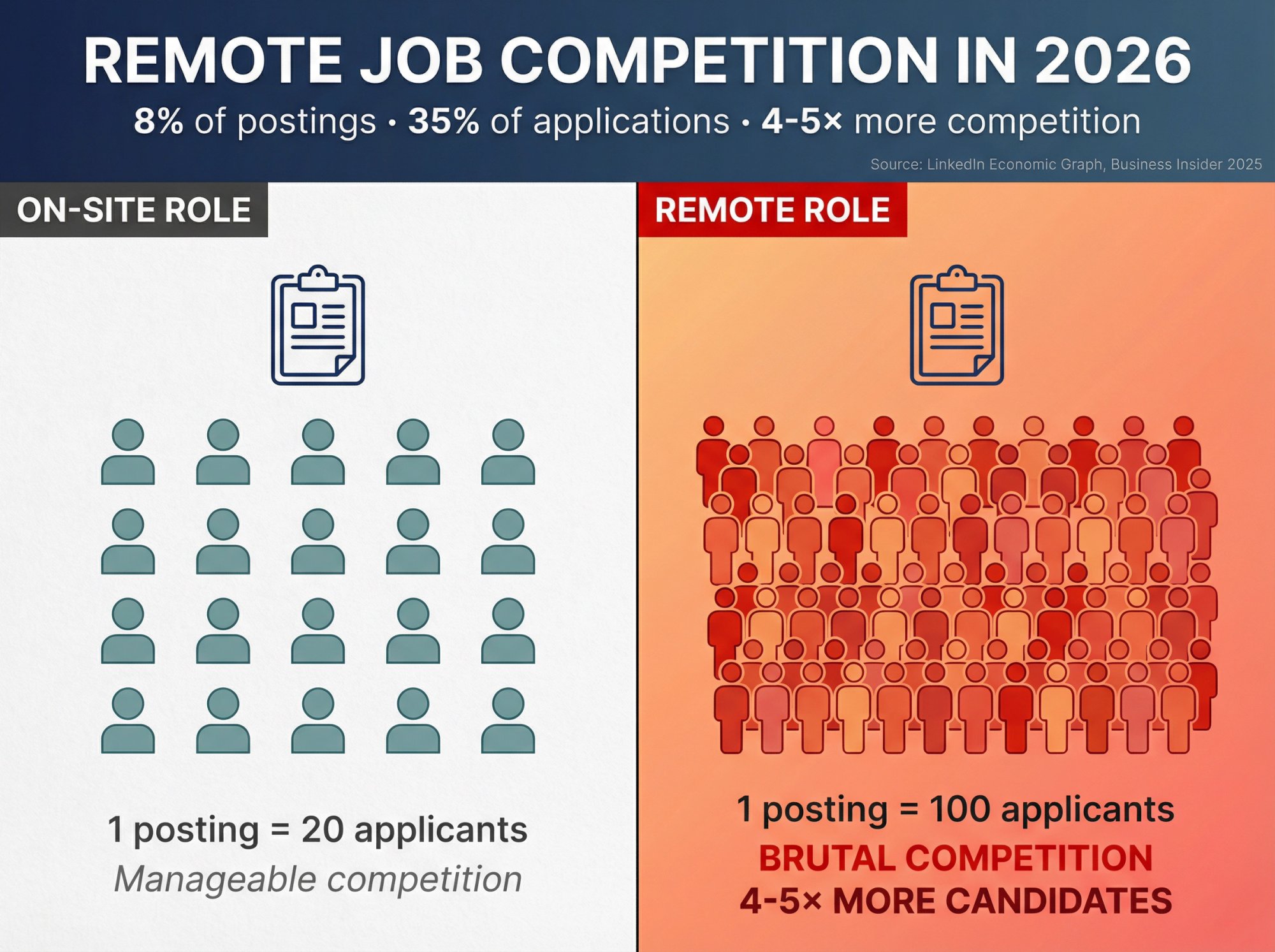
Remote jobs aren't just competitive. They're disproportionately competitive. Business Insider reported that in September 2025, remote roles were about 8% of paid U.S. job postings on LinkedIn, yet they drew 35% of all applications.
A separate analysis from industry research found that in Q3 2025, 12% of new job postings were fully remote and 24% were hybrid.
Do the math. If you're applying to remote jobs, you're competing against 4-5× more candidates than someone applying to an on-site role. That's just statistics.
Now add scams to the mix.
Why Scammers Target Remote Job Seekers
The FTC data is clear: job scam losses have exploded. But why?
① Desperation creates vulnerability
When people have been job searching for months without results, they're more willing to overlook red flags. Scammers know this.
② Remote work happens online anyway
"Interview via text" or "onboard through WhatsApp" sounds weird for an office job, but for remote work? It almost seems normal. (It's not.)
③ AI tools made scams scalable
Fake job postings, realistic-looking interview processes, official-sounding emails... all of this can be automated now. One scammer can run 50 fake "companies" simultaneously.
The combination is brutal.
You're fighting for limited legitimate opportunities while dodging an army of well-disguised scams. But you can win this. You just need the right system.
Scam Job Safety Filter: Spot Fake Remote Jobs in 60 Seconds
Before you invest time researching a company or customizing your resume, run this quick filter. It'll save you hours.
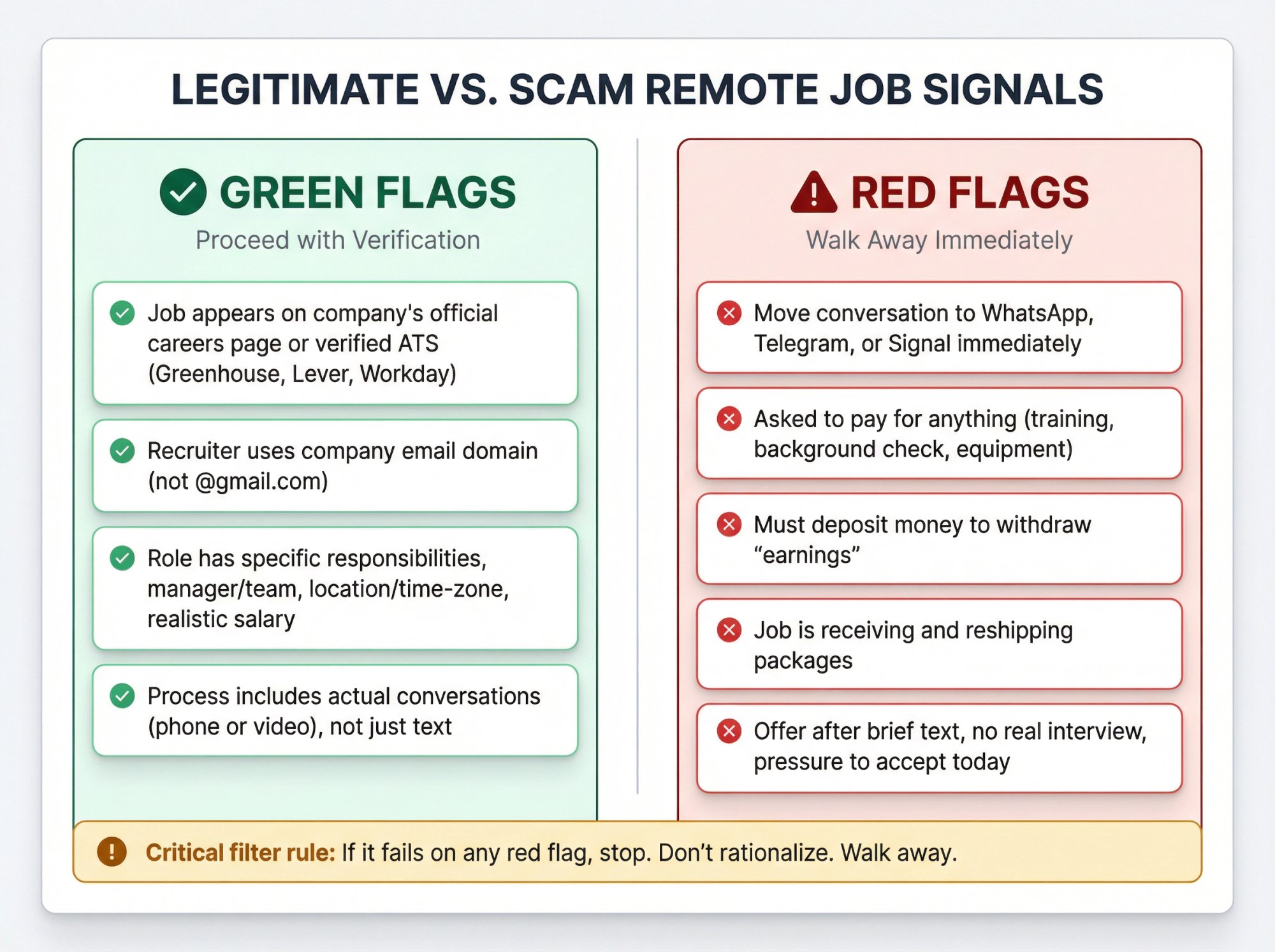
Critical filter rule: If it fails on any red flag, stop. Don't rationalize. Walk away.
Where To Find Legitimate Remote Jobs (Ranked by Safety)
Most remote job guides dump a list of 50 boards and call it advice. That's not helpful.
In practice, legitimate remote opportunities come from a few source types, and those types have very different trust levels. What follows is the hierarchy.
① Company Career Pages (Safest, Highest Trust)
Best for: Real roles, fewer scams, better offer reliability
This is the gold standard. If a job appears on a company's official careers page, it's almost certainly legitimate. Scammers can fake job board listings, but it's much harder to fake an entire company website, careers portal, and multi-stage interview process.
How to use this in real life:
• Build a list of 30-80 companies that hire remote workers in your function (engineering, design, marketing, customer success, etc.)
• Check their careers pages 2-3 times per week
• Many career pages let you create alerts for new postings (especially if they use ATS platforms like Lever or Greenhouse)
Pro tip: Use LinkedIn to identify companies with "Remote" or "Distributed" in their company description, then go directly to their careers pages.
② Government and Official Job Banks (Safe, Structured)
Best for: Public sector roles, verified employers, clear hiring processes
The FTC specifically recommends starting your search with trusted sources like CareerOneStop (a U.S. Department of Labor partner site) and other official resources.
Government job banks have verification layers built in. The tradeoff? Lower volume and sometimes slower hiring timelines.
(If you're outside the U.S., look for your country's labor department job bank and verified public-sector employment portals.)
③ Curated/Vetted Remote Job Boards (Often Safer, But Still Verify)
Best for: Remote-first companies, curated feeds, niche roles
Some job boards manually review postings. Others let anyone post anything. Your move: treat the board as a lead source, not proof of legitimacy. Even on curated boards, always verify the company and posting independently.
④ Major Job Platforms (High Volume, Higher Noise)
Best for: Scale, wide coverage, alert systems
Platforms like Indeed, LinkedIn Jobs, and Glassdoor give you massive reach. The tradeoff? You'll encounter more duplicates, outdated listings, and scams mixed in.
Use aggressive filters (remote only, posted in last 7 days, exclude certain keywords) and verify every posting using the workflow below.
⑤ Social Media DMs, WhatsApp Outreach, "Recruiter" Texts (Highest Risk)
Best for: Almost nothing (unless you verify independently)
If a stranger messages you on LinkedIn, sends you a WhatsApp about a "remote opportunity," or texts you out of nowhere, assume it's a scam until proven otherwise.
Both the FTC and BBB describe scam patterns starting with unexpected messages, often impersonating real companies.
Can genuine recruiters reach out? Yes. But you must verify their identity (Step 4 below) before engaging.
7-Step Scam-Proof Remote Job Verification Process
This is the core system. Run every remote job lead through these steps.

Step 1: Define Your Remote Work Requirements First
Before you apply anywhere, get clear on your non-negotiables:
Remote type:
• Fully remote (no office ever)
• Hybrid (X days in office)
• "Remote for first 90 days" (then relocate)
Location rules:
• True work-from-anywhere
• Specific countries only ("US only," "UK only," "EMEA time zones")
• Specific states/provinces (for tax/legal reasons)
Schedule flexibility:
• Async-friendly (work when you want)
• Strict 9-5 in a specific time zone
• Core hours with flexible start/end
Employment type:
• W-2 employee (US) or PAYE (UK)
• Contractor/freelance
• International contractor
Minimum compensation and benefits:
• Your baseline (don't waste time on lowball offers)
Legitimate remote postings usually spell these out clearly. Scams often stay vague or promise "total flexibility" without details.
Step 2: Verify Company Legitimacy (2-4 Minutes)
Do this before you customize your resume or spend time on an application.
Minimum verification steps:
① Google the company name + "scam"
The FTC explicitly recommends this search pattern. If the top results are "Is [Company] a scam?" or "Don't work for [Company]," you have your answer.
② Confirm a real website with consistent branding
The company should have a professional website with:
• A real domain (not something generic like "remotework247.net")
• An actual careers page
• Product or service information
• Contact information
③ Verify a LinkedIn company page
Check that the company has a LinkedIn page with:
• Real employees who list the company as their current employer
• Activity and updates
• A history (not created last month)
④ Find third-party evidence
Look for:
• Press coverage
• Product reviews (G2, Capterra, TrustPilot)
• Customer testimonials or case studies
• App store listings (if relevant)
Hard rule: If you can't find the company online with independent verification, walk away. That's exactly what the FTC advises.
Step 3: Confirm Job Posting on Company's Official Site
This single step eliminates most scams.
Gold standard: The job appears on the company's official careers page.
If you found it elsewhere (job board, social post, recruiter outreach):
• Navigate to the company's careers page
• Search for the job title or role
• Or search "site:companyname.com [job title]" in Google
If the job isn't on their careers page: It might still be legitimate (some companies use agencies or don't list every role publicly), but now you must verify the recruiter's identity (Step 4), confirm the ATS link matches the company's domain, and proceed with extra caution.
Why this matters: Scammers can post fake jobs on any public board. They can't easily fake a company's entire hiring infrastructure.
Step 4: Verify Recruiter Identity (Especially for Inbound Messages)
Recruiter impersonation is rampant in 2025.
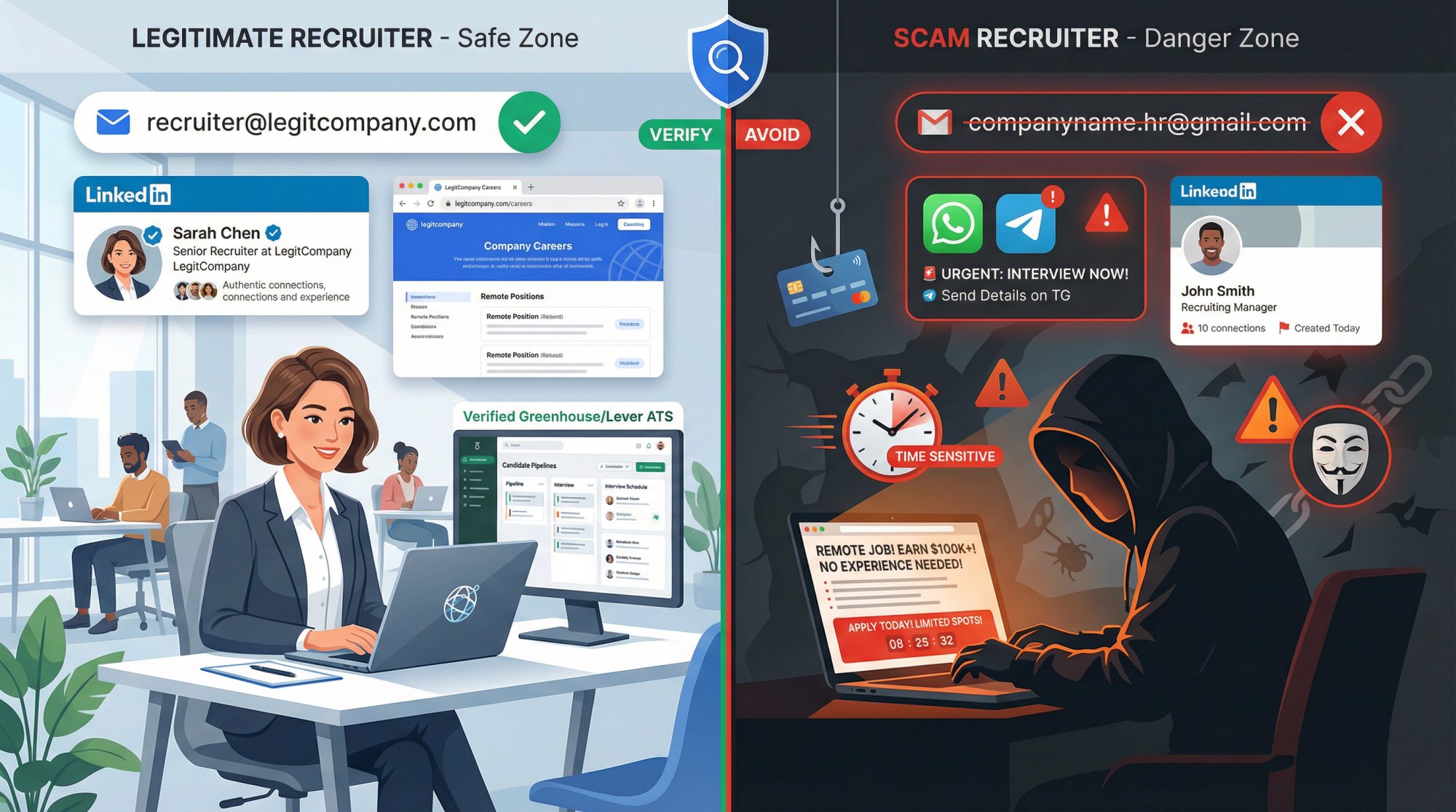
The BBB documents cases where scammers pretend to be HR reps from real companies, then push candidates to move conversations to WhatsApp, do text-only "interviews," and sign official-looking contracts.
Your verification checklist:
→ Email domain check:
Does the recruiter's email match the company's domain?
→ LinkedIn verification:
• Does the recruiter appear on LinkedIn as an employee of that company?
• Does their profile show a realistic career history?
• Do they have connections and activity that look genuine?
→ Profile legitimacy:
• Has the recruiter been at the company for more than a few weeks?
• Do they have recommendations or endorsements?
• Does their activity match their claimed role?
Hard rule: If they want to "interview" you only via chat/text and rush you toward an offer, assume it's a scam.
Step 5: Spot the 2026 Remote Job Scam Types
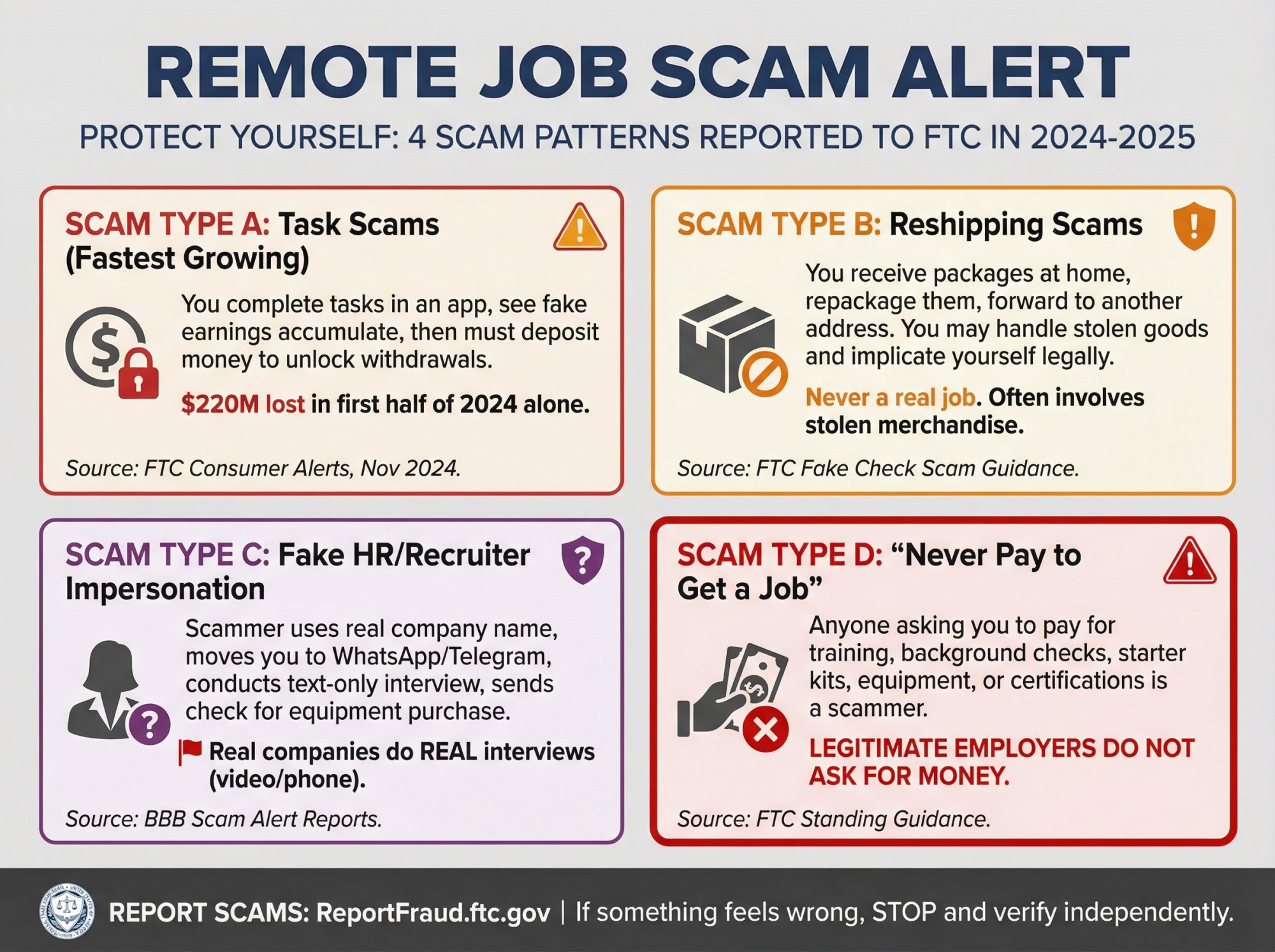
What follows are the four dominant scam formats you'll encounter.
A) Task Scams (The Fastest-Growing Format)
The FTC describes "gamified job scams" where you do repetitive tasks in an app or website, see fake "earnings" accumulate in your account, and eventually must deposit money to "unlock" withdrawals or reach the next level.
What the FTC reported:
• About 20,000 people reported task scams in the first half of 2024 (versus ~5,000 in all of 2023)
• Crypto losses to job scams hit $41 million in H1 2024 (versus ~21 million in all of 2023)
• Total job-scam losses topped $220 million in the first half of 2024 alone
Translation: If you're told to deposit money to access your "earnings," it's not a job. It's theft.
B) Reshipping Scams
The FTC warns about "jobs" where you receive packages at your home address, repackage and forward them to another location, and sometimes get paid a small amount per package.
Why it's dangerous: You're often handling stolen goods, which can implicate you legally. You're also providing your home address and identity to criminals.
The FTC's bottom line: Reshipping goods is never a real job.
C) Fake HR/Recruiter Impersonation
Scammers create realistic-looking email addresses, use real company names, and guide you through a fake hiring process.
Common pattern (from BBB reports):
• You get a message from "HR" (often on LinkedIn or via email)
• They quickly move you to WhatsApp or Telegram
• "Interview" happens via text (they ask you to answer questions by chat)
• You get an offer fast (sometimes within hours)
• They send you a check to "buy equipment" and ask you to send some of the money elsewhere
Spot it: Real companies do real interviews (video or phone). Text-only "interviews" are almost always scams.
D) "Never Pay to Get a Job" Scams
The FTC's standing advice: Anyone who asks you to pay to get a job is a scammer.
This includes "training fees" before you start, "background check fees" (real employers cover this), "starter kit" or "equipment" costs, and "certification" or "onboarding" charges.
Legitimate employers don't ask candidates for money.
Step 6: Validate Interview Process Quality
The FTC explicitly advises: Slow down. Talk to someone you trust before sharing personal information or sending money.
Step 7: Validate Job Offer and Onboarding Documents
This is where scams extract money or steal identities.
Before you share sensitive information (bank account, Social Security Number, passport scans, etc.):
① Confirm the offer email domain
The offer should come from @companyname.com, not a free email service.
② Verify the signer
Look up the person who signed the offer on LinkedIn and the company directory. Confirm they're a real employee.
③ Independently verify contact information
Find the company's phone number on their official website (not the number in the offer letter). Call and ask to speak with HR or the hiring manager to confirm the offer is real.
Never accept:
• Getting paid in cryptocurrency for standard employment (this is a red flag for task scams)
• Receiving a check and being asked to "send some back" or "forward part of it" (classic fake check scam)
• Being told to buy equipment with your own money and "get reimbursed" through odd payment methods
• Being asked to receive and forward packages (reshipping scam)
Remote Job Legitimacy Scorecard (Score Every Opportunity)
Use this scoring system for every remote job lead. If it scores under 70, treat it as high risk.
Scoring System (0-100 Points)
Score Interpretation
90-100: Strongly legitimate. Proceed with confidence (still verify offer stage).
70-89: Likely legitimate. Continue verification through offer stage.
50-69: High risk. Only proceed if you can independently confirm the posting on the company's careers page.
Below 50: Walk away. Too many red flags.
How To Build a Remote Job Search Pipeline That Works
What most people get wrong: they apply to 50 jobs randomly and hope something sticks.
That's not a strategy. It's exhausting, demoralizing, and ineffective.
Instead, build a 3-channel pipeline that combines targeting, scale, and verification.

The "3-Channel" Remote Job Sourcing System
Your goal isn't "more applications." Your goal is more verified applications to roles you can actually win.
Channel 1: Target Companies (Career Pages)
• Build a list of 30-80 companies that hire remote workers in your function
• Check their careers pages 2-3× per week
• Set up alerts where possible
• Apply directly through their system
Why it works: Lower competition than job boards, higher trust, better employer branding.
Channel 2: Platforms (Alerts + Filters)
• Use 2-3 major platforms (LinkedIn, Indeed, or niche boards)
• Set aggressive filters: remote only, posted in last 7 days, verified employers
• Create email alerts so opportunities come to you
• Verify every posting using the 7-step workflow above
Why it works: Volume and coverage. You'll catch opportunities your target companies don't list publicly.
Channel 3: Network and Referrals (Warm Intros Beat Cold Applications)
• Reach out to 2-5 people per week who work at your target companies
• Ask for role clarity, not favors: "Is this team remote across time zones?" or "What does success look like in the first 90 days?"
• When appropriate, ask if they'd be willing to refer you or introduce you to the hiring manager
Why it works: Referrals get prioritized. Even informal intros can move your application to the top of the pile.
Weekly rhythm example:
• Monday: Check 20 target company career pages, apply to 2-3 roles
• Wednesday: Review platform alerts, verify and apply to 3-5 roles
• Friday: Reach out to 3 people for networking conversations
This gives you consistent flow without burnout.
How AIApply Accelerates Your Remote Job Success
Let's be clear about something: AIApply doesn't find jobs for you. (Finding legitimate remote jobs is hard work, and this guide just walked you through the system.)
What AIApply does is speed up the application process once you have legitimate leads.
Where it fits into your workflow:
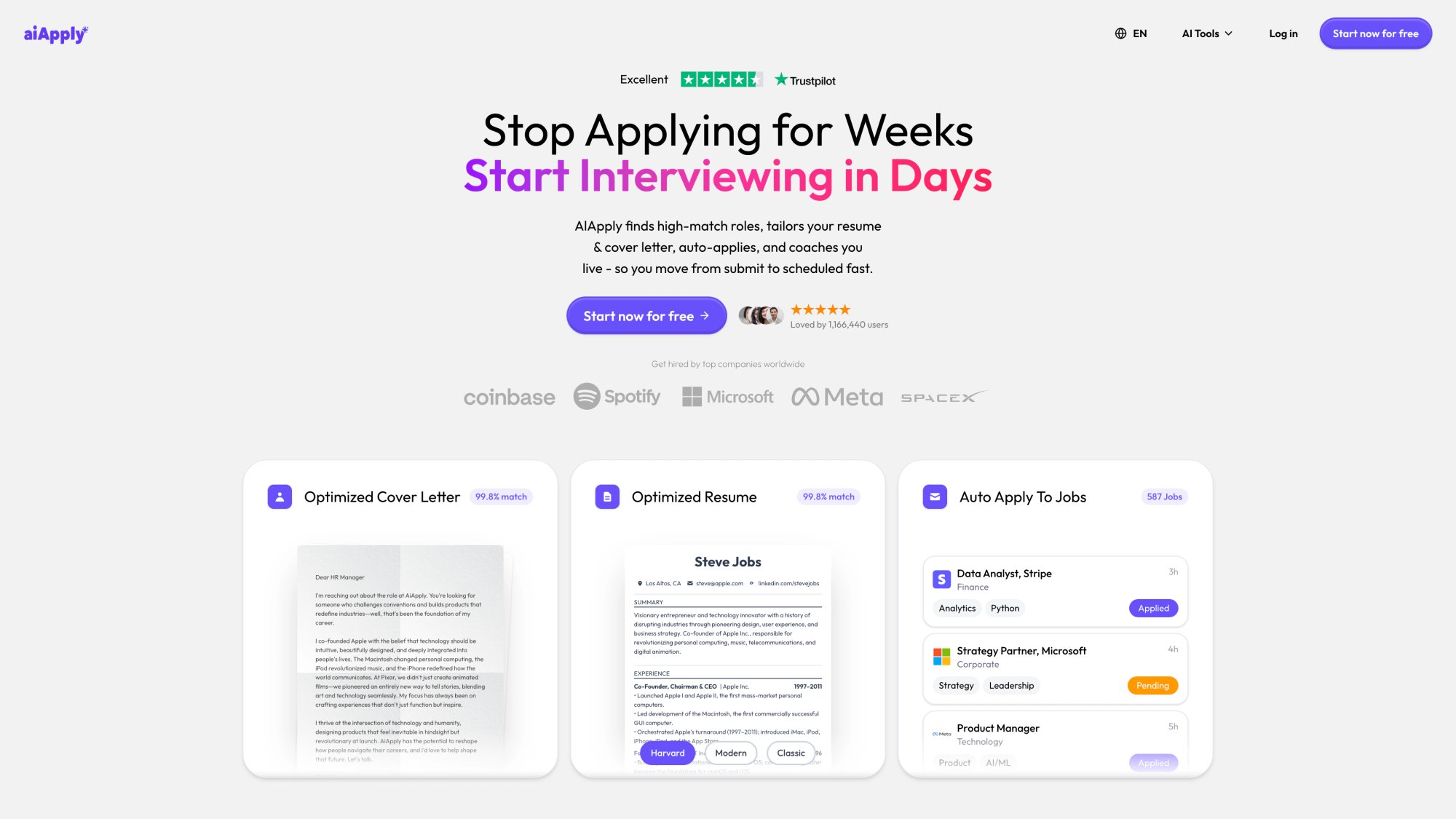
① Scan for ATS Gaps Before You Apply
You've found a legitimate remote job. Now you need to make sure your resume won't get filtered out by the Applicant Tracking System (ATS) before a human even sees it.
AIApply's Resume Scanner analyzes your resume against the job description and shows you:
• Missing keywords
• Formatting issues that confuse ATS systems
• How well your resume matches the role (as a percentage)

Translation: You'll know before you hit "submit" whether your resume has a fighting chance.
② Generate Role-Specific Resumes in Under 2 Minutes
Remote roles attract massive application volume. That means your resume needs to be precisely tailored to each job description.
Doing this manually for 10-15 applications per week? Exhausting.
We built AIApply's Resume Builder to handle this. You input the job description, and it generates an ATS-optimized resume tailored to that specific role. You can regenerate any section until it's exactly what you want.
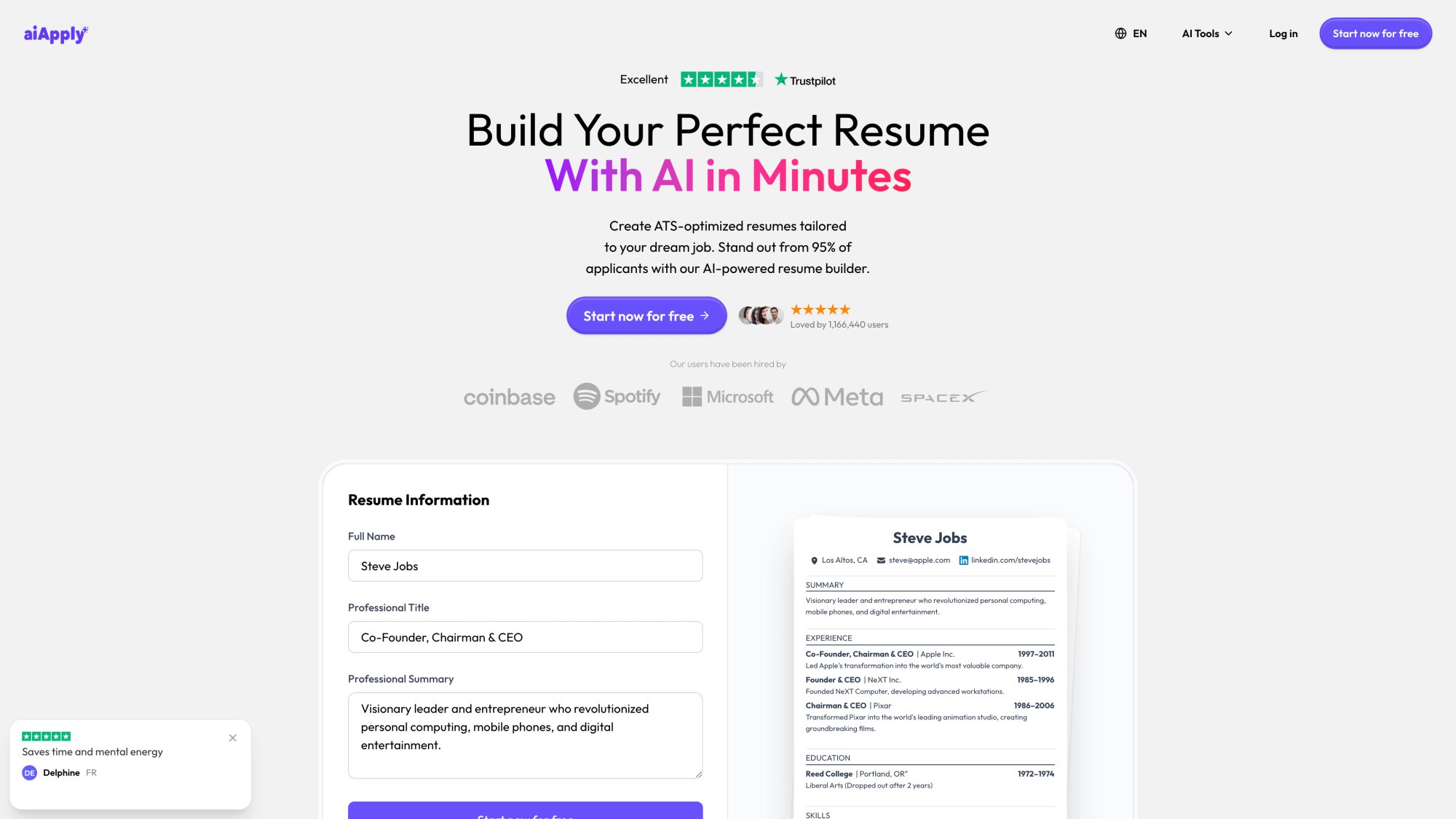
Real stat: Our users report creating customized resumes in under 2 minutes (versus 20-30 minutes manually).
③ Write Cover Letters That Actually Get Read
Most remote jobs don't require cover letters. But when they do (or when you want to stand out in a competitive role), a sharp letter can differentiate you.
AIApply's Cover Letter Generator creates role-specific letters that sound natural and human, not like generic templates.
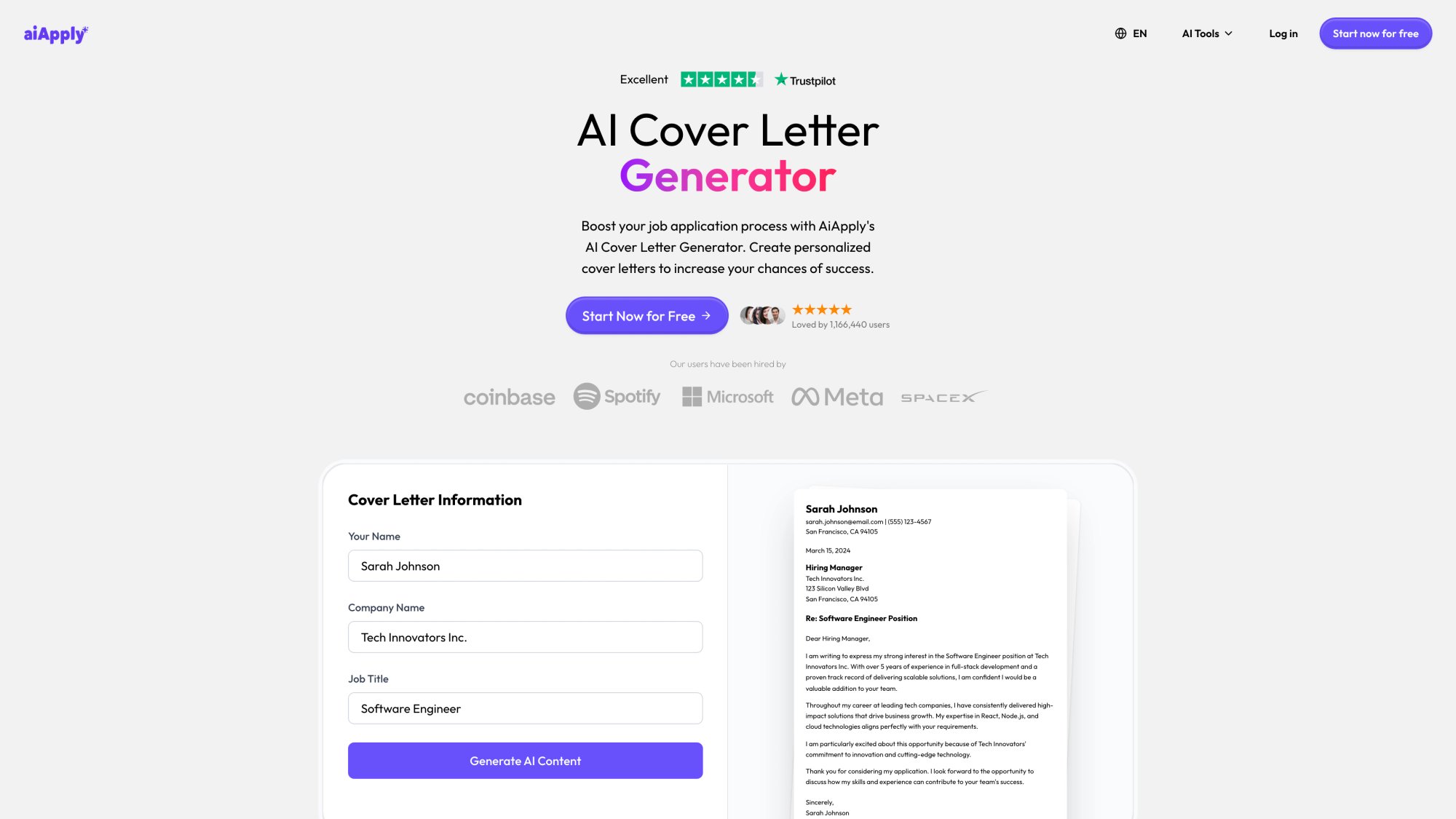
Key benefit: It's fast enough that you can customize a letter for every competitive role without burning hours.
④ Practice for Remote Interviews (Because They're Different)
Remote interviews have unique dynamics. You're on camera. You can't read body language as easily. Technical glitches happen.
AIApply's Mock Interview lets you practice with any job description. Paste the JD, run through realistic interview questions, and get instant feedback on your answers.
Bonus: Practicing reduces anxiety. A lot.
⑤ Get Real-Time Coaching During Live Interviews
This is where Interview Buddy becomes valuable.
It's a Chrome extension that provides real-time, on-screen coaching during your actual interview. It listens to the questions being asked (via your browser, works on Zoom, Google Meet, Microsoft Teams) and suggests answers based on your resume and the job description.
You can see the suggestions on your screen. The interviewer can't.
Critical detail: It includes a one-click hide feature if you need to share your screen.
User data: Interview Buddy has 10,000+ active users and a 3.7★ rating on the Chrome Web Store (updated July 2025).
⑥ Source from a Database of 1 Million+ Remote Roles
AIApply's Job Board aggregates over 1 million active job postings, with direct links to company career sites.
You still need to verify every posting (using the 7-step workflow above), but it gives you a centralized starting point.
How AIApply Users Are Performing
What the data shows:
• 800,000+ job seekers are actively using AIApply (as of June 2025)
• 80% more likely to get hired faster (compared to traditional application methods)
• 4.8/5 star rating from 500,000+ reviews
• Users have been hired at Coinbase, Spotify, Microsoft, Meta, SpaceX, and hundreds of other companies
Pricing and Access
Free tier includes:
• Resume Scanner (limited daily usage)
• Full access to the Job Board
• Cover Letter Generator (unlimited)
Pro plan (approximately $30/month) includes:
• Unlimited resume generation
• Interview Buddy Chrome extension
• Auto Apply credits (5 per month, additional credits available)
• Resume hosting and translations
• Backed by a hire-or-money-back guarantee
Auto Apply add-on: Credit packs for high-volume applications. Credits never expire.
Organization plans: Custom pricing for universities, career coaches, and companies.
You can explore features and pricing at aiapply.co.
What To Do If You Suspect a Job Scam
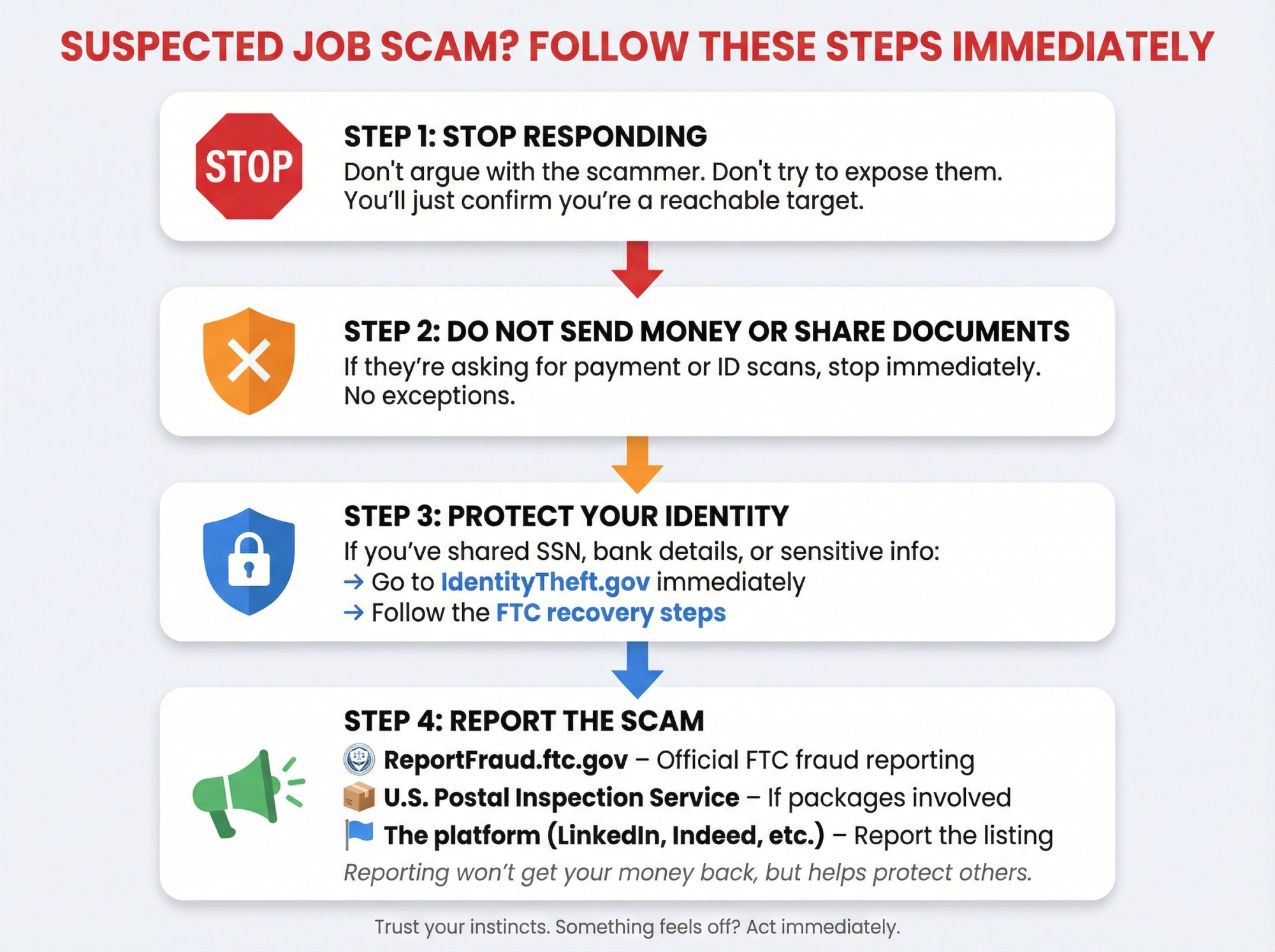
If something feels off, trust your instincts.
Step 1: Stop responding
Don't argue with the scammer. Don't try to "expose" them. You'll just confirm you're a reachable target.
Step 2: Do not send money or share personal documents
This should go without saying, but if you've already started the process and they're asking for payment or ID scans, stop immediately.
Step 3: Protect your identity (if you've already shared information)
If you shared your Social Security Number, bank details, or other sensitive info, go to IdentityTheft.gov (an FTC site) and follow the recovery steps.
Step 4: Report the scam
• ReportFraud.ftc.gov: The FTC's official fraud reporting site
• U.S. Postal Inspection Service: If the scam involved receiving or shipping packages
• The platform where you found the listing: Report fake postings on LinkedIn, Indeed, etc., so they can remove them
Reporting won't get your money back, but it helps authorities track patterns and warn others.
30-Day Remote Job Search Action Plan (Start Today)
What follows is a practical, week-by-week schedule to go from "I need a remote job" to "I'm landing interviews."
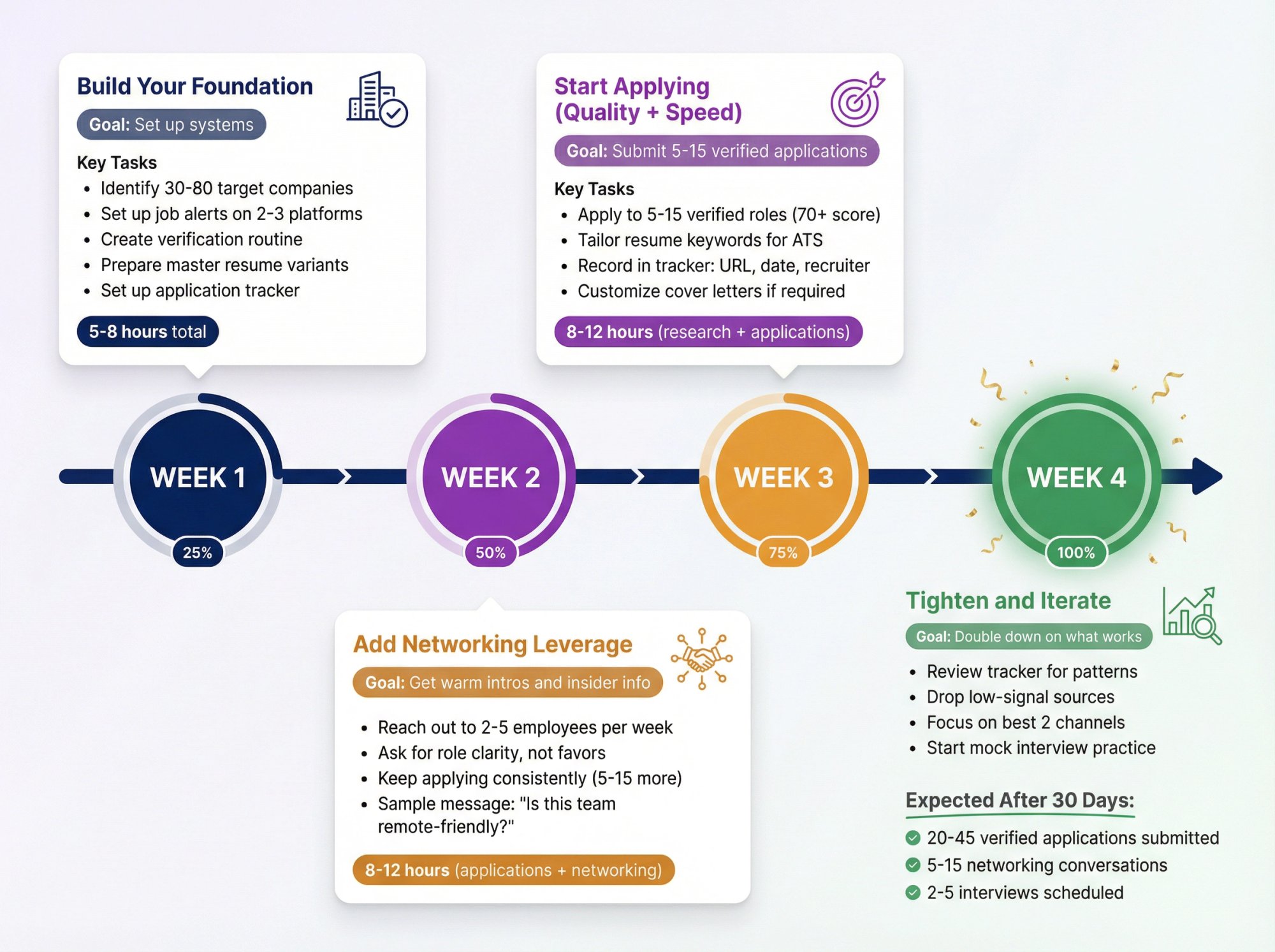
Week 1: Build Your Foundation
Goal: Set up your systems so you can source and verify efficiently.
Tasks:
• Identify 30-80 target companies that hire remote workers in your role
• Set up alerts on 2-3 major platforms for 5-10 job titles
• Create your "verification routine" using the scorecard above
• Prepare a master resume + 2-3 role-based variants (use AIApply's Resume Builder to speed this up)
• Set up a simple tracker (spreadsheet or tool) to log: company, role, posting URL, verification score, application date
Time commitment: 5-8 hours total
Week 2: Start Applying (Quality + Speed)
Goal: Submit 5-15 verified applications.
Tasks:
• Apply to 5-15 verified roles (prioritize 70+ on your legitimacy scorecard)
• Tailor resume keywords for each posting (ATS matters... a lot)
• Use your tracker to record: source URL, posting date, recruiter contact (if available), follow-up date
• If a role requires a cover letter, customize it (use AIApply's Cover Letter Generator for speed)
Time commitment: 8-12 hours (including research and application)
Week 3: Add Networking Leverage
Goal: Get warm intros and insider information.
Tasks:
• Reach out to 2-5 employees per week at your target companies (LinkedIn is easiest)
• Ask for role clarity, not favors: "Is this team remote across time zones?" or "What skills matter most in the first 90 days?"
• Keep applying consistently (another 5-15 verified roles)
Sample outreach message:
"Hi [Name], I noticed you work at [Company] as a [Role]. I'm considering applying for [Job Title] and wanted to ask: is this team remote-friendly across time zones, or are there core hours? Any insights would be really helpful. Thanks!"
Time commitment: 8-12 hours (applications + networking)
Week 4: Tighten and Iterate
Goal: Double down on what's working.
Tasks:
• Review your tracker: Which job titles are producing interviews? Which companies? Which sources?
• Drop low-signal boards or spammy sources
• Double down on the best 2 channels
• If you're getting interviews, start using AIApply's Mock Interview to practice
Time commitment: 6-10 hours (mostly applications, some strategy refinement)
Expected outcomes after 30 days:
• 20-45 verified applications submitted
• 5-15 networking conversations completed
• 2-5 interviews scheduled (if your materials are strong and the market is decent)
FAQ: Remote Job Hunting in 2026
Why do remote jobs feel so competitive?
Because demand is concentrated and supply is limited.
Business Insider reported that in September 2025, remote roles were about 8% of paid U.S. job postings on LinkedIn but attracted 35% of all applications. That's 4-5× more competition per role compared to on-site jobs.
Add to that: companies hiring remote workers can source globally, which means you're competing globally too.
Is it normal for remote jobs to have location restrictions?
Yes. Very normal.
Payroll, tax compliance, and time-zone constraints are real. A company that says "US only" or "EMEA time zones only" isn't being difficult. They're being practical.
Be cautious of "work from anywhere, no restrictions, no questions asked" claims unless the company is clearly built for global employment (and even then, verify).
What's the #1 scam signal to watch for?
Any version of: "Pay (or deposit) money to get paid."
This includes:
• Task scams ("deposit $100 to unlock your $500 earnings")
• Training fee scams ("pay $200 for onboarding materials")
• Equipment scams ("buy this software, we'll reimburse you")
The FTC's standing rule: Never pay to get a job.
What's the #1 legitimacy signal?
The job exists on the company's official careers page, and all hiring communications come from people with verified company email addresses and LinkedIn profiles.
If you can independently confirm these two things, you're 90% of the way to confirming legitimacy.
How do I know if a "remote job" is real?
Run it through the 7-step workflow in this guide:
Define your requirements
Verify the company exists
Confirm the posting is on their careers page
Verify recruiter identity
Check for scam patterns
Validate the interview process
Validate the offer
Use the legitimacy scorecard. If it scores 70+, it's likely real (but still verify through the offer stage).
Can I use AIApply's free features?
Yes. AIApply offers:
• Resume Scanner (limited daily usage on free tier)
• Cover Letter Generator (unlimited, even on free)
• Full access to the Job Board (1M+ listings)
The free tier is designed so you can test the tools before committing to a paid plan.
Should I use automation tools for remote job applications?
It depends on your situation.
If you're applying to 50+ remote roles per week and they're all legitimate (verified using the workflow above), tools like AIApply's Auto Apply can save massive time by customizing and submitting applications automatically.
But: automation only helps if you're sourcing high-quality, verified leads. Don't automate spam.
Our recommendation: Start manual. Learn what works. Then automate the repetitive parts (resume tailoring, form filling, tracking).
How long does it typically take to land a remote job?
Honest answer: it varies wildly based on your role, experience, and market conditions.
Realistic expectations for 2026:
• Best case: 2-4 weeks (if you're in high demand and apply strategically)
• Typical: 6-12 weeks (for most mid-level roles with consistent effort)
• Challenging markets: 3-6+ months (for highly competitive roles or career changers)
What you can control:
• Quality of your applications (tailored resumes, strong cover letters)
• Consistency (apply to 5-15 verified roles per week)
• Networking (warm intros beat cold applications)
• Interview performance (practice with AIApply's Mock Interview)
AIApply data shows that 80% of users land interviews within the first month when using the platform consistently.
Start Today (Because Every Week Matters)
Remote job hunting in 2026 is harder than it should be. Supply is tight. Scams are everywhere. Competition is fierce.
But if you follow the system in this guide, you'll have a real advantage:
You'll know where to look (company career pages, government job banks, curated boards)
You'll know how to verify (7-step workflow, legitimacy scorecard)
You'll know how to apply faster (AIApply's Resume Builder, Cover Letter Generator, Auto Apply)
You'll know how to perform in interviews (Mock Interview practice, Interview Buddy for live support)

The jobs are out there. You just need the right process to find them, verify them, and win them.
Data currency note: This guide was written and verified in December 2025. The statistics and scam patterns cited here come from 2024-2025 sources (FTC, BBB, LinkedIn Economic Graph, Business Insider, Robert Half). Remote job availability, platform policies, and scam tactics evolve quickly. Always re-verify details, especially anything involving money, identity documents, or off-platform messaging.
Ready to start? Head to aiapply.co and set up your free account. Your next remote job is waiting.
Job searching is exhausting. Remote job searching is exhausting and risky.
The remote work market in 2026 has a strange contradiction. Everyone wants remote jobs, but legitimate opportunities keep shrinking. According to LinkedIn's Economic Graph research, remote availability in the U.S. peaked in early 2022 and dropped to just 16% by late 2024 (for jobs members applied to that offered remote flexibility). By late 2024, only 9% of newly listed jobs were remote, yet remote roles made up 16% of "still-active" jobs that continued attracting applicants.
Translation: scarce supply, massive demand, and fierce competition.
What makes this harder? While you're fighting for limited legitimate opportunities, scammers have built an entire industry around fake remote jobs. The FTC reports that job scam losses jumped from $90 million in 2020 to $501 million in 2024. Reports tripled in that same period.
Consider this for a moment. More than half a billion dollars lost to people who just wanted a job.
So if you want to find legitimate remote work in 2026, you need two things working together: a high-signal sourcing strategy so you're not drowning in spam and ghost listings, and a scam verification system so you don't waste time, money, or your identity on fake opportunities.
This guide gives you both. Plus a 30-day action plan you can start today.
Why Remote Jobs Are So Competitive in 2026
What you're facing isn't just competition. It's brutal.
Remote jobs aren't just competitive. They're disproportionately competitive. Business Insider reported that in September 2025, remote roles were about 8% of paid U.S. job postings on LinkedIn, yet they drew 35% of all applications.
A separate analysis from industry research found that in Q3 2025, 12% of new job postings were fully remote and 24% were hybrid.
Do the math. If you're applying to remote jobs, you're competing against 4-5× more candidates than someone applying to an on-site role. That's just statistics.
Now add scams to the mix.
Why Scammers Target Remote Job Seekers
The FTC data is clear: job scam losses have exploded. But why?
① Desperation creates vulnerability
When people have been job searching for months without results, they're more willing to overlook red flags. Scammers know this.
② Remote work happens online anyway
"Interview via text" or "onboard through WhatsApp" sounds weird for an office job, but for remote work? It almost seems normal. (It's not.)
③ AI tools made scams scalable
Fake job postings, realistic-looking interview processes, official-sounding emails... all of this can be automated now. One scammer can run 50 fake "companies" simultaneously.
The combination is brutal.
You're fighting for limited legitimate opportunities while dodging an army of well-disguised scams. But you can win this. You just need the right system.
Scam Job Safety Filter: Spot Fake Remote Jobs in 60 Seconds
Before you invest time researching a company or customizing your resume, run this quick filter. It'll save you hours.
Critical filter rule: If it fails on any red flag, stop. Don't rationalize. Walk away.
Where To Find Legitimate Remote Jobs (Ranked by Safety)
Most remote job guides dump a list of 50 boards and call it advice. That's not helpful.
In practice, legitimate remote opportunities come from a few source types, and those types have very different trust levels. What follows is the hierarchy.
① Company Career Pages (Safest, Highest Trust)
Best for: Real roles, fewer scams, better offer reliability
This is the gold standard. If a job appears on a company's official careers page, it's almost certainly legitimate. Scammers can fake job board listings, but it's much harder to fake an entire company website, careers portal, and multi-stage interview process.
How to use this in real life:
• Build a list of 30-80 companies that hire remote workers in your function (engineering, design, marketing, customer success, etc.)
• Check their careers pages 2-3 times per week
• Many career pages let you create alerts for new postings (especially if they use ATS platforms like Lever or Greenhouse)
Pro tip: Use LinkedIn to identify companies with "Remote" or "Distributed" in their company description, then go directly to their careers pages.
② Government and Official Job Banks (Safe, Structured)
Best for: Public sector roles, verified employers, clear hiring processes
The FTC specifically recommends starting your search with trusted sources like CareerOneStop (a U.S. Department of Labor partner site) and other official resources.
Government job banks have verification layers built in. The tradeoff? Lower volume and sometimes slower hiring timelines.
(If you're outside the U.S., look for your country's labor department job bank and verified public-sector employment portals.)
③ Curated/Vetted Remote Job Boards (Often Safer, But Still Verify)
Best for: Remote-first companies, curated feeds, niche roles
Some job boards manually review postings. Others let anyone post anything. Your move: treat the board as a lead source, not proof of legitimacy. Even on curated boards, always verify the company and posting independently.
④ Major Job Platforms (High Volume, Higher Noise)
Best for: Scale, wide coverage, alert systems
Platforms like Indeed, LinkedIn Jobs, and Glassdoor give you massive reach. The tradeoff? You'll encounter more duplicates, outdated listings, and scams mixed in.
Use aggressive filters (remote only, posted in last 7 days, exclude certain keywords) and verify every posting using the workflow below.
⑤ Social Media DMs, WhatsApp Outreach, "Recruiter" Texts (Highest Risk)
Best for: Almost nothing (unless you verify independently)
If a stranger messages you on LinkedIn, sends you a WhatsApp about a "remote opportunity," or texts you out of nowhere, assume it's a scam until proven otherwise.
Both the FTC and BBB describe scam patterns starting with unexpected messages, often impersonating real companies.
Can genuine recruiters reach out? Yes. But you must verify their identity (Step 4 below) before engaging.
7-Step Scam-Proof Remote Job Verification Process
This is the core system. Run every remote job lead through these steps.
Step 1: Define Your Remote Work Requirements First
Before you apply anywhere, get clear on your non-negotiables:
Remote type:
• Fully remote (no office ever)
• Hybrid (X days in office)
• "Remote for first 90 days" (then relocate)
Location rules:
• True work-from-anywhere
• Specific countries only ("US only," "UK only," "EMEA time zones")
• Specific states/provinces (for tax/legal reasons)
Schedule flexibility:
• Async-friendly (work when you want)
• Strict 9-5 in a specific time zone
• Core hours with flexible start/end
Employment type:
• W-2 employee (US) or PAYE (UK)
• Contractor/freelance
• International contractor
Minimum compensation and benefits:
• Your baseline (don't waste time on lowball offers)
Legitimate remote postings usually spell these out clearly. Scams often stay vague or promise "total flexibility" without details.
Step 2: Verify Company Legitimacy (2-4 Minutes)
Do this before you customize your resume or spend time on an application.
Minimum verification steps:
① Google the company name + "scam"
The FTC explicitly recommends this search pattern. If the top results are "Is [Company] a scam?" or "Don't work for [Company]," you have your answer.
② Confirm a real website with consistent branding
The company should have a professional website with:
• A real domain (not something generic like "remotework247.net")
• An actual careers page
• Product or service information
• Contact information
③ Verify a LinkedIn company page
Check that the company has a LinkedIn page with:
• Real employees who list the company as their current employer
• Activity and updates
• A history (not created last month)
④ Find third-party evidence
Look for:
• Press coverage
• Product reviews (G2, Capterra, TrustPilot)
• Customer testimonials or case studies
• App store listings (if relevant)
Hard rule: If you can't find the company online with independent verification, walk away. That's exactly what the FTC advises.
Step 3: Confirm Job Posting on Company's Official Site
This single step eliminates most scams.
Gold standard: The job appears on the company's official careers page.
If you found it elsewhere (job board, social post, recruiter outreach):
• Navigate to the company's careers page
• Search for the job title or role
• Or search "site:companyname.com [job title]" in Google
If the job isn't on their careers page: It might still be legitimate (some companies use agencies or don't list every role publicly), but now you must verify the recruiter's identity (Step 4), confirm the ATS link matches the company's domain, and proceed with extra caution.
Why this matters: Scammers can post fake jobs on any public board. They can't easily fake a company's entire hiring infrastructure.
Step 4: Verify Recruiter Identity (Especially for Inbound Messages)
Recruiter impersonation is rampant in 2025.
The BBB documents cases where scammers pretend to be HR reps from real companies, then push candidates to move conversations to WhatsApp, do text-only "interviews," and sign official-looking contracts.
Your verification checklist:
→ Email domain check:
Does the recruiter's email match the company's domain?
→ LinkedIn verification:
• Does the recruiter appear on LinkedIn as an employee of that company?
• Does their profile show a realistic career history?
• Do they have connections and activity that look genuine?
→ Profile legitimacy:
• Has the recruiter been at the company for more than a few weeks?
• Do they have recommendations or endorsements?
• Does their activity match their claimed role?
Hard rule: If they want to "interview" you only via chat/text and rush you toward an offer, assume it's a scam.
Step 5: Spot the 2026 Remote Job Scam Types
What follows are the four dominant scam formats you'll encounter.
A) Task Scams (The Fastest-Growing Format)
The FTC describes "gamified job scams" where you do repetitive tasks in an app or website, see fake "earnings" accumulate in your account, and eventually must deposit money to "unlock" withdrawals or reach the next level.
What the FTC reported:
• About 20,000 people reported task scams in the first half of 2024 (versus ~5,000 in all of 2023)
• Crypto losses to job scams hit $41 million in H1 2024 (versus ~21 million in all of 2023)
• Total job-scam losses topped $220 million in the first half of 2024 alone
Translation: If you're told to deposit money to access your "earnings," it's not a job. It's theft.
B) Reshipping Scams
The FTC warns about "jobs" where you receive packages at your home address, repackage and forward them to another location, and sometimes get paid a small amount per package.
Why it's dangerous: You're often handling stolen goods, which can implicate you legally. You're also providing your home address and identity to criminals.
The FTC's bottom line: Reshipping goods is never a real job.
C) Fake HR/Recruiter Impersonation
Scammers create realistic-looking email addresses, use real company names, and guide you through a fake hiring process.
Common pattern (from BBB reports):
• You get a message from "HR" (often on LinkedIn or via email)
• They quickly move you to WhatsApp or Telegram
• "Interview" happens via text (they ask you to answer questions by chat)
• You get an offer fast (sometimes within hours)
• They send you a check to "buy equipment" and ask you to send some of the money elsewhere
Spot it: Real companies do real interviews (video or phone). Text-only "interviews" are almost always scams.
D) "Never Pay to Get a Job" Scams
The FTC's standing advice: Anyone who asks you to pay to get a job is a scammer.
This includes "training fees" before you start, "background check fees" (real employers cover this), "starter kit" or "equipment" costs, and "certification" or "onboarding" charges.
Legitimate employers don't ask candidates for money.
Step 6: Validate Interview Process Quality
The FTC explicitly advises: Slow down. Talk to someone you trust before sharing personal information or sending money.
Step 7: Validate Job Offer and Onboarding Documents
This is where scams extract money or steal identities.
Before you share sensitive information (bank account, Social Security Number, passport scans, etc.):
① Confirm the offer email domain
The offer should come from @companyname.com, not a free email service.
② Verify the signer
Look up the person who signed the offer on LinkedIn and the company directory. Confirm they're a real employee.
③ Independently verify contact information
Find the company's phone number on their official website (not the number in the offer letter). Call and ask to speak with HR or the hiring manager to confirm the offer is real.
Never accept:
• Getting paid in cryptocurrency for standard employment (this is a red flag for task scams)
• Receiving a check and being asked to "send some back" or "forward part of it" (classic fake check scam)
• Being told to buy equipment with your own money and "get reimbursed" through odd payment methods
• Being asked to receive and forward packages (reshipping scam)
Remote Job Legitimacy Scorecard (Score Every Opportunity)
Use this scoring system for every remote job lead. If it scores under 70, treat it as high risk.
Scoring System (0-100 Points)
Score Interpretation
90-100: Strongly legitimate. Proceed with confidence (still verify offer stage).
70-89: Likely legitimate. Continue verification through offer stage.
50-69: High risk. Only proceed if you can independently confirm the posting on the company's careers page.
Below 50: Walk away. Too many red flags.
How To Build a Remote Job Search Pipeline That Works
What most people get wrong: they apply to 50 jobs randomly and hope something sticks.
That's not a strategy. It's exhausting, demoralizing, and ineffective.
Instead, build a 3-channel pipeline that combines targeting, scale, and verification.
The "3-Channel" Remote Job Sourcing System
Your goal isn't "more applications." Your goal is more verified applications to roles you can actually win.
Channel 1: Target Companies (Career Pages)
• Build a list of 30-80 companies that hire remote workers in your function
• Check their careers pages 2-3× per week
• Set up alerts where possible
• Apply directly through their system
Why it works: Lower competition than job boards, higher trust, better employer branding.
Channel 2: Platforms (Alerts + Filters)
• Use 2-3 major platforms (LinkedIn, Indeed, or niche boards)
• Set aggressive filters: remote only, posted in last 7 days, verified employers
• Create email alerts so opportunities come to you
• Verify every posting using the 7-step workflow above
Why it works: Volume and coverage. You'll catch opportunities your target companies don't list publicly.
Channel 3: Network and Referrals (Warm Intros Beat Cold Applications)
• Reach out to 2-5 people per week who work at your target companies
• Ask for role clarity, not favors: "Is this team remote across time zones?" or "What does success look like in the first 90 days?"
• When appropriate, ask if they'd be willing to refer you or introduce you to the hiring manager
Why it works: Referrals get prioritized. Even informal intros can move your application to the top of the pile.
Weekly rhythm example:
• Monday: Check 20 target company career pages, apply to 2-3 roles
• Wednesday: Review platform alerts, verify and apply to 3-5 roles
• Friday: Reach out to 3 people for networking conversations
This gives you consistent flow without burnout.
How AIApply Accelerates Your Remote Job Success
Let's be clear about something: AIApply doesn't find jobs for you. (Finding legitimate remote jobs is hard work, and this guide just walked you through the system.)
What AIApply does is speed up the application process once you have legitimate leads.
Where it fits into your workflow:
① Scan for ATS Gaps Before You Apply
You've found a legitimate remote job. Now you need to make sure your resume won't get filtered out by the Applicant Tracking System (ATS) before a human even sees it.
AIApply's Resume Scanner analyzes your resume against the job description and shows you:
• Missing keywords
• Formatting issues that confuse ATS systems
• How well your resume matches the role (as a percentage)
Translation: You'll know before you hit "submit" whether your resume has a fighting chance.
② Generate Role-Specific Resumes in Under 2 Minutes
Remote roles attract massive application volume. That means your resume needs to be precisely tailored to each job description.
Doing this manually for 10-15 applications per week? Exhausting.
We built AIApply's Resume Builder to handle this. You input the job description, and it generates an ATS-optimized resume tailored to that specific role. You can regenerate any section until it's exactly what you want.
Real stat: Our users report creating customized resumes in under 2 minutes (versus 20-30 minutes manually).
③ Write Cover Letters That Actually Get Read
Most remote jobs don't require cover letters. But when they do (or when you want to stand out in a competitive role), a sharp letter can differentiate you.
AIApply's Cover Letter Generator creates role-specific letters that sound natural and human, not like generic templates.
Key benefit: It's fast enough that you can customize a letter for every competitive role without burning hours.
④ Practice for Remote Interviews (Because They're Different)
Remote interviews have unique dynamics. You're on camera. You can't read body language as easily. Technical glitches happen.
AIApply's Mock Interview lets you practice with any job description. Paste the JD, run through realistic interview questions, and get instant feedback on your answers.
Bonus: Practicing reduces anxiety. A lot.
⑤ Get Real-Time Coaching During Live Interviews
This is where Interview Buddy becomes valuable.
It's a Chrome extension that provides real-time, on-screen coaching during your actual interview. It listens to the questions being asked (via your browser, works on Zoom, Google Meet, Microsoft Teams) and suggests answers based on your resume and the job description.
You can see the suggestions on your screen. The interviewer can't.
Critical detail: It includes a one-click hide feature if you need to share your screen.
User data: Interview Buddy has 10,000+ active users and a 3.7★ rating on the Chrome Web Store (updated July 2025).
⑥ Source from a Database of 1 Million+ Remote Roles
AIApply's Job Board aggregates over 1 million active job postings, with direct links to company career sites.
You still need to verify every posting (using the 7-step workflow above), but it gives you a centralized starting point.
How AIApply Users Are Performing
What the data shows:
• 800,000+ job seekers are actively using AIApply (as of June 2025)
• 80% more likely to get hired faster (compared to traditional application methods)
• 4.8/5 star rating from 500,000+ reviews
• Users have been hired at Coinbase, Spotify, Microsoft, Meta, SpaceX, and hundreds of other companies
Pricing and Access
Free tier includes:
• Resume Scanner (limited daily usage)
• Full access to the Job Board
• Cover Letter Generator (unlimited)
Pro plan (approximately $30/month) includes:
• Unlimited resume generation
• Interview Buddy Chrome extension
• Auto Apply credits (5 per month, additional credits available)
• Resume hosting and translations
• Backed by a hire-or-money-back guarantee
Auto Apply add-on: Credit packs for high-volume applications. Credits never expire.
Organization plans: Custom pricing for universities, career coaches, and companies.
You can explore features and pricing at aiapply.co.
What To Do If You Suspect a Job Scam
If something feels off, trust your instincts.
Step 1: Stop responding
Don't argue with the scammer. Don't try to "expose" them. You'll just confirm you're a reachable target.
Step 2: Do not send money or share personal documents
This should go without saying, but if you've already started the process and they're asking for payment or ID scans, stop immediately.
Step 3: Protect your identity (if you've already shared information)
If you shared your Social Security Number, bank details, or other sensitive info, go to IdentityTheft.gov (an FTC site) and follow the recovery steps.
Step 4: Report the scam
• ReportFraud.ftc.gov: The FTC's official fraud reporting site
• U.S. Postal Inspection Service: If the scam involved receiving or shipping packages
• The platform where you found the listing: Report fake postings on LinkedIn, Indeed, etc., so they can remove them
Reporting won't get your money back, but it helps authorities track patterns and warn others.
30-Day Remote Job Search Action Plan (Start Today)
What follows is a practical, week-by-week schedule to go from "I need a remote job" to "I'm landing interviews."
Week 1: Build Your Foundation
Goal: Set up your systems so you can source and verify efficiently.
Tasks:
• Identify 30-80 target companies that hire remote workers in your role
• Set up alerts on 2-3 major platforms for 5-10 job titles
• Create your "verification routine" using the scorecard above
• Prepare a master resume + 2-3 role-based variants (use AIApply's Resume Builder to speed this up)
• Set up a simple tracker (spreadsheet or tool) to log: company, role, posting URL, verification score, application date
Time commitment: 5-8 hours total
Week 2: Start Applying (Quality + Speed)
Goal: Submit 5-15 verified applications.
Tasks:
• Apply to 5-15 verified roles (prioritize 70+ on your legitimacy scorecard)
• Tailor resume keywords for each posting (ATS matters... a lot)
• Use your tracker to record: source URL, posting date, recruiter contact (if available), follow-up date
• If a role requires a cover letter, customize it (use AIApply's Cover Letter Generator for speed)
Time commitment: 8-12 hours (including research and application)
Week 3: Add Networking Leverage
Goal: Get warm intros and insider information.
Tasks:
• Reach out to 2-5 employees per week at your target companies (LinkedIn is easiest)
• Ask for role clarity, not favors: "Is this team remote across time zones?" or "What skills matter most in the first 90 days?"
• Keep applying consistently (another 5-15 verified roles)
Sample outreach message:
"Hi [Name], I noticed you work at [Company] as a [Role]. I'm considering applying for [Job Title] and wanted to ask: is this team remote-friendly across time zones, or are there core hours? Any insights would be really helpful. Thanks!"
Time commitment: 8-12 hours (applications + networking)
Week 4: Tighten and Iterate
Goal: Double down on what's working.
Tasks:
• Review your tracker: Which job titles are producing interviews? Which companies? Which sources?
• Drop low-signal boards or spammy sources
• Double down on the best 2 channels
• If you're getting interviews, start using AIApply's Mock Interview to practice
Time commitment: 6-10 hours (mostly applications, some strategy refinement)
Expected outcomes after 30 days:
• 20-45 verified applications submitted
• 5-15 networking conversations completed
• 2-5 interviews scheduled (if your materials are strong and the market is decent)
FAQ: Remote Job Hunting in 2026
Why do remote jobs feel so competitive?
Because demand is concentrated and supply is limited.
Business Insider reported that in September 2025, remote roles were about 8% of paid U.S. job postings on LinkedIn but attracted 35% of all applications. That's 4-5× more competition per role compared to on-site jobs.
Add to that: companies hiring remote workers can source globally, which means you're competing globally too.
Is it normal for remote jobs to have location restrictions?
Yes. Very normal.
Payroll, tax compliance, and time-zone constraints are real. A company that says "US only" or "EMEA time zones only" isn't being difficult. They're being practical.
Be cautious of "work from anywhere, no restrictions, no questions asked" claims unless the company is clearly built for global employment (and even then, verify).
What's the #1 scam signal to watch for?
Any version of: "Pay (or deposit) money to get paid."
This includes:
• Task scams ("deposit $100 to unlock your $500 earnings")
• Training fee scams ("pay $200 for onboarding materials")
• Equipment scams ("buy this software, we'll reimburse you")
The FTC's standing rule: Never pay to get a job.
What's the #1 legitimacy signal?
The job exists on the company's official careers page, and all hiring communications come from people with verified company email addresses and LinkedIn profiles.
If you can independently confirm these two things, you're 90% of the way to confirming legitimacy.
How do I know if a "remote job" is real?
Run it through the 7-step workflow in this guide:
Define your requirements
Verify the company exists
Confirm the posting is on their careers page
Verify recruiter identity
Check for scam patterns
Validate the interview process
Validate the offer
Use the legitimacy scorecard. If it scores 70+, it's likely real (but still verify through the offer stage).
Can I use AIApply's free features?
Yes. AIApply offers:
• Resume Scanner (limited daily usage on free tier)
• Cover Letter Generator (unlimited, even on free)
• Full access to the Job Board (1M+ listings)
The free tier is designed so you can test the tools before committing to a paid plan.
Should I use automation tools for remote job applications?
It depends on your situation.
If you're applying to 50+ remote roles per week and they're all legitimate (verified using the workflow above), tools like AIApply's Auto Apply can save massive time by customizing and submitting applications automatically.
But: automation only helps if you're sourcing high-quality, verified leads. Don't automate spam.
Our recommendation: Start manual. Learn what works. Then automate the repetitive parts (resume tailoring, form filling, tracking).
How long does it typically take to land a remote job?
Honest answer: it varies wildly based on your role, experience, and market conditions.
Realistic expectations for 2026:
• Best case: 2-4 weeks (if you're in high demand and apply strategically)
• Typical: 6-12 weeks (for most mid-level roles with consistent effort)
• Challenging markets: 3-6+ months (for highly competitive roles or career changers)
What you can control:
• Quality of your applications (tailored resumes, strong cover letters)
• Consistency (apply to 5-15 verified roles per week)
• Networking (warm intros beat cold applications)
• Interview performance (practice with AIApply's Mock Interview)
AIApply data shows that 80% of users land interviews within the first month when using the platform consistently.
Start Today (Because Every Week Matters)
Remote job hunting in 2026 is harder than it should be. Supply is tight. Scams are everywhere. Competition is fierce.
But if you follow the system in this guide, you'll have a real advantage:
You'll know where to look (company career pages, government job banks, curated boards)
You'll know how to verify (7-step workflow, legitimacy scorecard)
You'll know how to apply faster (AIApply's Resume Builder, Cover Letter Generator, Auto Apply)
You'll know how to perform in interviews (Mock Interview practice, Interview Buddy for live support)
The jobs are out there. You just need the right process to find them, verify them, and win them.
Data currency note: This guide was written and verified in December 2025. The statistics and scam patterns cited here come from 2024-2025 sources (FTC, BBB, LinkedIn Economic Graph, Business Insider, Robert Half). Remote job availability, platform policies, and scam tactics evolve quickly. Always re-verify details, especially anything involving money, identity documents, or off-platform messaging.
Ready to start? Head to aiapply.co and set up your free account. Your next remote job is waiting.
.webp)
%20(1).webp)
.webp)
Don't miss out on
your next opportunity.
Create and send applications in seconds, not hours.


