
How to Apply on Indeed: Complete Guide (2026)


You found the perfect job on Indeed. You click Apply, and suddenly you're staring at a form that looks nothing like the last one you filled out.
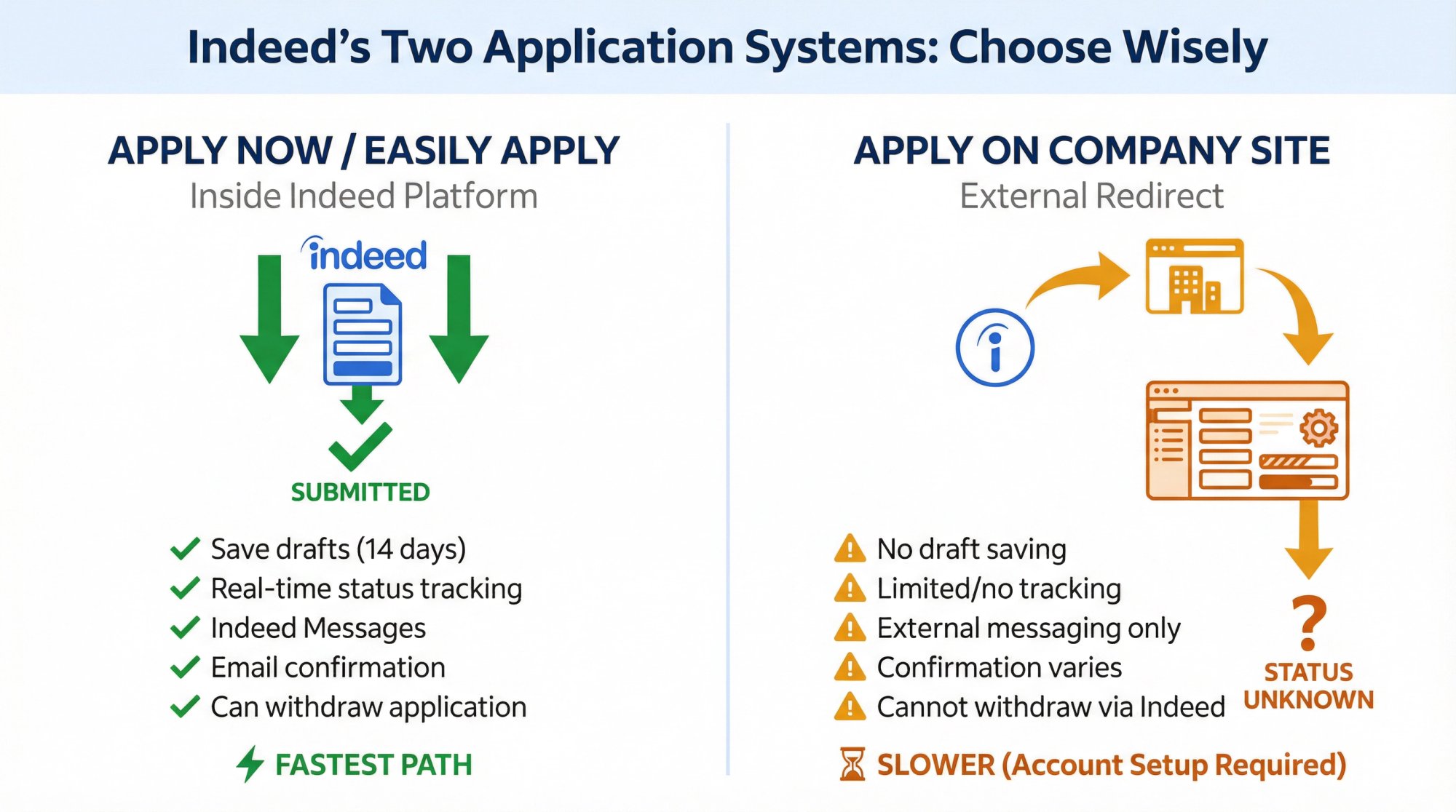
This happens because Indeed has two completely different application systems, and which one you get changes everything. How you submit, how you track status, whether you can save drafts, even whether you get confirmation emails all depends on which path the employer chose.
After helping over 1 million job seekers navigate applications through AIApply, we've seen every possible Indeed scenario. This guide gives you the exact steps for both application types, the quality checklist that prevents auto-rejections, and the safety protocols that protect you from scams.
Above: Indeed's homepage where your job search begins. From here, you'll search for positions and encounter one of two application systems.
What Are the Two Types of Indeed Applications?
Before you click anything, you need to know which application system you're dealing with.
Apply Now / Easily Apply (Inside Indeed)
These jobs let you apply completely within Indeed's platform. According to Indeed's help documentation, when you use this method you can:
• Save drafts and come back later
• Track application status in real time
• Use Indeed Messages to communicate with employers
• Receive confirmation emails after submitting
• Withdraw your application if needed
This is the fastest path. Most people prefer it.
Apply on Company Site (External Redirect)
These listings send you to the employer's website or applicant tracking system (ATS). Indeed notes that with this method you usually won't receive status updates from Indeed, and you'll need to use the employer's platform or email for communication.
One critical warning from Indeed: some employer sites may charge subscription fees. That doesn't automatically mean it's fraudulent, but it's a major red flag requiring verification.
How to Set Up Your Indeed Profile (Step 1)
Most people rush straight to applying. But if you skip profile setup, you're handicapping yourself.
Why Your Indeed Resume Affects Applications
Something most applicants don't know: According to Indeed's support documentation, if you have both an Indeed Resume and an uploaded resume file, employers only see your Indeed Resume.
That means your Indeed Resume must be accurate and strong, even if you plan to upload custom PDFs for each job. If you're starting from scratch, use AIApply's AI Resume Builder to create an ATS-friendly resume that passes Indeed's parsing system.
How to Upload Resume Files to Indeed
Indeed automatically converts uploaded files to PDF for viewing. But there are rules. Indeed's upload guidelines warn against several common mistakes:
What breaks resume uploads:
• Scanned documents or photos
• Two-column layouts (they parse poorly)
• Graphics and images
• Files larger than 5 MB
• Non-text formats
What works reliably:
• Single-column, text-based PDFs
• Word documents (.doc, .docx)
• Clean formatting with simple section headers
• Professional file names (FirstLast_Role_Indeed.pdf)
Need help optimizing your resume format? Our AI Resume Scanner checks for ATS compatibility issues and suggests fixes.
How to upload:
① Go to your profile and select Upload your resume
② Choose the file from your device
③ Preview the conversion
④ Confirm the upload
Indeed's resume documentation confirms this process converts your file automatically.
Indeed Privacy Controls for Job Seekers
Indeed lets you block up to 100 employers from seeing your profile. According to Indeed's What's New announcement, blocked employers can't view your profile unless you apply to their jobs.
This matters if you're:
• Currently employed and searching quietly
• Avoiding specific companies
• Concerned about recruiters at your current employer seeing your activity
Access this through the Resume Options menu, which Indeed describes as offering sharing, downloading, syncing, and blocking options.
How to Use Indeed's 'Apply Now' Button (Step 2)
This is the streamlined flow that happens entirely inside Indeed.
Desktop Application Process
① Open the job listing you want to apply for
② Click the Apply Now button (some regions show Easily Apply)
③ Choose your resume option:
• Use your Indeed Resume, or
• Select Apply with a different CV/resume to upload a custom file
Indeed's application guide confirms both options are available
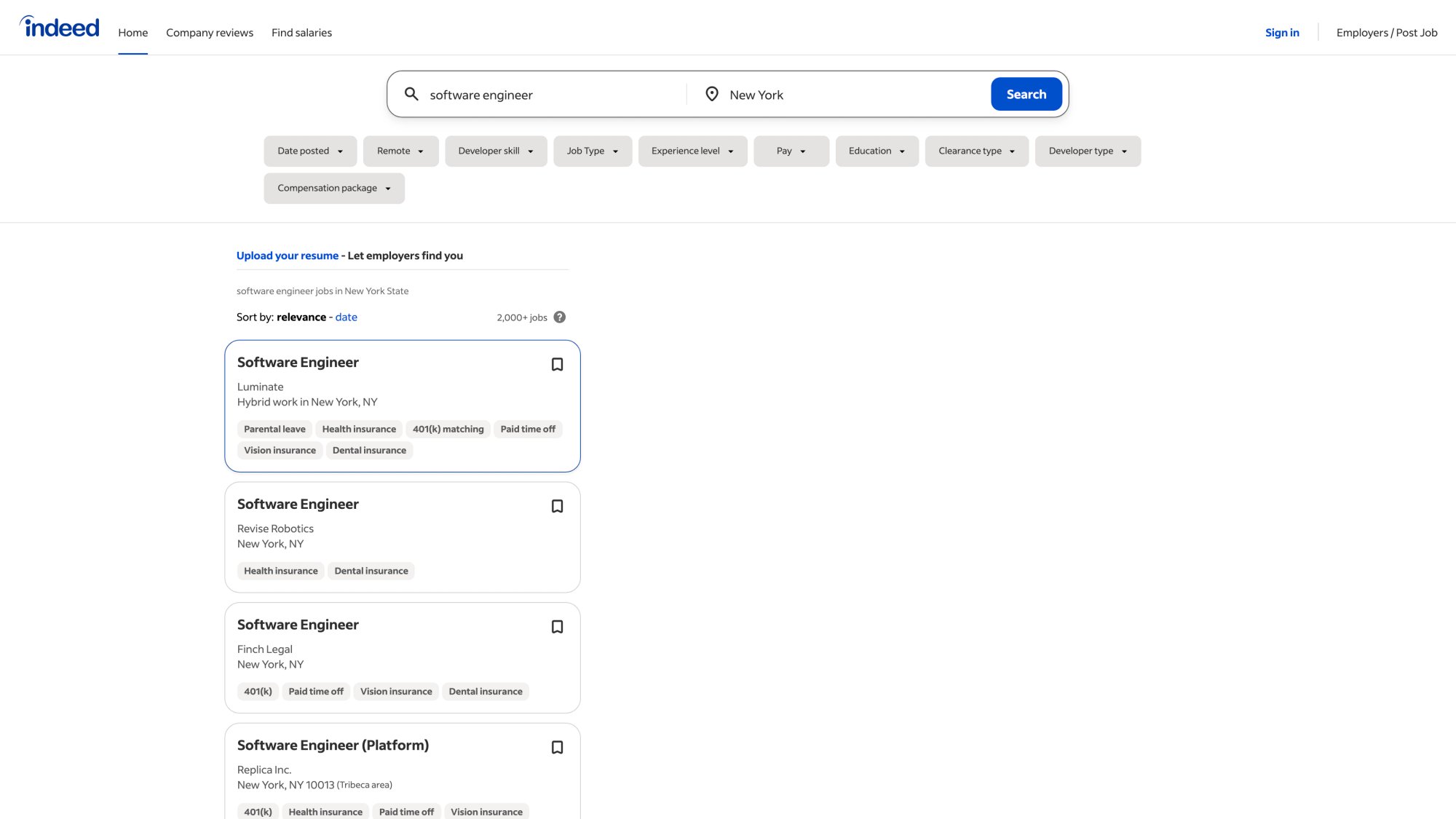
Above: Real Indeed job search results. Notice the "Apply Now" buttons that trigger the streamlined application flow. This is what you'll see before clicking to apply.
④ Fill in required fields and answer screening questions carefully
⑤ Add supporting documents if helpful (cover letter, portfolio, certifications)
⑥ Review everything before clicking Submit
⑦ Watch for the confirmation email listing your submitted documents
Indeed's support documentation confirms that confirmation emails typically arrive for applications submitted directly through Indeed.
Mobile App Application Process
The steps mirror desktop, with some interface differences. Indeed explicitly states you can upload cover letters via mobile using either file upload or by typing directly into a text field.
Mobile-specific tip: If you're uploading documents from your phone, make sure they're already saved to your device or cloud storage. Mobile upload menus can be finicky with file selection.
How to Add Cover Letters on Indeed (Step 3)
Cover letters confuse people because Indeed handles them differently than resumes.
Indeed Cover Letter Rules (2025-2026)
According to Indeed's cover letter FAQ:
• You cannot upload a cover letter to your profile
• You can upload or paste one during each application
• Once submitted, you cannot edit or replace it through Indeed
• You can attach up to 5 supporting documents total
If you upload the wrong cover letter, you'll need to contact the employer directly to correct it.
Two Ways to Add Cover Letters on Indeed
Option 1: Paste into the text field
Indeed's documentation describes a free-text option with a 4,000-character limit.
Pro tip: Write your letter in a document first, run spell-check, then paste. Formatting errors in a text field can make strong writing look careless.
Option 2: Upload a file
Indeed lists supported formats including PDF, DOCX, DOC, TXT, and RTF.
For roles where cover letters matter (marketing, communications, management), uploading a beautifully formatted PDF makes a better impression than plain text. Browse our cover letter examples for inspiration across different industries and roles.
How AIApply Creates Better Cover Letters Faster
This is where we save you hours without compromising quality.
Instead of writing from scratch every time, use AIApply's Cover Letter Generator to create role-specific letters in under two minutes. The AI analyzes the job description and writes natural, compelling copy that sounds human.
The workflow:
→ Copy the Indeed job description
→ Paste it into AIApply's Cover Letter Generator
→ Generate a tailored letter
→ Review and edit (always personalize)
→ Export as PDF or copy the text
→ Upload to Indeed or paste into the text field
If you're pasting, keep it under 4,000 characters to meet Indeed's text field limit.
Our AI is trained on millions of successful applications, so the output doesn't trigger AI detection tools when you review and personalize it.
How to Save Indeed Applications for Later (Step 4)
Started an application but realized you need more time? Use Save and Continue.
Indeed's save feature documentation explains the process:
① Click Save and Close near the job title
② The application appears in My Jobs with status "Application Started"
③ Saved applications remain for 14 days (unless the job expires sooner)
If it's been more than 14 days and the job is still active, Indeed recommends restarting by returning to the job post and clicking Apply again.
Strategic use case: If you're applying to 20+ jobs per week, save applications that need customization and batch-complete them when you have focused time. This prevents rushed submissions. Check out AIApply's Auto Apply feature to streamline high-volume job searches without sacrificing quality.
How to Apply on Company Site Through Indeed (Step 5)
When you click Apply on Company Site, you're leaving Indeed's ecosystem entirely.
What to Expect With External Applications
• You'll probably create a new account on the employer's website
• You may re-enter all your resume information manually (even after uploading)
• Updates typically come via email or the employer's ATS, not Indeed
• You won't see status tracking in Indeed's My Jobs
Indeed's job types documentation confirms these limitations for external applications.
The Company Site Subscription Fee Warning
Indeed explicitly warns that some employer sites may charge subscription fees.
What this means:
This doesn't automatically indicate a scam, but it's unusual. Legitimate employers sometimes use premium ATS platforms that charge candidates for enhanced services. But this is also a common scam tactic.
Before paying anything:
① Google the company name + "scam" or "reviews"
② Verify the company exists (check LinkedIn, official website, business registrations)
③ Confirm the job posting is legitimate through other channels
④ Read what you're paying for very carefully
If it feels wrong, trust your instinct. Learn more about job search safety and ATS systems.
How to Track Indeed Applications (Step 6)
Treat your search like a sales pipeline, not a lottery.
Indeed's My Jobs feature is where serious job seekers win.
Indeed Application Status Types
How to Withdraw an Indeed Application
According to Indeed, you can only withdraw if you applied directly on Indeed. You may not be able to reapply to that posting.
If you withdrew by mistake, you'll need to message the employer to correct it.
Why Indeed Applications Disappear From My Jobs
Indeed lists common reasons including:
• You applied on a company site (not directly on Indeed)
• The application is linked to a different email/account
• You applied more than six months ago
How to Fix Indeed Application Problems (Step 7)
Fix: "Apply Now" Button Won't Work
Indeed's troubleshooting guide confirms these fixes resolve most issues.
Fix: Resume Upload Fails or Looks Broken
Common fixes:
• Confirm your file type is supported (PDF, DOC, DOCX)
• Remove two-column layouts, graphics, and photos
• Check file size (keep under 5 MB)
• Avoid scanned documents
Indeed's upload documentation warns that formatting issues often stem from incompatible layouts or non-text elements.
If language sections appear incorrect, you might be on the wrong regional Indeed site. One Indeed guide suggests deleting the resume and re-uploading after selecting your correct country via Indeed Worldwide.
Need a resume that's guaranteed ATS-compatible? Try our AI Resume Checker to identify and fix formatting issues before uploading.
Fix: You Uploaded the Wrong Cover Letter
Indeed's position is clear: you can't edit or replace it after applying. You'll need to contact the employer directly.
Prevention is easier than correction. Always preview uploaded files before clicking Submit.
How to Avoid Indeed Scams and Fake Jobs
Indeed's safe job search guide recommends specific protective actions.
Indeed Job Scam Red Flags
Always report suspicious messages through Indeed's platform.
The Most Common Indeed Scam Pattern
A "recruiter" messages you about a high-paying remote position. They conduct a brief text-based interview. Then they send a check for "home office equipment" and ask you to forward some money to a vendor.
The check bounces. You're out the money you forwarded. The "recruiter" disappears.
If money moves in unexpected directions, stop.
Indeed Job Seeker Rules You Must Follow
Indeed's Job Seeker Guidelines explicitly state that misuse can lead to content removal, limited access, or account closure.
The Indeed Automation Rule
Indeed says don't use third-party bots or other tools to apply for jobs automatically.
What this means for AIApply users:
We help you create better application materials faster. But you still apply manually through Indeed's official flow. We're not automating clicks or submissions.
This approach respects platform rules while dramatically reducing the time you spend writing resumes and cover letters.
The compliant workflow:
→ Generate tailored documents with AIApply
→ Review and personalize
→ Apply manually through Indeed
→ Track in My Jobs
Quality applications, done faster, without breaking rules. Explore our resume builder and see how much time you can save.
Why Indeed Removed Skills Assessments (2025 Update)
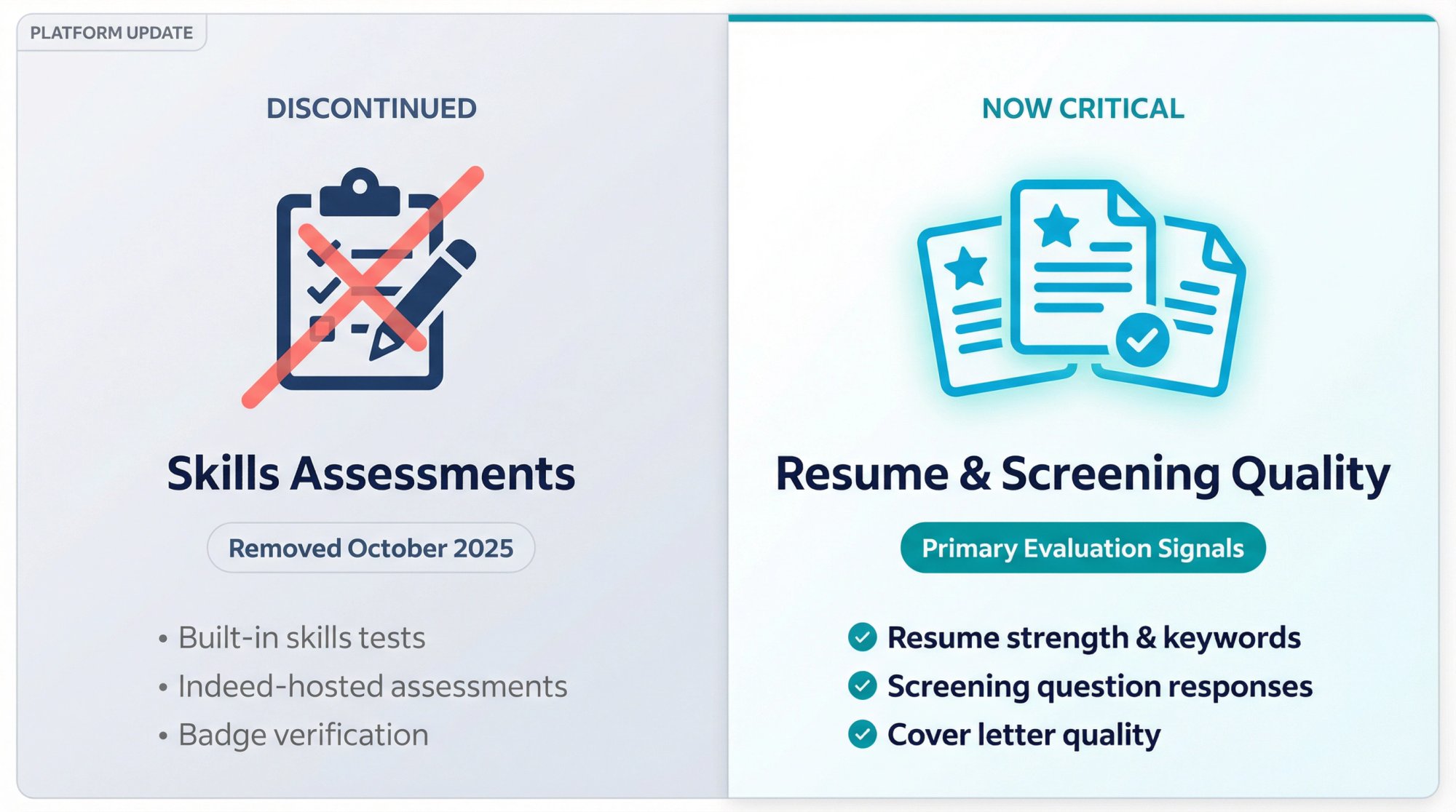
Indeed published a product update announcing that beginning in October, skills assessments would no longer be offered globally.
What this means:
• Indeed's built-in skills tests are gone
• Employers may still use their own assessments on external sites
• Your resume and screening answers matter more than ever
Focus energy on strengthening your resume, cover letter, and initial screening responses. These are now the primary evaluation signals before you reach the interview stage. Use our AI Resume Editor to polish your resume to perfection.
AIApply Workflow: How to Apply Faster on Indeed
Our platform helps over 1 million job seekers apply faster without sacrificing quality. This is the exact workflow for Indeed.
The Complete Indeed Application Process
Step 1: Prepare your documents
① Copy the Indeed job description
② Use AIApply Resume Builder to generate a role-matched, ATS-friendly resume
③ Use AIApply Cover Letter Generator to create a tailored cover letter
④ Export as clean, single-column PDF (avoid graphics and tables)
Step 2: Apply through Indeed
① Click Apply Now on the Indeed listing
② Choose Apply with a different CV/resume
③ Upload your AIApply-generated documents
④ Fill in screening questions carefully
⑤ Attach supporting documents if needed
⑥ Submit
Step 3: Prepare for interviews
When you land interviews, use AIApply's Interview Buddy for real-time assistance during video calls. It provides live coaching visible only to you.
Indeed Application Quality Control Checklist
This is what recruiters wish every applicant would do:
Indeed's job seeker guidelines recommend careful attention to what information you share.
For role-specific guidance, check out our comprehensive career guides and resume examples to see what works for your industry.
Indeed Application FAQ: Common Questions Answered
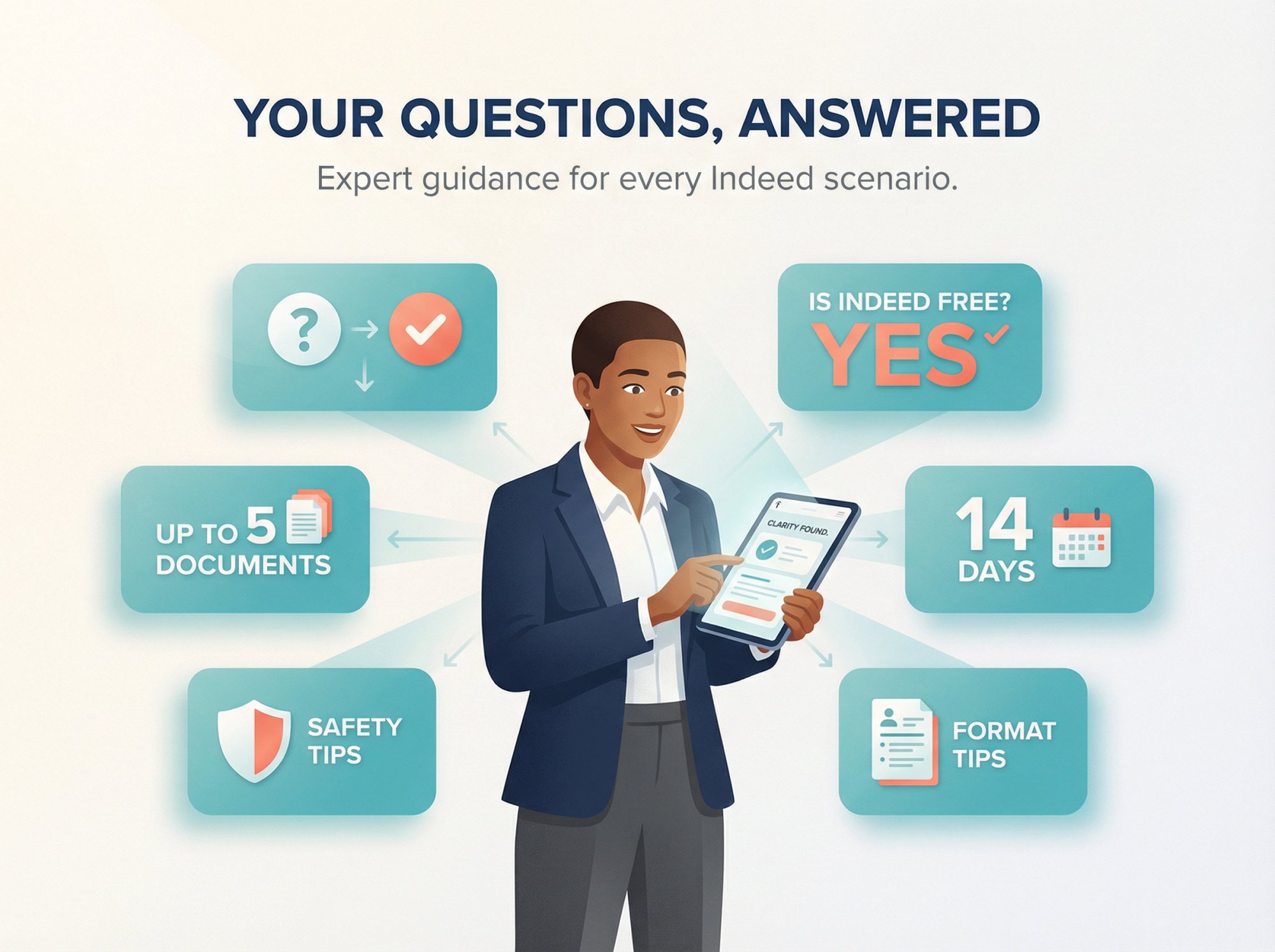
Is Indeed free to use?
Yes. Indeed confirms it's a free platform for searching, applying, and interviewing.
Can I apply on Indeed without a cover letter?
Yes, cover letters are often optional. Indeed notes that some employers allow applications without cover letters, though including one can strengthen your candidacy.
Can I upload a cover letter to my Indeed profile?
No. According to Indeed, cover letters can't be saved to your profile, but you can upload or paste them during each application.
How many supporting documents can I attach?
Indeed allows up to 5 supporting documents per application.
Can I edit my cover letter after applying?
Not through Indeed. Their FAQ states you need to contact the employer directly to make changes after submission.
Why don't I see status updates for my application?
Status tracking is typically available only for jobs where you applied directly on Indeed. If you applied on a company site, you won't see updates in My Jobs.
Can I withdraw an application on Indeed?
Only if you applied directly through Indeed's platform. According to Indeed, applications submitted on external sites cannot be withdrawn through Indeed.
How long do saved applications remain accessible?
Saved applications remain for 14 days unless the job expires sooner. After 14 days, you'll need to restart the application process.
What should I do if Indeed says my resume formatting is wrong?
Remove two-column layouts, graphics, photos, and scanned content. Use a simple, text-based format. Indeed recommends single-column layouts with clean section headers.
Can I use the same resume for every application?
Technically yes, but it's not recommended. Tailoring your resume to each job description significantly increases your chances. AIApply's Resume Builder makes customization fast without starting from scratch each time. Check out our AI Resume Rewriter to adapt your resume for different roles quickly.
How do I know if a job posting on Indeed is legitimate?
Check for red flags: requests for money, unprofessional emails, offers without interviews, and vague job descriptions. Indeed's safety guidelines provide detailed warning signs and protective measures.
Does AIApply work with Indeed's application system?
Yes. We help you create better documents faster, then you apply manually through Indeed's official process. This approach is fully compliant with Indeed's automation rules.
How to Balance Speed and Quality on Indeed
The job market moves fast. Applications close quickly. Employers move on candidates within days.
But rushed applications get rejected. Quality still matters.
The solution isn't choosing between speed and quality. It's using the right tools to achieve both.
AIApply helps you create professional, tailored application materials in minutes instead of hours. You maintain control, review everything, and submit through Indeed's official channels.
Over 1 million job seekers use our platform because it works. Users are 80% more likely to get hired when they use our complete workflow.
Start with your next Indeed application. Generate a tailored resume and cover letter with our AI Resume Builder and AI Cover Letter Generator. See how much time you save without compromising quality.
You're competing against hundreds of applicants. Make every application count.
This guide is for educational purposes. AIApply is not affiliated with Indeed. Platform features may vary by country and can change. Always follow Indeed's official guidelines and safety recommendations.
You found the perfect job on Indeed. You click Apply, and suddenly you're staring at a form that looks nothing like the last one you filled out.
This happens because Indeed has two completely different application systems, and which one you get changes everything. How you submit, how you track status, whether you can save drafts, even whether you get confirmation emails all depends on which path the employer chose.
After helping over 1 million job seekers navigate applications through AIApply, we've seen every possible Indeed scenario. This guide gives you the exact steps for both application types, the quality checklist that prevents auto-rejections, and the safety protocols that protect you from scams.
Above: Indeed's homepage where your job search begins. From here, you'll search for positions and encounter one of two application systems.
What Are the Two Types of Indeed Applications?
Before you click anything, you need to know which application system you're dealing with.
Apply Now / Easily Apply (Inside Indeed)
These jobs let you apply completely within Indeed's platform. According to Indeed's help documentation, when you use this method you can:
• Save drafts and come back later
• Track application status in real time
• Use Indeed Messages to communicate with employers
• Receive confirmation emails after submitting
• Withdraw your application if needed
This is the fastest path. Most people prefer it.
Apply on Company Site (External Redirect)
These listings send you to the employer's website or applicant tracking system (ATS). Indeed notes that with this method you usually won't receive status updates from Indeed, and you'll need to use the employer's platform or email for communication.
One critical warning from Indeed: some employer sites may charge subscription fees. That doesn't automatically mean it's fraudulent, but it's a major red flag requiring verification.
How to Set Up Your Indeed Profile (Step 1)
Most people rush straight to applying. But if you skip profile setup, you're handicapping yourself.
Why Your Indeed Resume Affects Applications
Something most applicants don't know: According to Indeed's support documentation, if you have both an Indeed Resume and an uploaded resume file, employers only see your Indeed Resume.
That means your Indeed Resume must be accurate and strong, even if you plan to upload custom PDFs for each job. If you're starting from scratch, use AIApply's AI Resume Builder to create an ATS-friendly resume that passes Indeed's parsing system.
How to Upload Resume Files to Indeed
Indeed automatically converts uploaded files to PDF for viewing. But there are rules. Indeed's upload guidelines warn against several common mistakes:
What breaks resume uploads:
• Scanned documents or photos
• Two-column layouts (they parse poorly)
• Graphics and images
• Files larger than 5 MB
• Non-text formats
What works reliably:
• Single-column, text-based PDFs
• Word documents (.doc, .docx)
• Clean formatting with simple section headers
• Professional file names (FirstLast_Role_Indeed.pdf)
Need help optimizing your resume format? Our AI Resume Scanner checks for ATS compatibility issues and suggests fixes.
How to upload:
① Go to your profile and select Upload your resume
② Choose the file from your device
③ Preview the conversion
④ Confirm the upload
Indeed's resume documentation confirms this process converts your file automatically.
Indeed Privacy Controls for Job Seekers
Indeed lets you block up to 100 employers from seeing your profile. According to Indeed's What's New announcement, blocked employers can't view your profile unless you apply to their jobs.
This matters if you're:
• Currently employed and searching quietly
• Avoiding specific companies
• Concerned about recruiters at your current employer seeing your activity
Access this through the Resume Options menu, which Indeed describes as offering sharing, downloading, syncing, and blocking options.
How to Use Indeed's 'Apply Now' Button (Step 2)
This is the streamlined flow that happens entirely inside Indeed.
Desktop Application Process
① Open the job listing you want to apply for
② Click the Apply Now button (some regions show Easily Apply)
③ Choose your resume option:
• Use your Indeed Resume, or
• Select Apply with a different CV/resume to upload a custom file
Indeed's application guide confirms both options are available
Above: Real Indeed job search results. Notice the "Apply Now" buttons that trigger the streamlined application flow. This is what you'll see before clicking to apply.
④ Fill in required fields and answer screening questions carefully
⑤ Add supporting documents if helpful (cover letter, portfolio, certifications)
⑥ Review everything before clicking Submit
⑦ Watch for the confirmation email listing your submitted documents
Indeed's support documentation confirms that confirmation emails typically arrive for applications submitted directly through Indeed.
Mobile App Application Process
The steps mirror desktop, with some interface differences. Indeed explicitly states you can upload cover letters via mobile using either file upload or by typing directly into a text field.
Mobile-specific tip: If you're uploading documents from your phone, make sure they're already saved to your device or cloud storage. Mobile upload menus can be finicky with file selection.
How to Add Cover Letters on Indeed (Step 3)
Cover letters confuse people because Indeed handles them differently than resumes.
Indeed Cover Letter Rules (2025-2026)
According to Indeed's cover letter FAQ:
• You cannot upload a cover letter to your profile
• You can upload or paste one during each application
• Once submitted, you cannot edit or replace it through Indeed
• You can attach up to 5 supporting documents total
If you upload the wrong cover letter, you'll need to contact the employer directly to correct it.
Two Ways to Add Cover Letters on Indeed
Option 1: Paste into the text field
Indeed's documentation describes a free-text option with a 4,000-character limit.
Pro tip: Write your letter in a document first, run spell-check, then paste. Formatting errors in a text field can make strong writing look careless.
Option 2: Upload a file
Indeed lists supported formats including PDF, DOCX, DOC, TXT, and RTF.
For roles where cover letters matter (marketing, communications, management), uploading a beautifully formatted PDF makes a better impression than plain text. Browse our cover letter examples for inspiration across different industries and roles.
How AIApply Creates Better Cover Letters Faster
This is where we save you hours without compromising quality.
Instead of writing from scratch every time, use AIApply's Cover Letter Generator to create role-specific letters in under two minutes. The AI analyzes the job description and writes natural, compelling copy that sounds human.
The workflow:
→ Copy the Indeed job description
→ Paste it into AIApply's Cover Letter Generator
→ Generate a tailored letter
→ Review and edit (always personalize)
→ Export as PDF or copy the text
→ Upload to Indeed or paste into the text field
If you're pasting, keep it under 4,000 characters to meet Indeed's text field limit.
Our AI is trained on millions of successful applications, so the output doesn't trigger AI detection tools when you review and personalize it.
How to Save Indeed Applications for Later (Step 4)
Started an application but realized you need more time? Use Save and Continue.
Indeed's save feature documentation explains the process:
① Click Save and Close near the job title
② The application appears in My Jobs with status "Application Started"
③ Saved applications remain for 14 days (unless the job expires sooner)
If it's been more than 14 days and the job is still active, Indeed recommends restarting by returning to the job post and clicking Apply again.
Strategic use case: If you're applying to 20+ jobs per week, save applications that need customization and batch-complete them when you have focused time. This prevents rushed submissions. Check out AIApply's Auto Apply feature to streamline high-volume job searches without sacrificing quality.
How to Apply on Company Site Through Indeed (Step 5)
When you click Apply on Company Site, you're leaving Indeed's ecosystem entirely.
What to Expect With External Applications
• You'll probably create a new account on the employer's website
• You may re-enter all your resume information manually (even after uploading)
• Updates typically come via email or the employer's ATS, not Indeed
• You won't see status tracking in Indeed's My Jobs
Indeed's job types documentation confirms these limitations for external applications.
The Company Site Subscription Fee Warning
Indeed explicitly warns that some employer sites may charge subscription fees.
What this means:
This doesn't automatically indicate a scam, but it's unusual. Legitimate employers sometimes use premium ATS platforms that charge candidates for enhanced services. But this is also a common scam tactic.
Before paying anything:
① Google the company name + "scam" or "reviews"
② Verify the company exists (check LinkedIn, official website, business registrations)
③ Confirm the job posting is legitimate through other channels
④ Read what you're paying for very carefully
If it feels wrong, trust your instinct. Learn more about job search safety and ATS systems.
How to Track Indeed Applications (Step 6)
Treat your search like a sales pipeline, not a lottery.
Indeed's My Jobs feature is where serious job seekers win.
Indeed Application Status Types
How to Withdraw an Indeed Application
According to Indeed, you can only withdraw if you applied directly on Indeed. You may not be able to reapply to that posting.
If you withdrew by mistake, you'll need to message the employer to correct it.
Why Indeed Applications Disappear From My Jobs
Indeed lists common reasons including:
• You applied on a company site (not directly on Indeed)
• The application is linked to a different email/account
• You applied more than six months ago
How to Fix Indeed Application Problems (Step 7)
Fix: "Apply Now" Button Won't Work
Indeed's troubleshooting guide confirms these fixes resolve most issues.
Fix: Resume Upload Fails or Looks Broken
Common fixes:
• Confirm your file type is supported (PDF, DOC, DOCX)
• Remove two-column layouts, graphics, and photos
• Check file size (keep under 5 MB)
• Avoid scanned documents
Indeed's upload documentation warns that formatting issues often stem from incompatible layouts or non-text elements.
If language sections appear incorrect, you might be on the wrong regional Indeed site. One Indeed guide suggests deleting the resume and re-uploading after selecting your correct country via Indeed Worldwide.
Need a resume that's guaranteed ATS-compatible? Try our AI Resume Checker to identify and fix formatting issues before uploading.
Fix: You Uploaded the Wrong Cover Letter
Indeed's position is clear: you can't edit or replace it after applying. You'll need to contact the employer directly.
Prevention is easier than correction. Always preview uploaded files before clicking Submit.
How to Avoid Indeed Scams and Fake Jobs
Indeed's safe job search guide recommends specific protective actions.
Indeed Job Scam Red Flags
Always report suspicious messages through Indeed's platform.
The Most Common Indeed Scam Pattern
A "recruiter" messages you about a high-paying remote position. They conduct a brief text-based interview. Then they send a check for "home office equipment" and ask you to forward some money to a vendor.
The check bounces. You're out the money you forwarded. The "recruiter" disappears.
If money moves in unexpected directions, stop.
Indeed Job Seeker Rules You Must Follow
Indeed's Job Seeker Guidelines explicitly state that misuse can lead to content removal, limited access, or account closure.
The Indeed Automation Rule
Indeed says don't use third-party bots or other tools to apply for jobs automatically.
What this means for AIApply users:
We help you create better application materials faster. But you still apply manually through Indeed's official flow. We're not automating clicks or submissions.
This approach respects platform rules while dramatically reducing the time you spend writing resumes and cover letters.
The compliant workflow:
→ Generate tailored documents with AIApply
→ Review and personalize
→ Apply manually through Indeed
→ Track in My Jobs
Quality applications, done faster, without breaking rules. Explore our resume builder and see how much time you can save.
Why Indeed Removed Skills Assessments (2025 Update)
Indeed published a product update announcing that beginning in October, skills assessments would no longer be offered globally.
What this means:
• Indeed's built-in skills tests are gone
• Employers may still use their own assessments on external sites
• Your resume and screening answers matter more than ever
Focus energy on strengthening your resume, cover letter, and initial screening responses. These are now the primary evaluation signals before you reach the interview stage. Use our AI Resume Editor to polish your resume to perfection.
AIApply Workflow: How to Apply Faster on Indeed
Our platform helps over 1 million job seekers apply faster without sacrificing quality. This is the exact workflow for Indeed.
The Complete Indeed Application Process
Step 1: Prepare your documents
① Copy the Indeed job description
② Use AIApply Resume Builder to generate a role-matched, ATS-friendly resume
③ Use AIApply Cover Letter Generator to create a tailored cover letter
④ Export as clean, single-column PDF (avoid graphics and tables)
Step 2: Apply through Indeed
① Click Apply Now on the Indeed listing
② Choose Apply with a different CV/resume
③ Upload your AIApply-generated documents
④ Fill in screening questions carefully
⑤ Attach supporting documents if needed
⑥ Submit
Step 3: Prepare for interviews
When you land interviews, use AIApply's Interview Buddy for real-time assistance during video calls. It provides live coaching visible only to you.
Indeed Application Quality Control Checklist
This is what recruiters wish every applicant would do:
Indeed's job seeker guidelines recommend careful attention to what information you share.
For role-specific guidance, check out our comprehensive career guides and resume examples to see what works for your industry.
Indeed Application FAQ: Common Questions Answered
Is Indeed free to use?
Yes. Indeed confirms it's a free platform for searching, applying, and interviewing.
Can I apply on Indeed without a cover letter?
Yes, cover letters are often optional. Indeed notes that some employers allow applications without cover letters, though including one can strengthen your candidacy.
Can I upload a cover letter to my Indeed profile?
No. According to Indeed, cover letters can't be saved to your profile, but you can upload or paste them during each application.
How many supporting documents can I attach?
Indeed allows up to 5 supporting documents per application.
Can I edit my cover letter after applying?
Not through Indeed. Their FAQ states you need to contact the employer directly to make changes after submission.
Why don't I see status updates for my application?
Status tracking is typically available only for jobs where you applied directly on Indeed. If you applied on a company site, you won't see updates in My Jobs.
Can I withdraw an application on Indeed?
Only if you applied directly through Indeed's platform. According to Indeed, applications submitted on external sites cannot be withdrawn through Indeed.
How long do saved applications remain accessible?
Saved applications remain for 14 days unless the job expires sooner. After 14 days, you'll need to restart the application process.
What should I do if Indeed says my resume formatting is wrong?
Remove two-column layouts, graphics, photos, and scanned content. Use a simple, text-based format. Indeed recommends single-column layouts with clean section headers.
Can I use the same resume for every application?
Technically yes, but it's not recommended. Tailoring your resume to each job description significantly increases your chances. AIApply's Resume Builder makes customization fast without starting from scratch each time. Check out our AI Resume Rewriter to adapt your resume for different roles quickly.
How do I know if a job posting on Indeed is legitimate?
Check for red flags: requests for money, unprofessional emails, offers without interviews, and vague job descriptions. Indeed's safety guidelines provide detailed warning signs and protective measures.
Does AIApply work with Indeed's application system?
Yes. We help you create better documents faster, then you apply manually through Indeed's official process. This approach is fully compliant with Indeed's automation rules.
How to Balance Speed and Quality on Indeed
The job market moves fast. Applications close quickly. Employers move on candidates within days.
But rushed applications get rejected. Quality still matters.
The solution isn't choosing between speed and quality. It's using the right tools to achieve both.
AIApply helps you create professional, tailored application materials in minutes instead of hours. You maintain control, review everything, and submit through Indeed's official channels.
Over 1 million job seekers use our platform because it works. Users are 80% more likely to get hired when they use our complete workflow.
Start with your next Indeed application. Generate a tailored resume and cover letter with our AI Resume Builder and AI Cover Letter Generator. See how much time you save without compromising quality.
You're competing against hundreds of applicants. Make every application count.
This guide is for educational purposes. AIApply is not affiliated with Indeed. Platform features may vary by country and can change. Always follow Indeed's official guidelines and safety recommendations.
.webp)
%20(1).webp)
.webp)
Don't miss out on
your next opportunity.
Create and send applications in seconds, not hours.


