
How To List Certifications On a Resume (2026 Guide)

.webp)
Certifications can be a "yes or no" gate for interviews. But here's the problem: most people list them in ways that humans miss and ATS systems can't read properly.
You might have spent months earning that credential, only to watch your resume get filtered out because you wrote "PMP" instead of "Project Management Professional (PMP)." Or buried your nursing license in a skills section where recruiters never look.
This guide shows you exactly where certifications go, how to format them so ATS systems parse them correctly, and what details matter (dates, issuer, expiry, credential ID). You'll get copy/paste templates you can use right now, plus real examples for the scenarios people actually face.
If you're building or updating your resume, AIApply's AI Resume Builder can help you structure everything consistently and optimize for ATS systems. But whether you use a tool or not, the formatting decisions in this guide will make the difference between getting filtered out and getting interviews.
Resume Certification Templates You Can Copy and Paste
If you just need the right format, here are the three most common approaches.
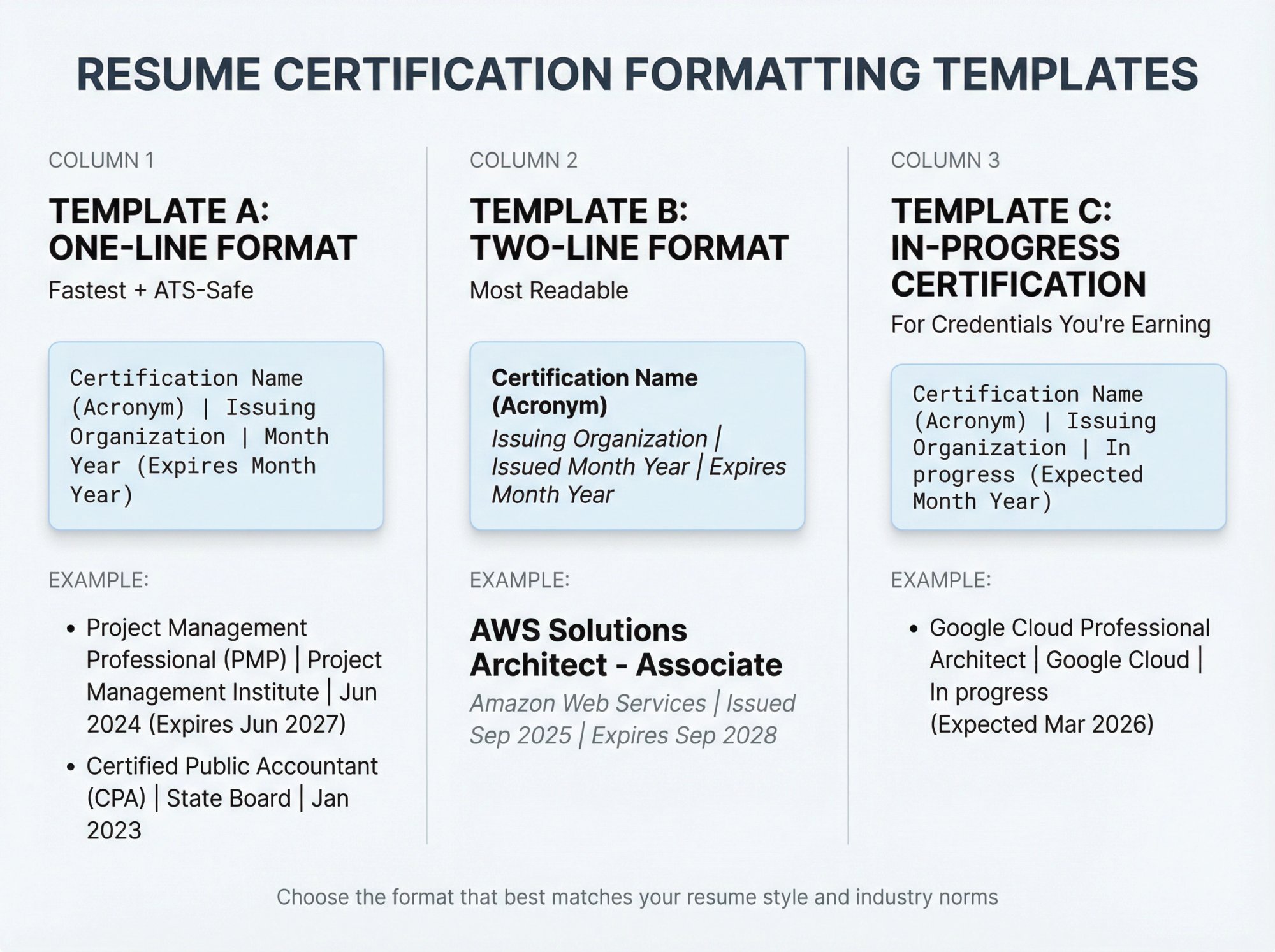
Template A: One-Line Format (Fastest + ATS-Safe)
Certifications
Format: Certification Name (Acronym) | Issuing Organization | Month Year (Expires Month Year)
Example:
• Project Management Professional (PMP) | Project Management Institute | Jun 2024 (Expires Jun 2027)
• Certified Public Accountant (CPA) | State Board | Jan 2023
This format follows industry best practices: name, issuing body, date, expiration (if applicable), and location (if needed). It's clean, easy to scan, and ATS-friendly.
Template B: Two-Line Format (Most Readable)
Certifications
Certification Name (Acronym)
Issuing Organization | Issued Month Year | Expires Month Year
Example:
AWS Solutions Architect - Associate
Amazon Web Services | Issued Sep 2025 | Expires Sep 2028
Use this when you want certifications to stand out visually. The bold name grabs attention, and the second line provides context without cluttering.
Template C: In-Progress Certification
Certifications
• Certification Name (Acronym) | Issuing Organization | In progress (Expected Month Year)
Listing important credentials you're working on is a standard practice, especially if the job cares about them. Adding an expected completion date shows commitment and keeps you competitive.
Why Resume Certification Formatting Matters for ATS
Certifications signal competence because they're typically earned through defined standards (training, experience requirements, or exams). But the way you format them directly affects whether they get seen.
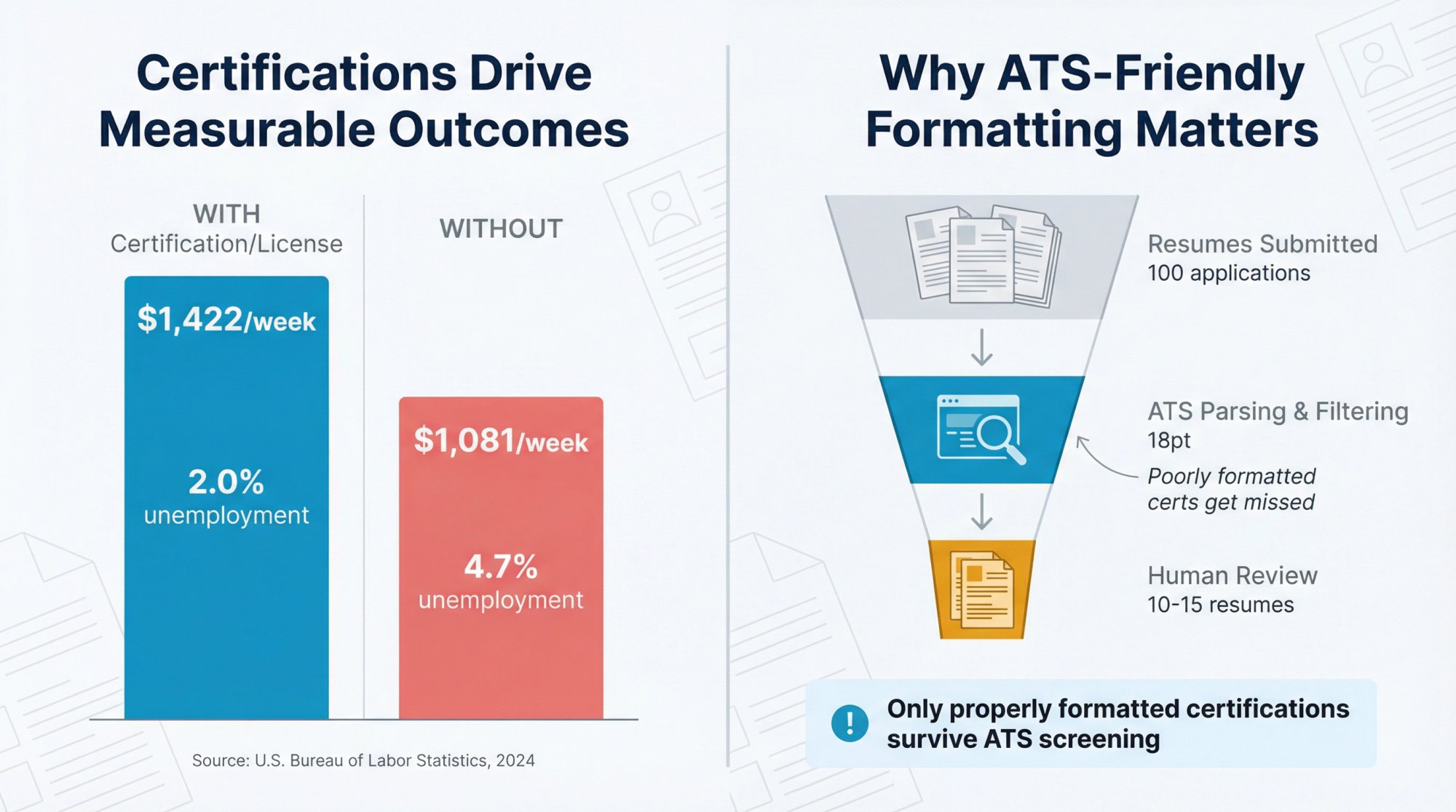
Here's why it matters:
1. Certifications correlate with measurable career outcomes
U.S. Bureau of Labor Statistics data from 2024 shows a meaningful gap between full-time workers with certifications or licenses and those without:
Source: Bureau of Labor Statistics CPS 2024 annual averages and unemployment data
Those numbers don't prove the credential caused better outcomes (occupation and experience matter too), but they show why employers treat certifications as a filter.
2. ATS systems parse resumes into structured data
Most companies use Applicant Tracking Systems that convert your resume into searchable fields. Greenhouse's ATS documentation explains that these systems extract skills, job titles, dates, and certifications to match candidates to requirements.
If you format certifications poorly (acronyms only, buried in a paragraph, fancy tables), the ATS might miss them entirely. And if the system misses them, the recruiter never sees them.
3. Recruiters scan resumes in seconds
Even when your resume reaches a human, recruiters spend about 7 seconds on the first pass. If your certifications aren't clearly labeled and easy to find, they're invisible.
Critical insight: Formatting isn't just about looking nice. It's about making sure the credential you worked hard to earn actually helps you get hired.
And if you want to take the guesswork out of ATS optimization, AIApply's AI Resume Scanner automatically formats everything to ATS standards while keeping it readable for humans.
Certification vs Certificate vs License: What Should You List?
This sounds pedantic until it costs you in a screening call.
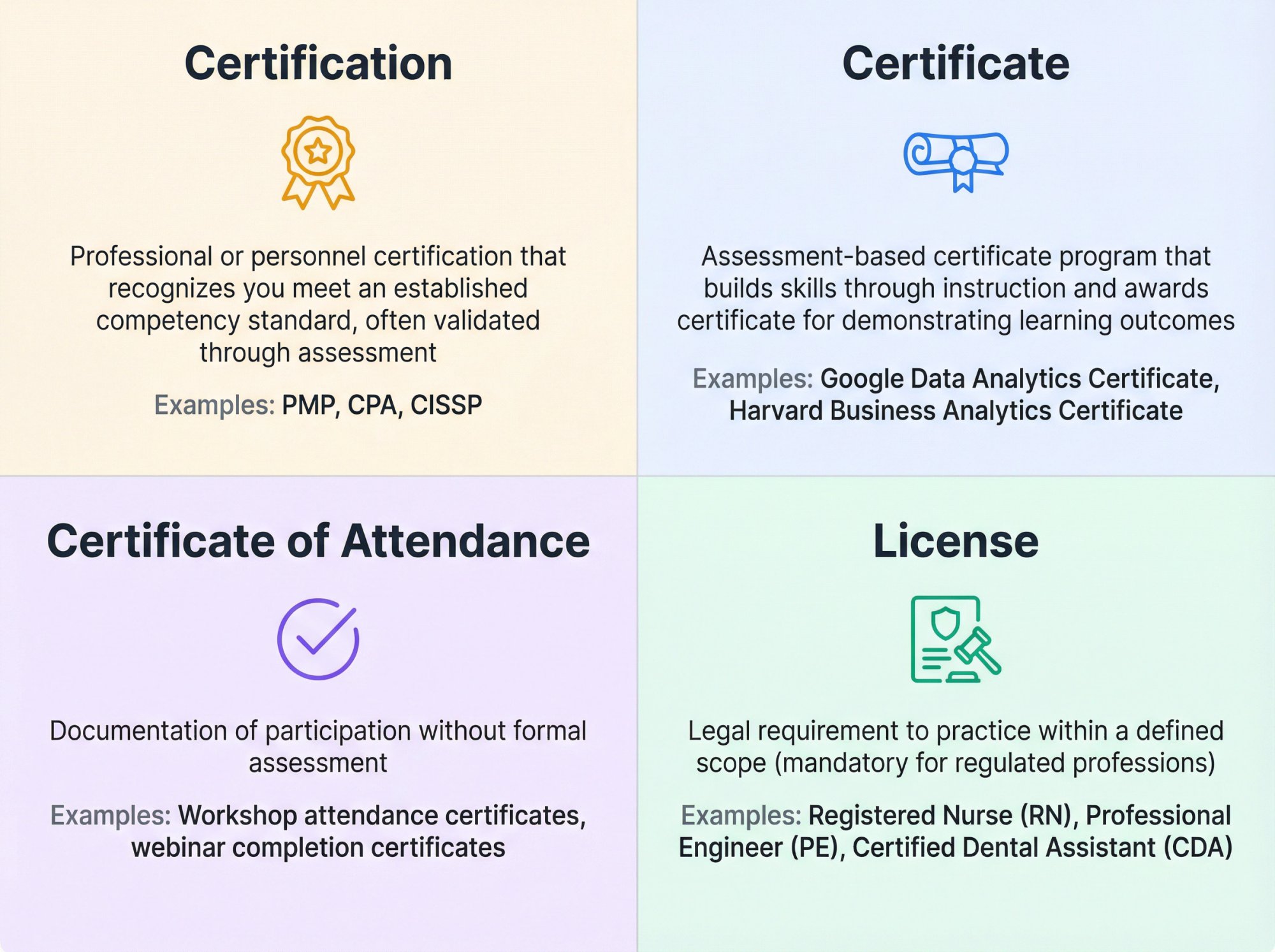
Why This Matters on Your Resume
If you label everything as a "certification," you might look careless or misleading. A completion certificate for a 2-hour webinar doesn't belong in the same section as your state nursing license.
Consider using separate sections:
① Certifications & Licenses (for regulated credentials and professional certifications)
② Professional Development or Training (for completion certificates and workshops)
This keeps your resume honest and helps recruiters quickly identify credentials that matter for the role.
Where To List Certifications On Your Resume
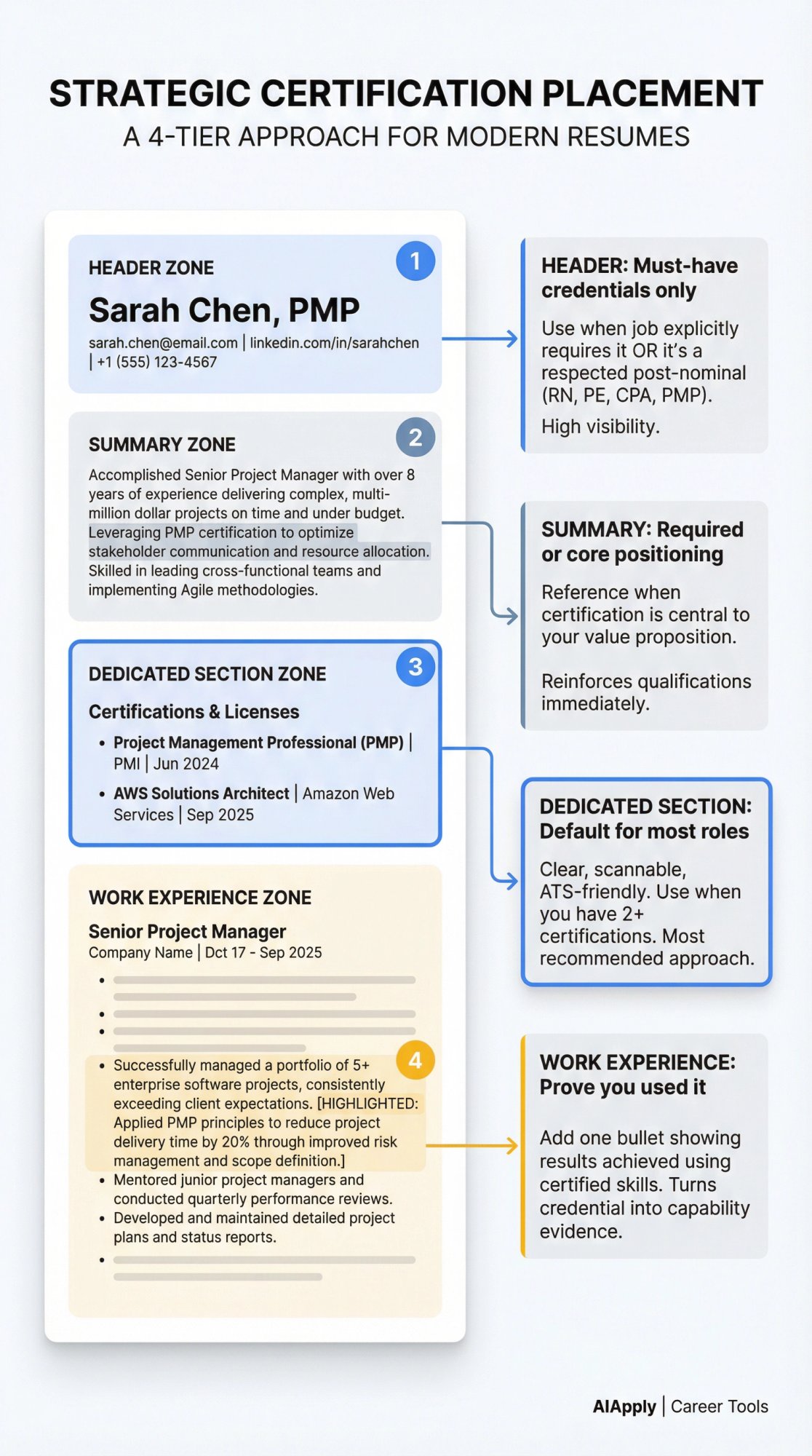
Think of placement like "how quickly does a recruiter need to see this?"
The Placement Rule
Resume best practices suggest that if certifications are required, list them in multiple places (next to your name, in your summary, and in a dedicated section) so they don't get missed.
Strategic placement across your resume is recommended: a dedicated section, alongside your name when widely recognized, and in your summary or cover letter.
Best Places to List Certifications (Ranked)
1) A Standalone "Certifications" or "Certifications & Licenses" Section
This is the default for most roles and is recommended when you have more than one or two certifications.
Why it works: Clear label, easy to scan, ATS-friendly.
2) In the Header (After Your Name) | Only for Must-Have Credentials
Use this when:
→ The job explicitly requires the credential, OR
→ It's a common, respected post-nominal in your profession (regulated license or credential with strong industry recognition)
Adding accepted abbreviations beside your name is standard practice in fields where credentials are paramount.
Example:
Alex Taylor, PMPLondon, UK • alex@email.com • +44 7700 900000 • LinkedInImportant: Some credential bodies publish usage rules. PMI's trademark guidelines state that PMI credentials can appear immediately after the holder's name, but anyone whose certification has lapsed should discontinue use.
Even if you're not listing a PMI credential, the principle is universal: don't use post-nominals unless you're allowed to and in good standing.
3) In Your Professional Summary (1 Line)
Use this when the certification is required or core to your positioning. Referencing relevant certifications in your resume summary reinforces qualifications.
Example:
Cybersecurity analyst with 4+ years in SOC operations and incident response, CompTIA Security+ certified.
4) Inside Your Work Experience (To Prove You Used It)
This is the move most people skip, and it's the one that makes certifications feel real instead of decorative.
Instead of only listing the credential, add one bullet under a relevant role showing how you applied the certified skill:
• "Implemented AWS Well-Architected review process; reduced monthly cloud spend by 18% while improving availability."
This turns a credential from a badge into evidence of capability.
What To Include In Each Certification Entry
Standard guidance outlines a clean structure:
→ Certification name (written out in full)
→ Certifying body
→ Date of certification / expiration (if applicable)
→ Location (if applicable, like state-specific credentials)
→ Only list valid certifications that haven't expired; include expected completion date for in-progress
Here's how to translate that into a practical format.
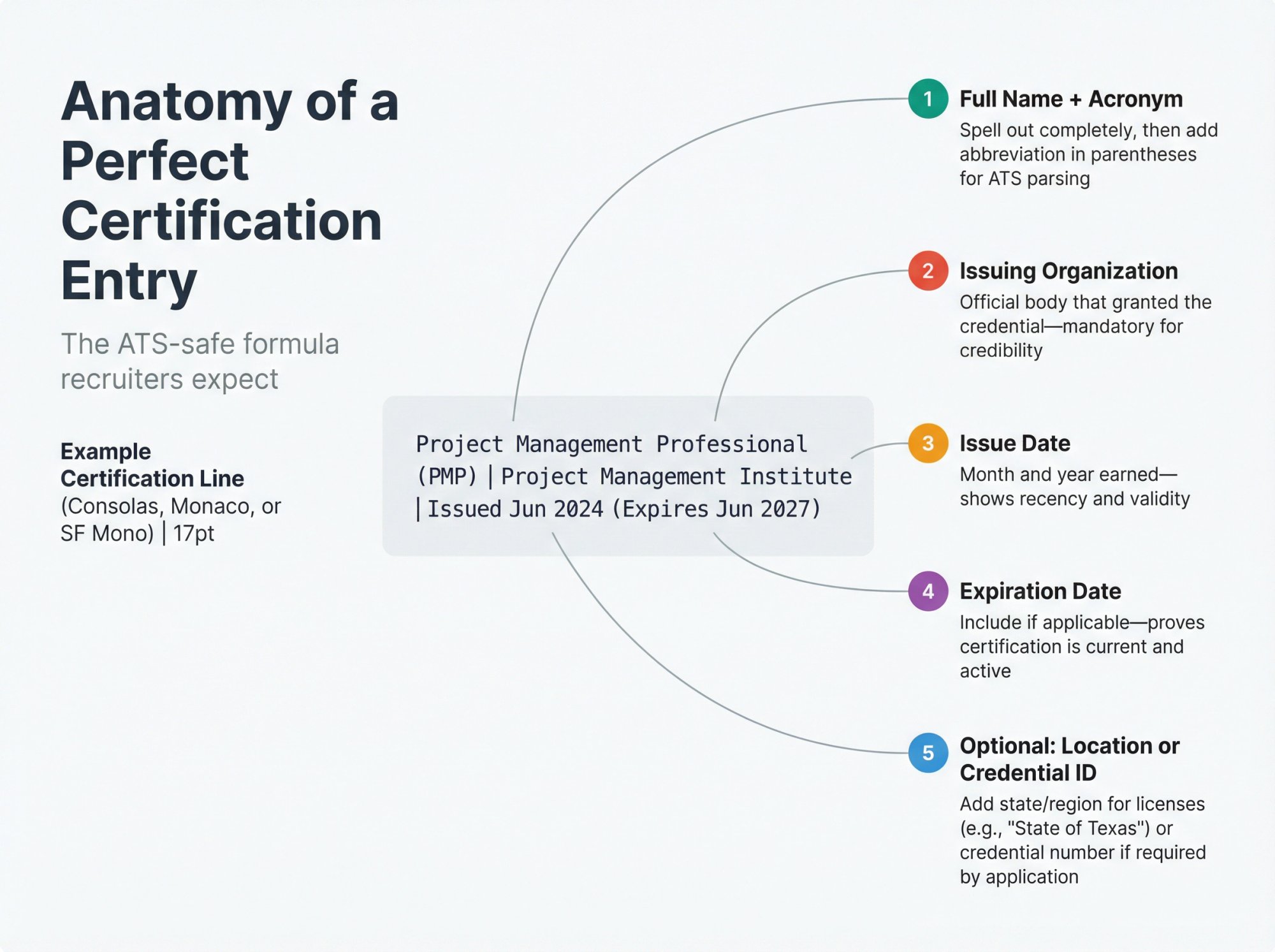
The "Perfect" Certification Entry (ATS-Safe)
Certification Name (Acronym) | Issuing Organization | Issued Month Year (Expires Month Year)
Example:
• Project Management Professional (PMP) | Project Management Institute | Issued Jun 2024 (Expires Jun 2027)
When To Add Location
Add location when the credential is state or region-specific (common for regulated licenses). Location applies when certification is specific to a state or region.
Example:
• Professional Engineer (PE) | State of Texas | Issued May 2023 (Expires May 2025)
When To Add "In Progress"
If the credential is important to the target role, list it and add an expected completion date. This approach is recommended for in-progress credentials.
Example:
• AWS Certified Solutions Architect - Professional | Amazon Web Services | In progress (Expected Mar 2026)
What About Credential IDs?
If the application asks for it, include it. Otherwise, keep it optional. Many candidates prefer not to share IDs publicly unless required.
If you include it, format cleanly:
• Credential ID: ABC-123456
How To Make Certifications ATS-Friendly
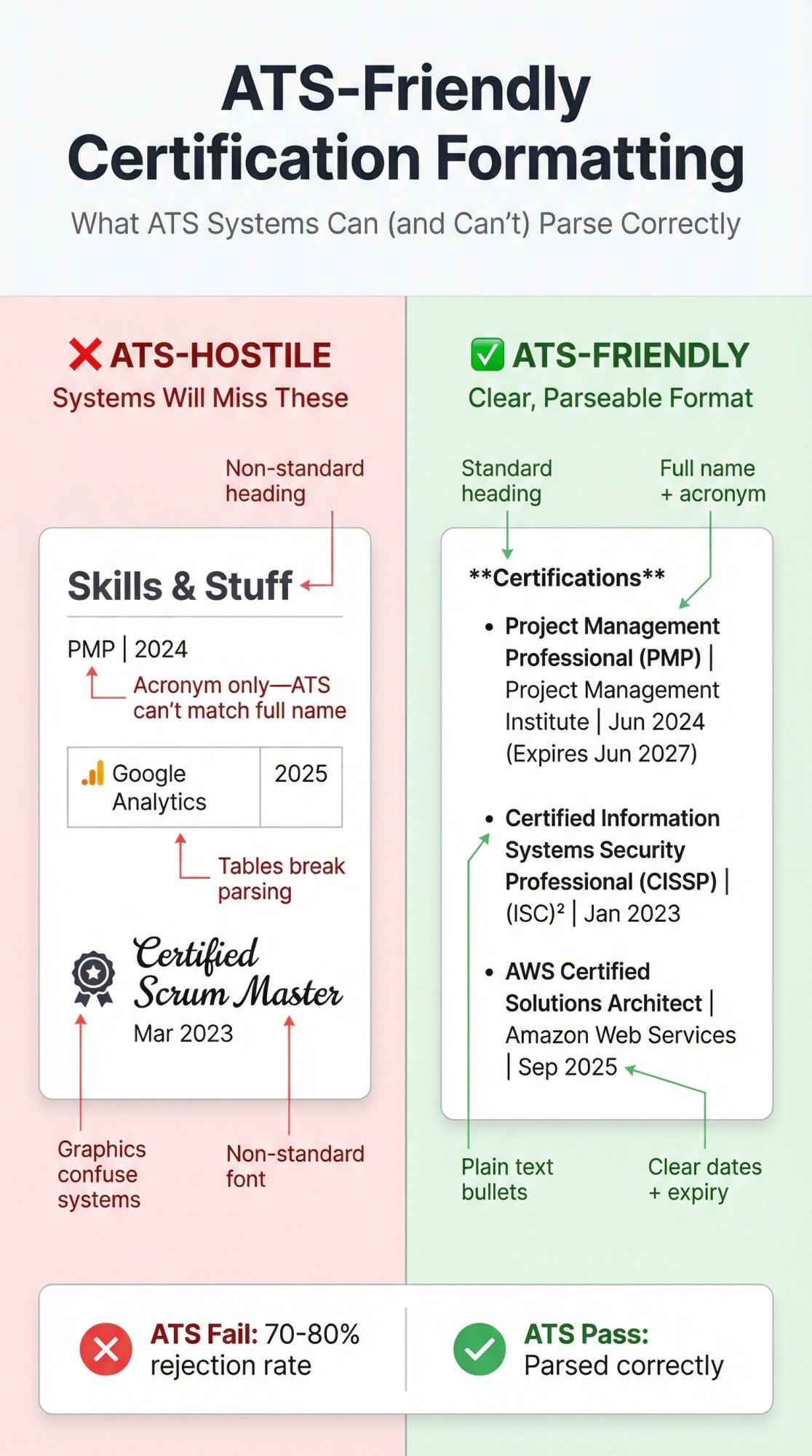
1) Spell Out Acronyms At Least Once
Acronyms may not show up on ATS and should be written out fully at least once.
Including both long-form and acronym when a term has an abbreviation (example: "Enterprise Resource Planning (ERP)") is a best practice.
Do this for certifications too:
• "Certified Information Systems Security Professional (CISSP)"
not just "CISSP"
2) Use a Standard Section Heading
Use one of these:
• Certifications
• Certifications & Licenses
• Licenses & Certifications
Using standard headings and keeping formatting simple helps systems parse correctly.
3) Avoid Tables, Columns, Icons, and Graphics
Complex elements like tables and columns can confuse ATS parsing.
Keep certifications as plain text bullets. Save the fancy design for your portfolio.
4) Put the Credential Name Exactly As the Job Ad Uses It
ATS keyword matching is often literal. If the job ad says "PMP," include both:
• Project Management Professional (PMP)
This covers both human readers and system searches.
5) Prioritize Relevance Over Completeness
Your resume isn't your credential archive. If a certification doesn't help you win this job, it might be taking space away from something that does.
When you're tailoring resumes per job (which you should be doing), AIApply's AI Resume Rewriter makes it easy to adjust which certifications appear for each application without starting from scratch every time.
How To Order Your Certifications
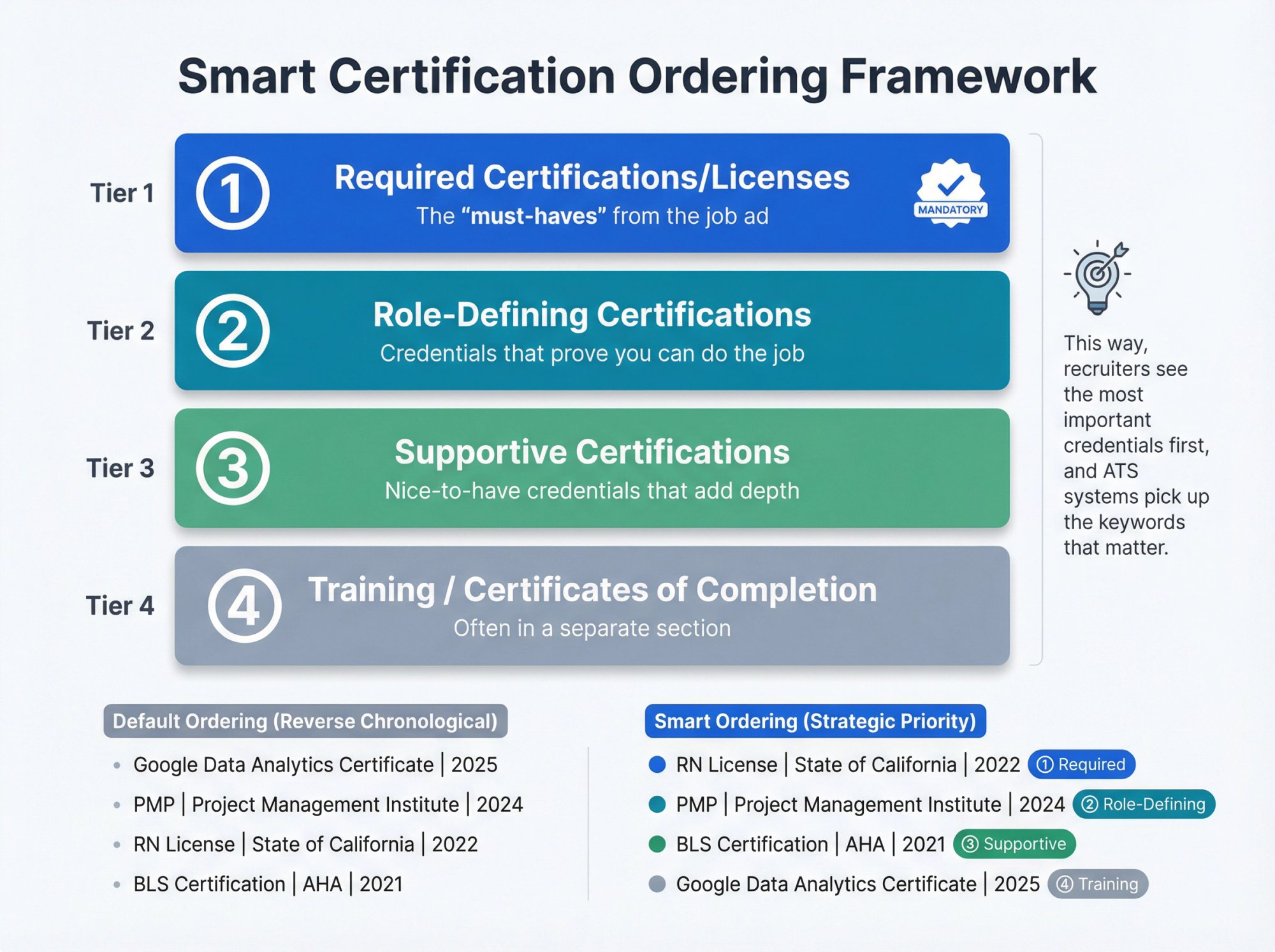
Default Ordering: Reverse Chronological
Standard practice is listing certifications in reverse chronological order, starting with the most recently achieved or in progress.
But There's a Smarter Exception
If one credential is the requirement or primary differentiator, it goes first even if it's not the newest.
A practical ordering framework:
① Required certifications/licenses (the "must-haves" from the job ad)
② Role-defining certifications (credentials that prove you can do the job)
③ Supportive certifications (nice-to-have credentials that add depth)
④ Training / certificates of completion (often in a separate section)
This way, recruiters see the most important credentials first, and ATS systems pick up the keywords that matter.
Resume Certification Examples: Copy/Paste Templates
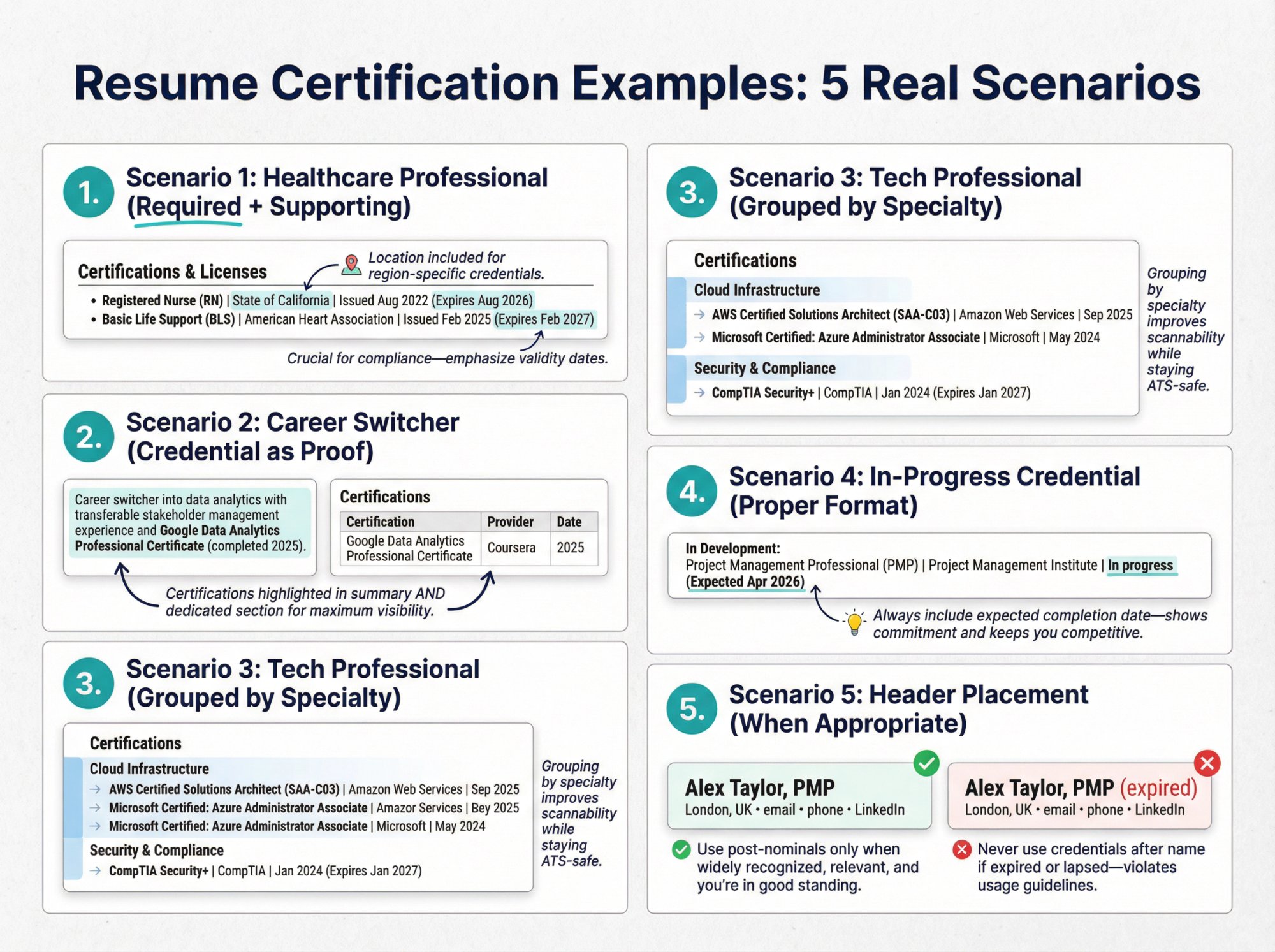
Scenario 1: One Required License + One Supporting Certification
Certifications & Licenses
• Registered Nurse (RN) | State of California | Issued Aug 2022 (Expires Aug 2026)
• Basic Life Support (BLS) | American Heart Association | Issued Feb 2025 (Expires Feb 2027)
This follows best practices on including location (state-specific) and expiration dates when applicable.
Scenario 2: Career Switcher Using Certifications To Compensate For Limited Experience
Professional Summary
Career switcher into data analytics with transferable stakeholder management experience and Google Data Analytics Professional Certificate (completed 2025).
Certifications
Certifications can be especially helpful when you lack relevant work experience (career switchers, recent graduates), and highlighting them strategically is recommended.
Scenario 3: Multiple Technical Certifications (Grouped By Category)
Certifications
Cloud Infrastructure
→ AWS Certified Solutions Architect (SAA-C03) | Amazon Web Services | Sep 2025
→ Microsoft Certified: Azure Administrator Associate | Microsoft | May 2024
Security & Compliance
→ CompTIA Security+ | CompTIA | Jan 2024 (Expires Jan 2027)
Grouping makes scanning easy for humans while staying ATS-safe because it remains plain text.
Scenario 4: In-Progress Certification (Done Right)
In Development:
Project Management Professional (PMP) | Project Management Institute | In progress (Expected Apr 2026)
This follows the recommendation to include in-progress certifications with expected completion dates.
Scenario 5: When To Put Credentials After Your Name (And When Not To)
Header example (only when relevant + permitted):
Alex Taylor, PMPLondon, UK • email • phone • LinkedInAdding widely recognized credential abbreviations next to your name is standard in fields where credentials are required.
But don't do this if your credential is expired or lapsed. PMI's guidelines explicitly instruct that anyone whose PMI certification has lapsed should stop using the credential.
Resume Certification Mistakes That Cost Interviews
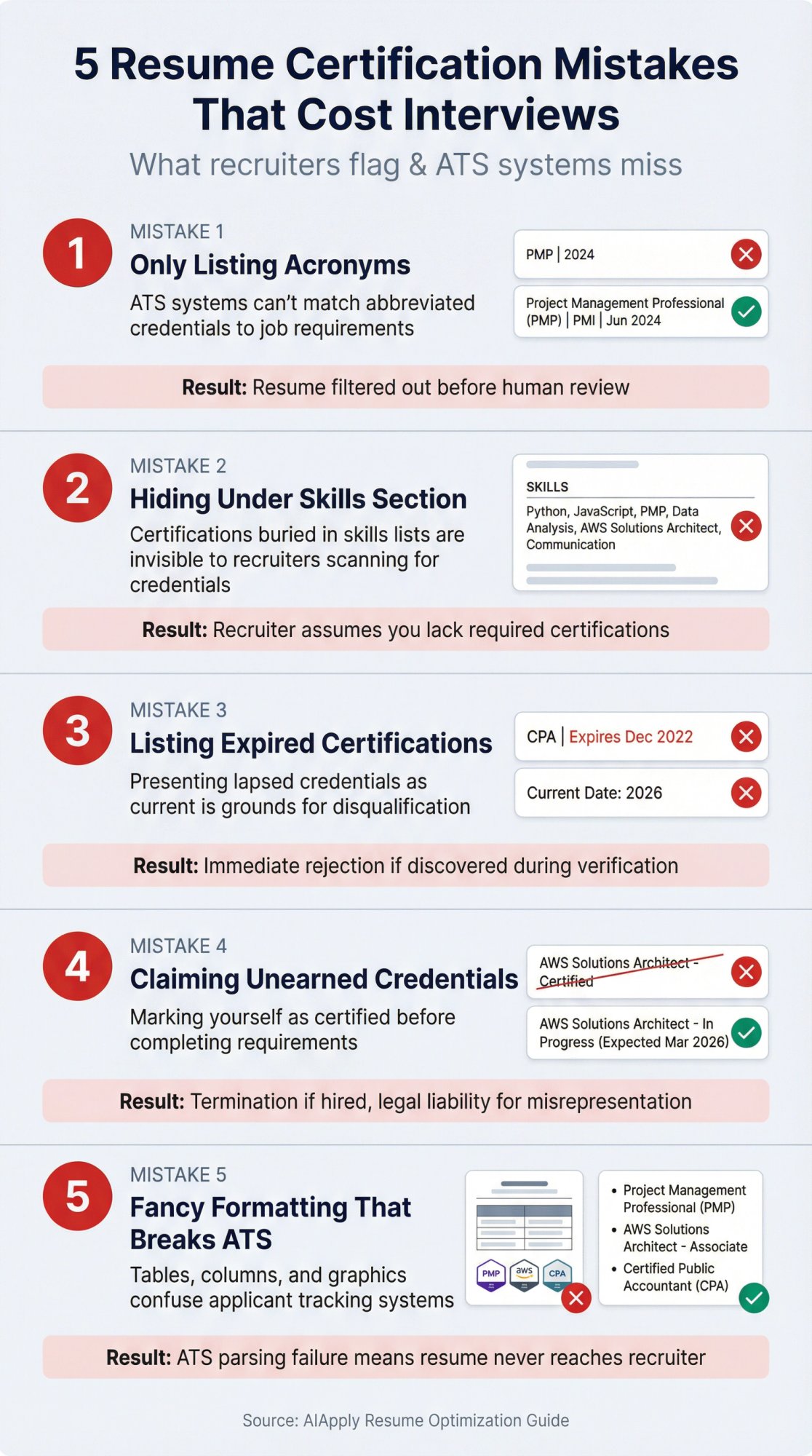
❌ Mistake 1: Only Listing Acronyms
Bad:
• PMP | 2024
Better:
• Project Management Professional (PMP) | Project Management Institute | Jun 2024
Acronyms may not show up on ATS and should be written out at least once.
❌ Mistake 2: Hiding Certifications Under "Skills"
Skills sections are great, but certifications deserve a dedicated section when you have more than one or two.
Why? This approach is recommended because it's easier for both humans and ATS to locate.
❌ Mistake 3: Listing Expired Certifications As If They're Active
Best practice is listing valid certifications and adding expiration dates when applicable; only list certifications that haven't expired.
If your certification expired:
• Renew it (ideal), or
• Leave it off, or
• Clearly label it as expired/inactive if you must reference it (be prepared to explain)
❌ Mistake 4: Claiming a Credential You Don't Have Yet
"In progress" is fine. "Certified" when you haven't earned it is not.
Always represent status accurately. Misrepresentation is grounds for immediate disqualification (or termination if discovered after hire).
❌ Mistake 5: Using Fancy Layouts That Break Parsing
Avoid: tables, columns, graphics, and symbol-heavy formatting in key qualification sections. These can confuse ATS.
Keep certifications as plain text bullets. ATS systems are built to read text, not interpret design.
Resume vs CV (UK): Where Certifications Typically Go
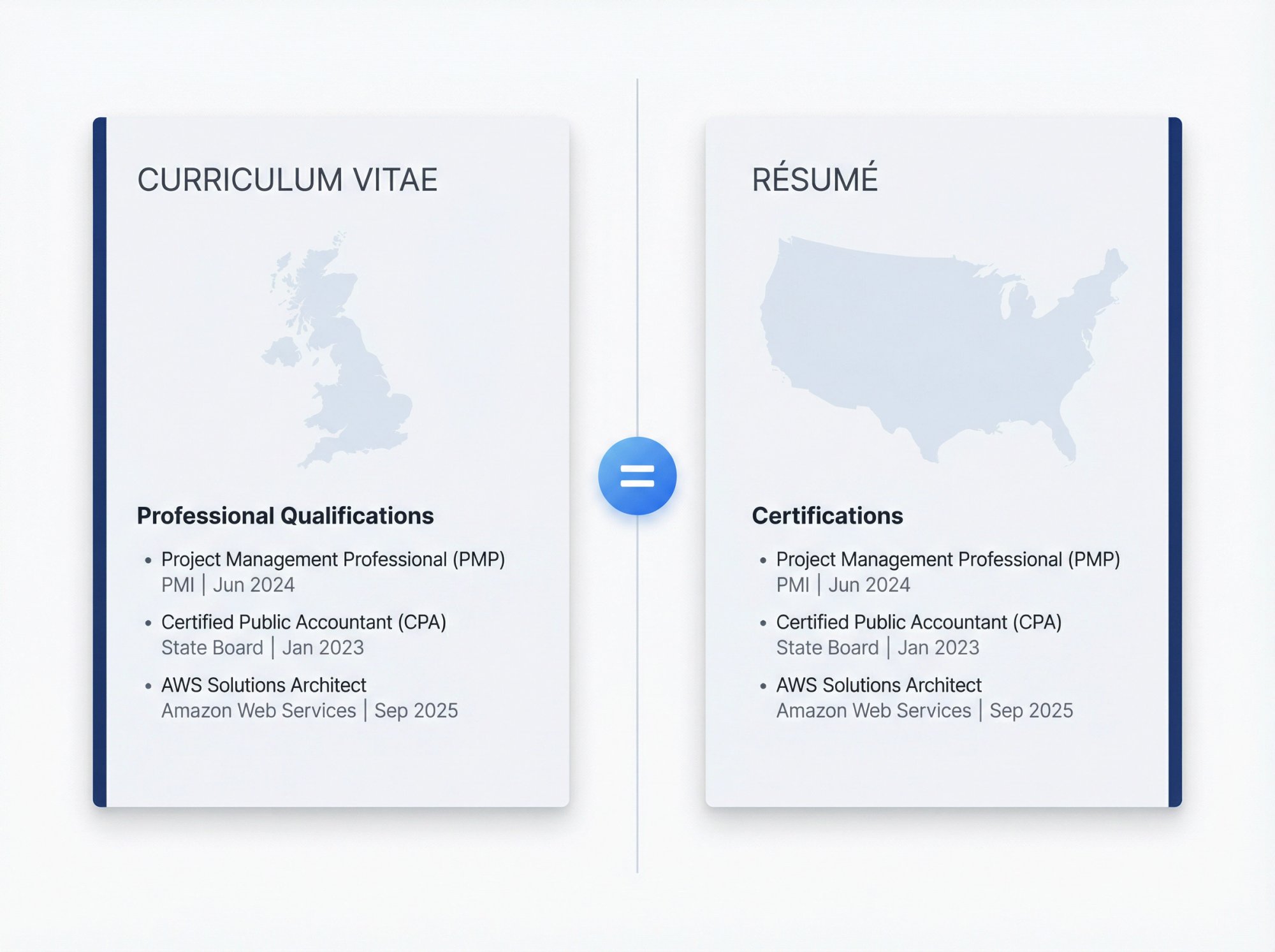
In the UK, many candidates use "CV" rather than "resume," and you'll often see Qualifications or Professional Qualifications as a section heading.
UK CV guidance commonly emphasizes clear section structure (contact details, profile, work history, education/qualifications).
Practical translation:
• If it's a regulated license or core qualification: list it prominently (often near the top)
• If it's a professional certification: include a dedicated Certifications / Professional Qualifications section
• If it's a short course certificate: consider Training / Professional Development
The principles are the same whether you call it a resume or CV: make credentials easy to find, spell them out, and keep formatting simple.
Speed This Up With AIApply (Optional But Powerful)
If you're tailoring your resume per job (which you absolutely should), certifications are one of the easiest places to gain ATS alignment because job ads often list exact credential keywords.
Here's a simple workflow:
① Use AIApply's AI Resume Builder to create a clean, ATS-optimized structure
The builder uses professionally designed ATS-friendly resume templates that keep your sections consistent and readable by both humans and ATS systems. You won't have to worry about whether your formatting is breaking ATS parsing.
② Tailor your certifications and keywords to the job description
Include both full names and acronyms so you cover all possible keyword matches.
③ Run your resume through an ATS-focused review
AIApply's ATS optimization is built around keyword matching, clean formatting, and simple structure. The Resume Scanner can help you identify gaps before you apply.
If you're applying to dozens of jobs with slightly different requirements (common for tech certifications), AIApply's Auto Apply can help you customize resumes at scale without copy/pasting manually.
Frequently Asked Questions
Should I include certifications in the skills section too?
You can mention them in skills, but don't rely on that alone. A dedicated "Certifications" section is easier for both humans and ATS to locate, especially when you have multiple credentials.
How many certifications should I list?
As many as are relevant and help you win this role, typically 3 to 8 for most jobs. If you have dozens, prioritize (required + role-defining first). Your resume isn't your credential archive.
Do I need to include the expiration date?
If the certification expires or has a "renew by" date, include it so employers can see it's current. Adding expiration/renewal dates where applicable is explicitly recommended.
What if my certification is in progress?
List it as "In progress" and include an expected completion date (especially if the job cares about it). This is recommended for important credentials you're working toward.
Can I put certification letters after my name?
Only when:
• It's widely recognized in your field,
• It's relevant to the role,
• You're allowed to use it and you're in good standing
PMI's trademark guidelines are a good example: they describe how PMI credentials may appear after a holder's name and instruct lapsed holders to stop using the credential.
What if my certification expired?
Renew it if possible. If you can't renew it right away, either leave it off your resume or clearly label it as expired (and be prepared to explain in the interview). Only listing valid certifications that haven't expired is the recommended approach.
Should I include online course certificates (Coursera, Udemy, LinkedIn Learning)?
It depends. If the course is well-known and relevant to the job, yes. If it's a generic 2-hour workshop completion certificate, probably not. Consider a separate "Professional Development" section for these, or integrate them into your LinkedIn profile instead.
How do I handle certifications from previous careers?
Only include them if they're relevant to the target role. If you're switching from healthcare to tech, your CPR certification probably doesn't help. But if you're going from software engineering to healthcare IT, technical certifications still matter. Prioritize what helps you win this job.
Before You Submit: Final Quality Checklist
Use this before sending your resume to make sure certifications are working for you, not against you.
Formatting & Structure:
I used a clear heading: Certifications / Certifications & Licenses
Every item includes full name + acronym at least once
Each entry has issuer and date earned
I included expiration date where applicable
Content Accuracy:
I added location only for region-specific credentials
I labeled anything not yet earned as In progress with expected date
I removed any expired certifications or labeled them clearly
ATS Optimization:
Formatting is plain text (no tables/columns/icons)
Certifications match the job ad's wording (keywords)
Section is easy to find and scan in under 5 seconds
Proof of Application:
- I proved at least 1 key certification in Work Experience with a results bullet
Wrap-Up: Make Your Certifications Count
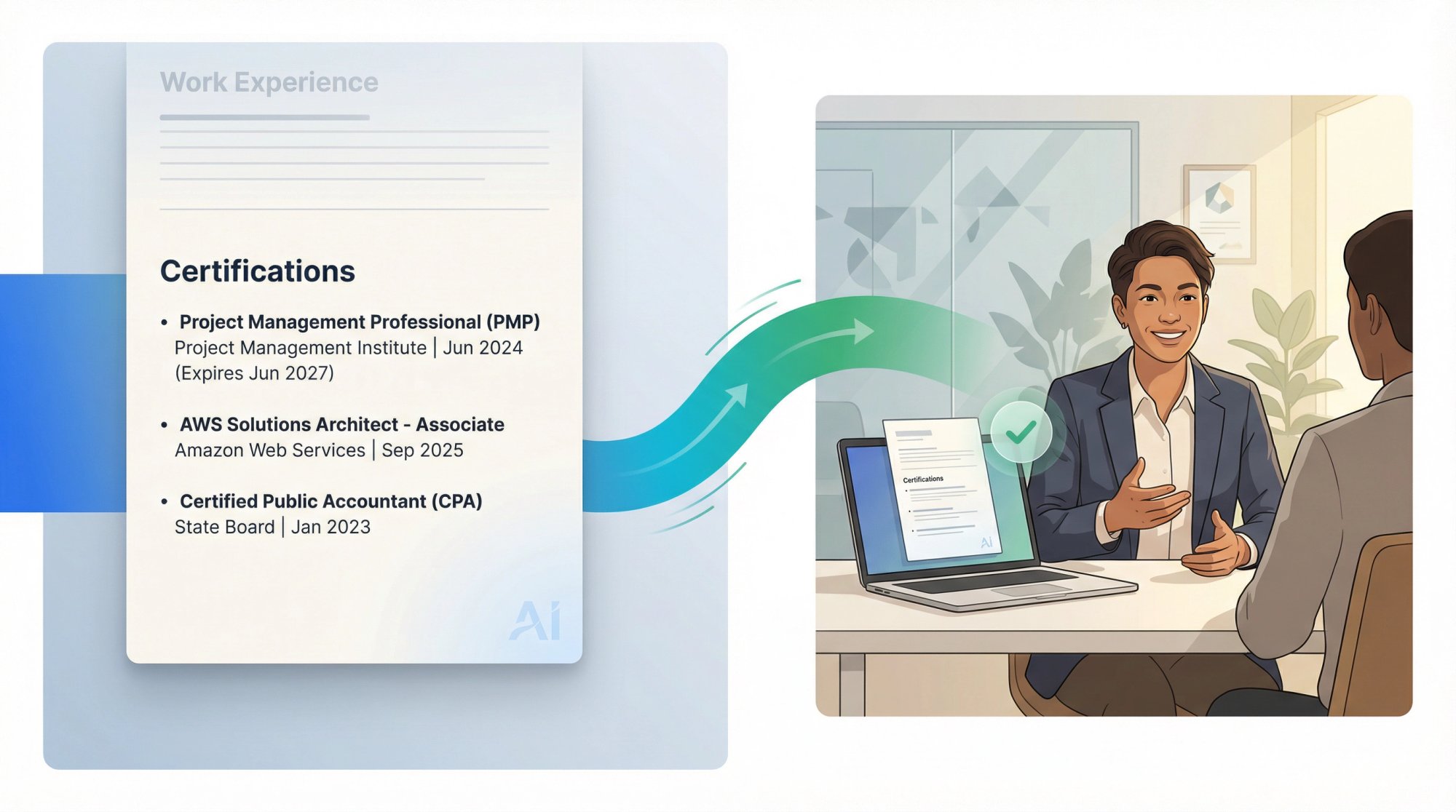
Certifications are expensive (in time and money). Don't let poor formatting waste that investment.
The difference between getting filtered out and getting interviews often comes down to details: spelling out acronyms, adding expiration dates, using standard section headings, and matching the job ad's exact wording.
If you want to take the guesswork out of formatting and ATS optimization, AIApply handles the technical details so you can focus on the content. Whether you build your resume manually or use AIApply's AI Resume Builder, the principles in this guide will help you present your credentials in the clearest, most effective way possible.
Now go make those certifications work for you.
Certifications can be a "yes or no" gate for interviews. But here's the problem: most people list them in ways that humans miss and ATS systems can't read properly.
You might have spent months earning that credential, only to watch your resume get filtered out because you wrote "PMP" instead of "Project Management Professional (PMP)." Or buried your nursing license in a skills section where recruiters never look.
This guide shows you exactly where certifications go, how to format them so ATS systems parse them correctly, and what details matter (dates, issuer, expiry, credential ID). You'll get copy/paste templates you can use right now, plus real examples for the scenarios people actually face.
If you're building or updating your resume, AIApply's AI Resume Builder can help you structure everything consistently and optimize for ATS systems. But whether you use a tool or not, the formatting decisions in this guide will make the difference between getting filtered out and getting interviews.
Resume Certification Templates You Can Copy and Paste
If you just need the right format, here are the three most common approaches.
Template A: One-Line Format (Fastest + ATS-Safe)
Certifications
Format: Certification Name (Acronym) | Issuing Organization | Month Year (Expires Month Year)
Example:
• Project Management Professional (PMP) | Project Management Institute | Jun 2024 (Expires Jun 2027)
• Certified Public Accountant (CPA) | State Board | Jan 2023
This format follows industry best practices: name, issuing body, date, expiration (if applicable), and location (if needed). It's clean, easy to scan, and ATS-friendly.
Template B: Two-Line Format (Most Readable)
Certifications
Certification Name (Acronym)
Issuing Organization | Issued Month Year | Expires Month Year
Example:
AWS Solutions Architect - Associate
Amazon Web Services | Issued Sep 2025 | Expires Sep 2028
Use this when you want certifications to stand out visually. The bold name grabs attention, and the second line provides context without cluttering.
Template C: In-Progress Certification
Certifications
• Certification Name (Acronym) | Issuing Organization | In progress (Expected Month Year)
Listing important credentials you're working on is a standard practice, especially if the job cares about them. Adding an expected completion date shows commitment and keeps you competitive.
Why Resume Certification Formatting Matters for ATS
Certifications signal competence because they're typically earned through defined standards (training, experience requirements, or exams). But the way you format them directly affects whether they get seen.
Here's why it matters:
1. Certifications correlate with measurable career outcomes
U.S. Bureau of Labor Statistics data from 2024 shows a meaningful gap between full-time workers with certifications or licenses and those without:
Source: Bureau of Labor Statistics CPS 2024 annual averages and unemployment data
Those numbers don't prove the credential caused better outcomes (occupation and experience matter too), but they show why employers treat certifications as a filter.
2. ATS systems parse resumes into structured data
Most companies use Applicant Tracking Systems that convert your resume into searchable fields. Greenhouse's ATS documentation explains that these systems extract skills, job titles, dates, and certifications to match candidates to requirements.
If you format certifications poorly (acronyms only, buried in a paragraph, fancy tables), the ATS might miss them entirely. And if the system misses them, the recruiter never sees them.
3. Recruiters scan resumes in seconds
Even when your resume reaches a human, recruiters spend about 7 seconds on the first pass. If your certifications aren't clearly labeled and easy to find, they're invisible.
Critical insight: Formatting isn't just about looking nice. It's about making sure the credential you worked hard to earn actually helps you get hired.
And if you want to take the guesswork out of ATS optimization, AIApply's AI Resume Scanner automatically formats everything to ATS standards while keeping it readable for humans.
Certification vs Certificate vs License: What Should You List?
This sounds pedantic until it costs you in a screening call.
Why This Matters on Your Resume
If you label everything as a "certification," you might look careless or misleading. A completion certificate for a 2-hour webinar doesn't belong in the same section as your state nursing license.
Consider using separate sections:
① Certifications & Licenses (for regulated credentials and professional certifications)
② Professional Development or Training (for completion certificates and workshops)
This keeps your resume honest and helps recruiters quickly identify credentials that matter for the role.
Where To List Certifications On Your Resume
Think of placement like "how quickly does a recruiter need to see this?"
The Placement Rule
Resume best practices suggest that if certifications are required, list them in multiple places (next to your name, in your summary, and in a dedicated section) so they don't get missed.
Strategic placement across your resume is recommended: a dedicated section, alongside your name when widely recognized, and in your summary or cover letter.
Best Places to List Certifications (Ranked)
1) A Standalone "Certifications" or "Certifications & Licenses" Section
This is the default for most roles and is recommended when you have more than one or two certifications.
Why it works: Clear label, easy to scan, ATS-friendly.
2) In the Header (After Your Name) | Only for Must-Have Credentials
Use this when:
→ The job explicitly requires the credential, OR
→ It's a common, respected post-nominal in your profession (regulated license or credential with strong industry recognition)
Adding accepted abbreviations beside your name is standard practice in fields where credentials are paramount.
Example:
Alex Taylor, PMPLondon, UK • alex@email.com • +44 7700 900000 • LinkedInImportant: Some credential bodies publish usage rules. PMI's trademark guidelines state that PMI credentials can appear immediately after the holder's name, but anyone whose certification has lapsed should discontinue use.
Even if you're not listing a PMI credential, the principle is universal: don't use post-nominals unless you're allowed to and in good standing.
3) In Your Professional Summary (1 Line)
Use this when the certification is required or core to your positioning. Referencing relevant certifications in your resume summary reinforces qualifications.
Example:
Cybersecurity analyst with 4+ years in SOC operations and incident response, CompTIA Security+ certified.
4) Inside Your Work Experience (To Prove You Used It)
This is the move most people skip, and it's the one that makes certifications feel real instead of decorative.
Instead of only listing the credential, add one bullet under a relevant role showing how you applied the certified skill:
• "Implemented AWS Well-Architected review process; reduced monthly cloud spend by 18% while improving availability."
This turns a credential from a badge into evidence of capability.
What To Include In Each Certification Entry
Standard guidance outlines a clean structure:
→ Certification name (written out in full)
→ Certifying body
→ Date of certification / expiration (if applicable)
→ Location (if applicable, like state-specific credentials)
→ Only list valid certifications that haven't expired; include expected completion date for in-progress
Here's how to translate that into a practical format.
The "Perfect" Certification Entry (ATS-Safe)
Certification Name (Acronym) | Issuing Organization | Issued Month Year (Expires Month Year)
Example:
• Project Management Professional (PMP) | Project Management Institute | Issued Jun 2024 (Expires Jun 2027)
When To Add Location
Add location when the credential is state or region-specific (common for regulated licenses). Location applies when certification is specific to a state or region.
Example:
• Professional Engineer (PE) | State of Texas | Issued May 2023 (Expires May 2025)
When To Add "In Progress"
If the credential is important to the target role, list it and add an expected completion date. This approach is recommended for in-progress credentials.
Example:
• AWS Certified Solutions Architect - Professional | Amazon Web Services | In progress (Expected Mar 2026)
What About Credential IDs?
If the application asks for it, include it. Otherwise, keep it optional. Many candidates prefer not to share IDs publicly unless required.
If you include it, format cleanly:
• Credential ID: ABC-123456
How To Make Certifications ATS-Friendly
1) Spell Out Acronyms At Least Once
Acronyms may not show up on ATS and should be written out fully at least once.
Including both long-form and acronym when a term has an abbreviation (example: "Enterprise Resource Planning (ERP)") is a best practice.
Do this for certifications too:
• "Certified Information Systems Security Professional (CISSP)"
not just "CISSP"
2) Use a Standard Section Heading
Use one of these:
• Certifications
• Certifications & Licenses
• Licenses & Certifications
Using standard headings and keeping formatting simple helps systems parse correctly.
3) Avoid Tables, Columns, Icons, and Graphics
Complex elements like tables and columns can confuse ATS parsing.
Keep certifications as plain text bullets. Save the fancy design for your portfolio.
4) Put the Credential Name Exactly As the Job Ad Uses It
ATS keyword matching is often literal. If the job ad says "PMP," include both:
• Project Management Professional (PMP)
This covers both human readers and system searches.
5) Prioritize Relevance Over Completeness
Your resume isn't your credential archive. If a certification doesn't help you win this job, it might be taking space away from something that does.
When you're tailoring resumes per job (which you should be doing), AIApply's AI Resume Rewriter makes it easy to adjust which certifications appear for each application without starting from scratch every time.
How To Order Your Certifications
Default Ordering: Reverse Chronological
Standard practice is listing certifications in reverse chronological order, starting with the most recently achieved or in progress.
But There's a Smarter Exception
If one credential is the requirement or primary differentiator, it goes first even if it's not the newest.
A practical ordering framework:
① Required certifications/licenses (the "must-haves" from the job ad)
② Role-defining certifications (credentials that prove you can do the job)
③ Supportive certifications (nice-to-have credentials that add depth)
④ Training / certificates of completion (often in a separate section)
This way, recruiters see the most important credentials first, and ATS systems pick up the keywords that matter.
Resume Certification Examples: Copy/Paste Templates
Scenario 1: One Required License + One Supporting Certification
Certifications & Licenses
• Registered Nurse (RN) | State of California | Issued Aug 2022 (Expires Aug 2026)
• Basic Life Support (BLS) | American Heart Association | Issued Feb 2025 (Expires Feb 2027)
This follows best practices on including location (state-specific) and expiration dates when applicable.
Scenario 2: Career Switcher Using Certifications To Compensate For Limited Experience
Professional Summary
Career switcher into data analytics with transferable stakeholder management experience and Google Data Analytics Professional Certificate (completed 2025).
Certifications
Certifications can be especially helpful when you lack relevant work experience (career switchers, recent graduates), and highlighting them strategically is recommended.
Scenario 3: Multiple Technical Certifications (Grouped By Category)
Certifications
Cloud Infrastructure
→ AWS Certified Solutions Architect (SAA-C03) | Amazon Web Services | Sep 2025
→ Microsoft Certified: Azure Administrator Associate | Microsoft | May 2024
Security & Compliance
→ CompTIA Security+ | CompTIA | Jan 2024 (Expires Jan 2027)
Grouping makes scanning easy for humans while staying ATS-safe because it remains plain text.
Scenario 4: In-Progress Certification (Done Right)
In Development:
Project Management Professional (PMP) | Project Management Institute | In progress (Expected Apr 2026)
This follows the recommendation to include in-progress certifications with expected completion dates.
Scenario 5: When To Put Credentials After Your Name (And When Not To)
Header example (only when relevant + permitted):
Alex Taylor, PMPLondon, UK • email • phone • LinkedInAdding widely recognized credential abbreviations next to your name is standard in fields where credentials are required.
But don't do this if your credential is expired or lapsed. PMI's guidelines explicitly instruct that anyone whose PMI certification has lapsed should stop using the credential.
Resume Certification Mistakes That Cost Interviews
❌ Mistake 1: Only Listing Acronyms
Bad:
• PMP | 2024
Better:
• Project Management Professional (PMP) | Project Management Institute | Jun 2024
Acronyms may not show up on ATS and should be written out at least once.
❌ Mistake 2: Hiding Certifications Under "Skills"
Skills sections are great, but certifications deserve a dedicated section when you have more than one or two.
Why? This approach is recommended because it's easier for both humans and ATS to locate.
❌ Mistake 3: Listing Expired Certifications As If They're Active
Best practice is listing valid certifications and adding expiration dates when applicable; only list certifications that haven't expired.
If your certification expired:
• Renew it (ideal), or
• Leave it off, or
• Clearly label it as expired/inactive if you must reference it (be prepared to explain)
❌ Mistake 4: Claiming a Credential You Don't Have Yet
"In progress" is fine. "Certified" when you haven't earned it is not.
Always represent status accurately. Misrepresentation is grounds for immediate disqualification (or termination if discovered after hire).
❌ Mistake 5: Using Fancy Layouts That Break Parsing
Avoid: tables, columns, graphics, and symbol-heavy formatting in key qualification sections. These can confuse ATS.
Keep certifications as plain text bullets. ATS systems are built to read text, not interpret design.
Resume vs CV (UK): Where Certifications Typically Go
In the UK, many candidates use "CV" rather than "resume," and you'll often see Qualifications or Professional Qualifications as a section heading.
UK CV guidance commonly emphasizes clear section structure (contact details, profile, work history, education/qualifications).
Practical translation:
• If it's a regulated license or core qualification: list it prominently (often near the top)
• If it's a professional certification: include a dedicated Certifications / Professional Qualifications section
• If it's a short course certificate: consider Training / Professional Development
The principles are the same whether you call it a resume or CV: make credentials easy to find, spell them out, and keep formatting simple.
Speed This Up With AIApply (Optional But Powerful)
If you're tailoring your resume per job (which you absolutely should), certifications are one of the easiest places to gain ATS alignment because job ads often list exact credential keywords.
Here's a simple workflow:
① Use AIApply's AI Resume Builder to create a clean, ATS-optimized structure
The builder uses professionally designed ATS-friendly resume templates that keep your sections consistent and readable by both humans and ATS systems. You won't have to worry about whether your formatting is breaking ATS parsing.
② Tailor your certifications and keywords to the job description
Include both full names and acronyms so you cover all possible keyword matches.
③ Run your resume through an ATS-focused review
AIApply's ATS optimization is built around keyword matching, clean formatting, and simple structure. The Resume Scanner can help you identify gaps before you apply.
If you're applying to dozens of jobs with slightly different requirements (common for tech certifications), AIApply's Auto Apply can help you customize resumes at scale without copy/pasting manually.
Frequently Asked Questions
Should I include certifications in the skills section too?
You can mention them in skills, but don't rely on that alone. A dedicated "Certifications" section is easier for both humans and ATS to locate, especially when you have multiple credentials.
How many certifications should I list?
As many as are relevant and help you win this role, typically 3 to 8 for most jobs. If you have dozens, prioritize (required + role-defining first). Your resume isn't your credential archive.
Do I need to include the expiration date?
If the certification expires or has a "renew by" date, include it so employers can see it's current. Adding expiration/renewal dates where applicable is explicitly recommended.
What if my certification is in progress?
List it as "In progress" and include an expected completion date (especially if the job cares about it). This is recommended for important credentials you're working toward.
Can I put certification letters after my name?
Only when:
• It's widely recognized in your field,
• It's relevant to the role,
• You're allowed to use it and you're in good standing
PMI's trademark guidelines are a good example: they describe how PMI credentials may appear after a holder's name and instruct lapsed holders to stop using the credential.
What if my certification expired?
Renew it if possible. If you can't renew it right away, either leave it off your resume or clearly label it as expired (and be prepared to explain in the interview). Only listing valid certifications that haven't expired is the recommended approach.
Should I include online course certificates (Coursera, Udemy, LinkedIn Learning)?
It depends. If the course is well-known and relevant to the job, yes. If it's a generic 2-hour workshop completion certificate, probably not. Consider a separate "Professional Development" section for these, or integrate them into your LinkedIn profile instead.
How do I handle certifications from previous careers?
Only include them if they're relevant to the target role. If you're switching from healthcare to tech, your CPR certification probably doesn't help. But if you're going from software engineering to healthcare IT, technical certifications still matter. Prioritize what helps you win this job.
Before You Submit: Final Quality Checklist
Use this before sending your resume to make sure certifications are working for you, not against you.
Formatting & Structure:
I used a clear heading: Certifications / Certifications & Licenses
Every item includes full name + acronym at least once
Each entry has issuer and date earned
I included expiration date where applicable
Content Accuracy:
I added location only for region-specific credentials
I labeled anything not yet earned as In progress with expected date
I removed any expired certifications or labeled them clearly
ATS Optimization:
Formatting is plain text (no tables/columns/icons)
Certifications match the job ad's wording (keywords)
Section is easy to find and scan in under 5 seconds
Proof of Application:
- I proved at least 1 key certification in Work Experience with a results bullet
Wrap-Up: Make Your Certifications Count
Certifications are expensive (in time and money). Don't let poor formatting waste that investment.
The difference between getting filtered out and getting interviews often comes down to details: spelling out acronyms, adding expiration dates, using standard section headings, and matching the job ad's exact wording.
If you want to take the guesswork out of formatting and ATS optimization, AIApply handles the technical details so you can focus on the content. Whether you build your resume manually or use AIApply's AI Resume Builder, the principles in this guide will help you present your credentials in the clearest, most effective way possible.
Now go make those certifications work for you.
.webp)
%20(1).webp)
.webp)
Don't miss out on
your next opportunity.
Create and send applications in seconds, not hours.


