
How to Use AI for Job Search in 2026

.webp)
If you're searching "how to use AI for job search," you're not really looking for a list of tools. You're trying to achieve outcomes: more interviews (without sending 200 generic applications), faster applications (without losing quality), less guesswork ("Am I a fit? Why am I getting ghosted?"), higher confidence in interviews (and better answers under pressure), and a repeatable system you can run until you land the offer.
In 2026, AI can absolutely help, but only if you use it like a strategist, not like a spam cannon.
Why? Because recruiters and companies are using AI too. LinkedIn reported that 93% of recruiters plan to increase their use of AI in 2026, and two-thirds (66%) plan to increase AI for pre-screening interviews. On the candidate side, LinkedIn reported 81% of people have used or plan to use AI in their job search. Meanwhile, ATS software is still everywhere. Jobscan's 2025 ATS Usage Report found 97.8% of Fortune 500 companies had a detectable ATS in 2025 (with 2024 at 98.4%).
So the win isn't "use AI." The win is: use AI to send stronger signals than everyone else, faster, without breaking trust.
This guide shows you exactly how.
Table of contents
→ How AI Changed Job Search in 2026 (And What Still Matters)
→ How to Build Your AI Job Search System
→ How to Use AI at Every Stage of Job Search
→ AI Job Search Prompts You Can Copy and Use Today
→ How to Avoid AI Detection and Common Application Mistakes
→ AI Job Search Privacy and Legal Compliance in 2026
→ AIApply Complete Job Search Workflow (Start to Finish)
→ Common Questions About AI Job Search (Answered)
→ Data currency note (important)
How AI Changed Job Search in 2026 (And What Still Matters)
What AI Changed in Job Search (2026)
1) Keyword guessing is dying; "semantic matching" is growing
Recruiters are increasingly using AI to find candidates based on skills they might not have surfaced before. LinkedIn reported 59% of recruiters say AI is already helping them discover candidates with skills they wouldn't have found otherwise.
2) The application bar went up
When everyone can generate a "perfect" resume in 30 seconds with AI resume builders, a perfect-looking resume isn't a differentiator anymore. Evidence is.
3) Screening is getting earlier and more automated
SHRM's 2025 Talent Trends report on AI in HR says just over half of organizations (51%) use AI to support recruiting, with 44% using it for screening resumes.
4) "Trust" is now a competitive advantage
According to SHRM, an estimated 40% to 80% of job applicants use AI for resumes, cover letters, and interview prep, which contributes to recruiter skepticism and sameness. At the same time, a U.S. Chamber of Commerce piece summarizing a TopResume survey reported nearly 20% of recruiters would reject a candidate who used an AI-generated resume or cover letter (and many are OK with AI for proofreading rather than wholesale writing).
You can't control how every recruiter feels, but you can control whether your application reads like mass-produced fluff.
What Still Matters in Job Search (AI Can't Replace This)
Hiring still rewards:
• Clear role fit
• Proof of impact
• Strong communication
• Social proof (referrals, warm intros, credible online presence)
• Consistent follow-through
AI should amplify those, not replace them.
How to Build Your AI Job Search System
Most job seekers fail because they treat job search like a set of random tasks. Instead, run it like an operating system with clear inputs and outputs.
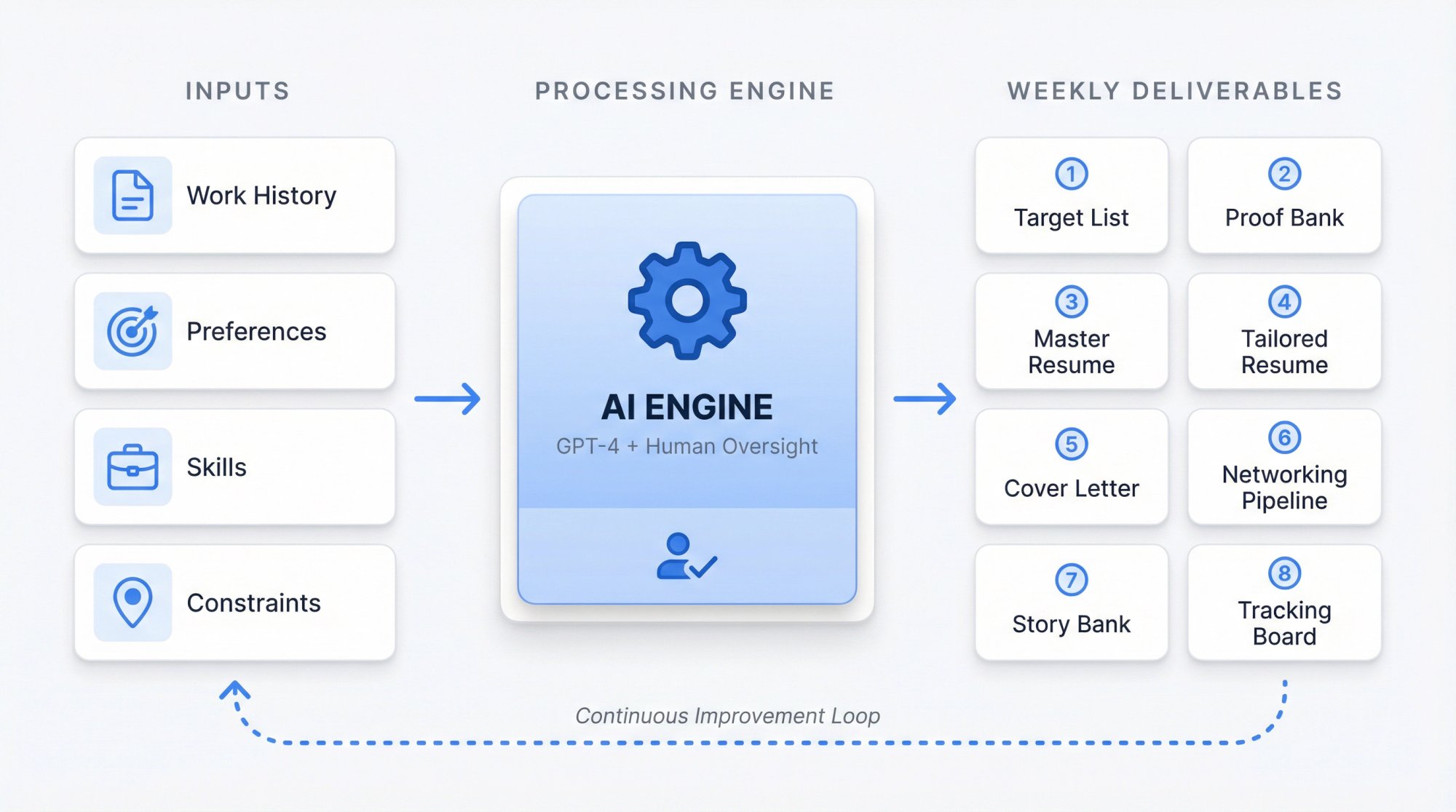
Critical mindset shift: Your AI-assisted job search should produce consistent deliverables every week, not random bursts of activity.
Your AI Job Search OS (simple and brutally effective)
Each week, your AI-assisted job search should produce:
① A target list (roles, companies, constraints)
② A proof bank (accomplishments, metrics, mini case studies, portfolio links)
③ A master resume (your full inventory, not tailored yet)
④ A tailored resume for each high-priority role
⑤ A tailored cover letter only when it helps (yes, sometimes it does)
⑥ A networking pipeline (5 to 15 targeted touches per week)
⑦ An interview story bank (STAR stories mapped to the role)
⑧ A tracking board (what you sent, what worked, what didn't)
AI is the engine for speed and clarity. You are the source of truth (and the one who closes the loop).
How to Use AI at Every Stage of Job Search
Step 1: Define Your Target Job Search (Be Specific)
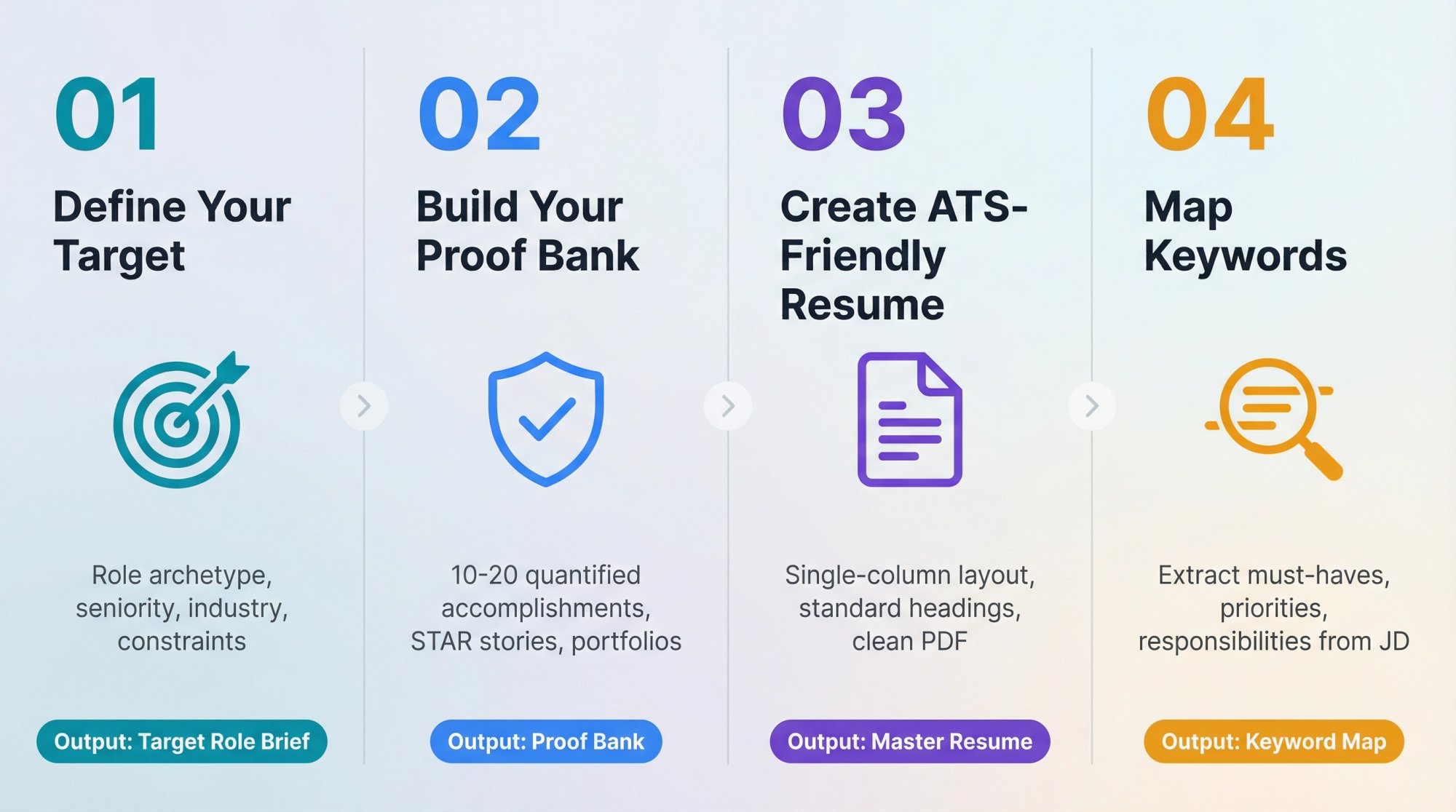
If you apply to "marketing roles," AI will generate generic outputs. Instead, define your target precisely.
You need:
→ Role archetype: "Lifecycle email marketer for B2C subscription apps"
→ Seniority: "mid-level"
→ Industry: "fintech / consumer apps"
→ Constraints: remote, UK time zone, salary floor, etc.
AI use: turn your messy preferences into a clear target role spec.
Output you want: a 1-page "Target Role Brief" you can reuse.
Step 2: Build Your Proof Bank (Your Secret Weapon)
AI can generate words. It can't generate credible proof.
Your proof bank should include:
→ 10 to 20 quantified accomplishments (before/after metrics)
→ 5 to 10 "pain, action, result" mini case studies
→ 6 to 12 STAR stories (Situation, Task, Action, Result)
→ Your strongest projects, portfolios, presentations, GitHub, writing, etc.
AI use: pull achievements out of your history, tighten bullets, and convert vague work into measurable impact.
Rule: If the metric isn't real, don't use it. Replace it with a truthful proxy ("reduced manual effort by automating X; saved approximately 2 hours per week for team") or remove it.
Step 3: Create an ATS-Friendly Master Resume
ATS isn't your enemy. It's just a database, parser, and workflow. Jobscan's analysis shows ATS usage remains dominant in large companies. That means formatting still matters.
ATS-safe formatting rules (still true in 2026):
AI use: rewrite bullets for clarity and impact while keeping structure stable.
Use AIApply's AI Resume Scanner to check your resume against ATS requirements and get a detailed compatibility score before submitting.

The Resume Scanner analyzes your resume against ATS parsing rules, identifies keyword gaps, and provides specific recommendations to improve your compatibility score before you hit submit.
Step 4: Turn Job Descriptions into Keyword Maps
Your goal isn't "stuff keywords." Your goal is match the employer's priorities in their language.
For each job, extract:
① Must-have hard skills/tools
② Must-have domain knowledge
③ Nice-to-have skills
④ Responsibilities that repeat (signals priority)
⑤ "Soft skills" that are actually behaviors (stakeholder management, ambiguity, etc.)
AI use: summarize, cluster, and rank these requirements.
Output you want: a short map you can paste into your resume tailoring workflow.
Step 5: Tailor Your Resume Without Sounding Generic
This is where most AI-generated resumes fail: they read "correct," but empty. The fix is simple.
For each job, tailor only 3 zones:
• Zone 1: Headline / summary (2 to 3 lines)
• Zone 2: Skills section (re-ordered to match job priorities)
• Zone 3: Top 3 to 5 bullets across your most relevant roles/projects
Leave the rest stable. This preserves truth and avoids "resume drift." SHRM notes recruiters are dealing with floods of applications and sameness as candidates use AI to tailor to job descriptions. Your resume has to feel specific, not mass-produced.
AIApply's Resume Builder streamlines this process by automatically analyzing job descriptions and suggesting targeted modifications to your resume while maintaining your authentic voice and achievements.
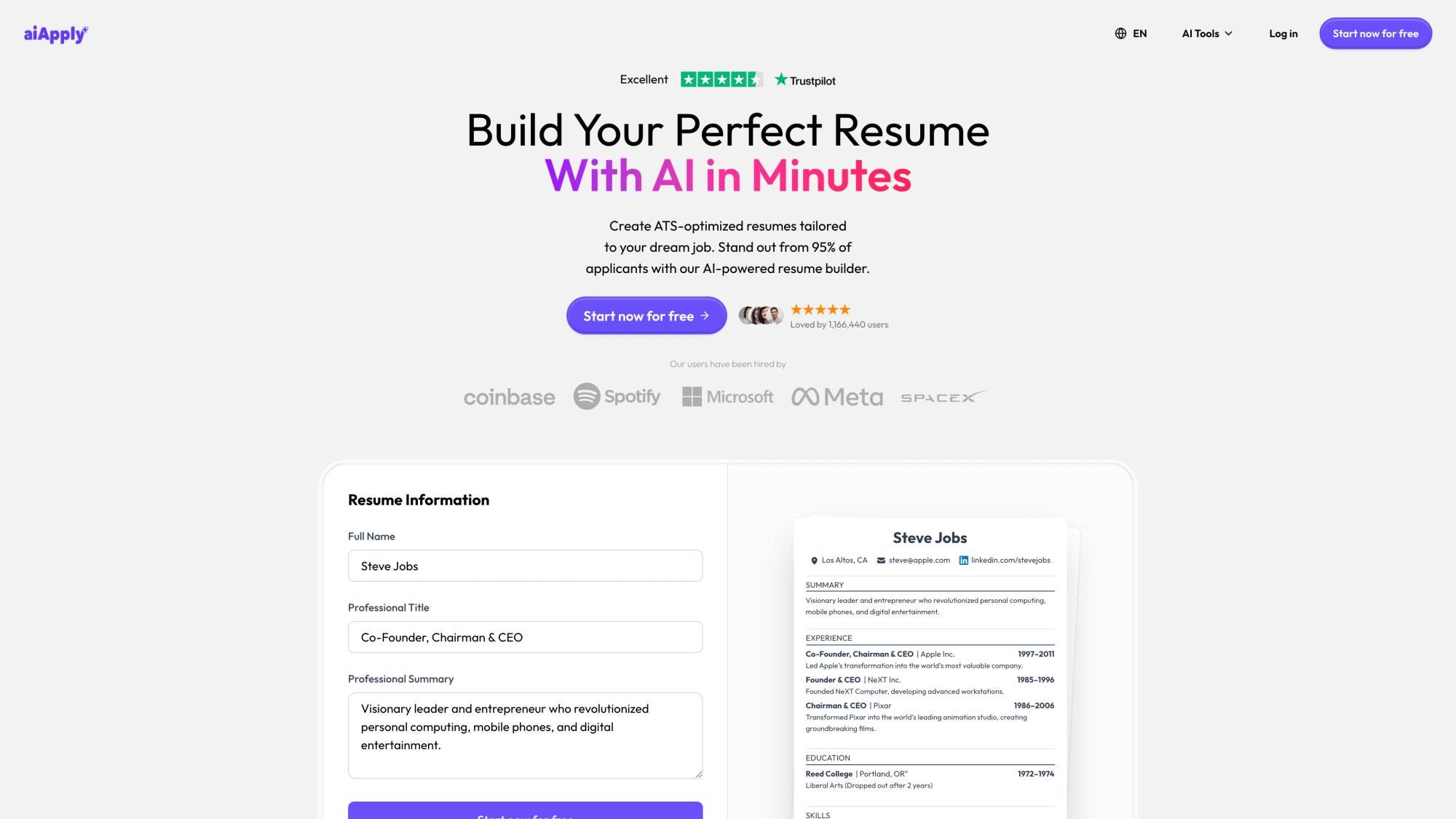
The Resume Builder provides professionally designed templates, real-time preview as you edit, and one-click tailoring that mirrors the role's priorities while keeping your resume ATS-compliant. Every section remains fully editable so you can add the specific details that only you would know.
Step 6: Write Cover Letters That Actually Help
Cover letters help most when you're changing industries or functions, you have a non-obvious story (gap, relocation, unusual path), the role is writing-heavy or stakeholder-heavy, or the company explicitly values them.
If you do write one, the structure that wins is:
1) Why this role (1 to 2 lines, specific)
2) Why you (2 to 3 proof points mapped to their priorities)
3) Why this company (something real: product, strategy, mission, constraints)
4) Close (clear call to action)
AI use: draft, then you personalize, then AI tightens.
AIApply's AI Cover Letter Generator creates role-specific drafts that you can customize with company-specific details, ensuring your cover letter sounds authentic while maintaining professional quality.
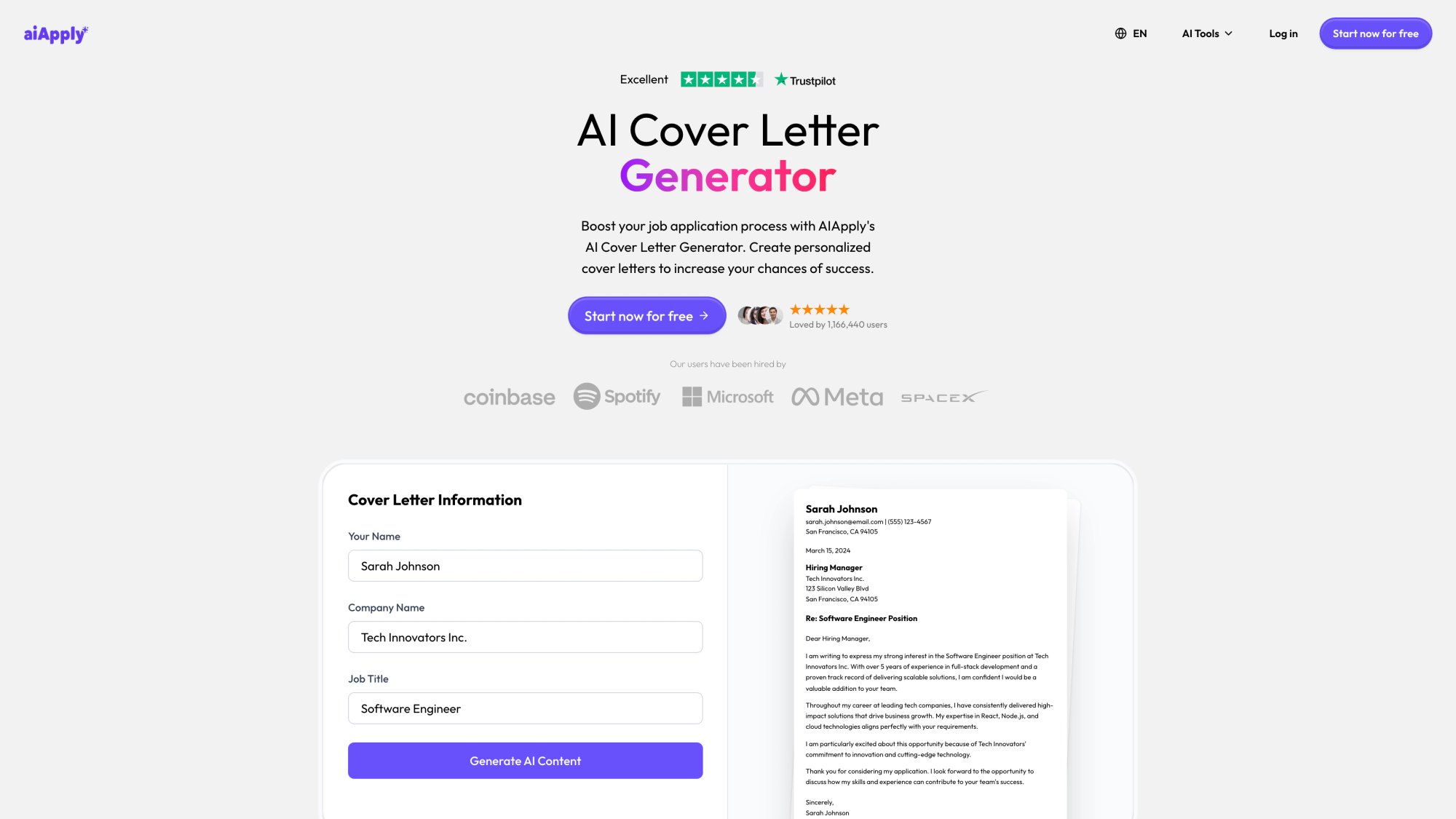
The Cover Letter Generator analyzes the job description and creates a targeted draft with proof points mapped to the employer's priorities. You then personalize the company-specific paragraph with real product or strategy details so the final letter feels genuinely researched, not templated.
Step 7: Use Automation Strategically (Quality + Volume)
The brutal truth: sometimes you need volume. But volume without strategy becomes noise.
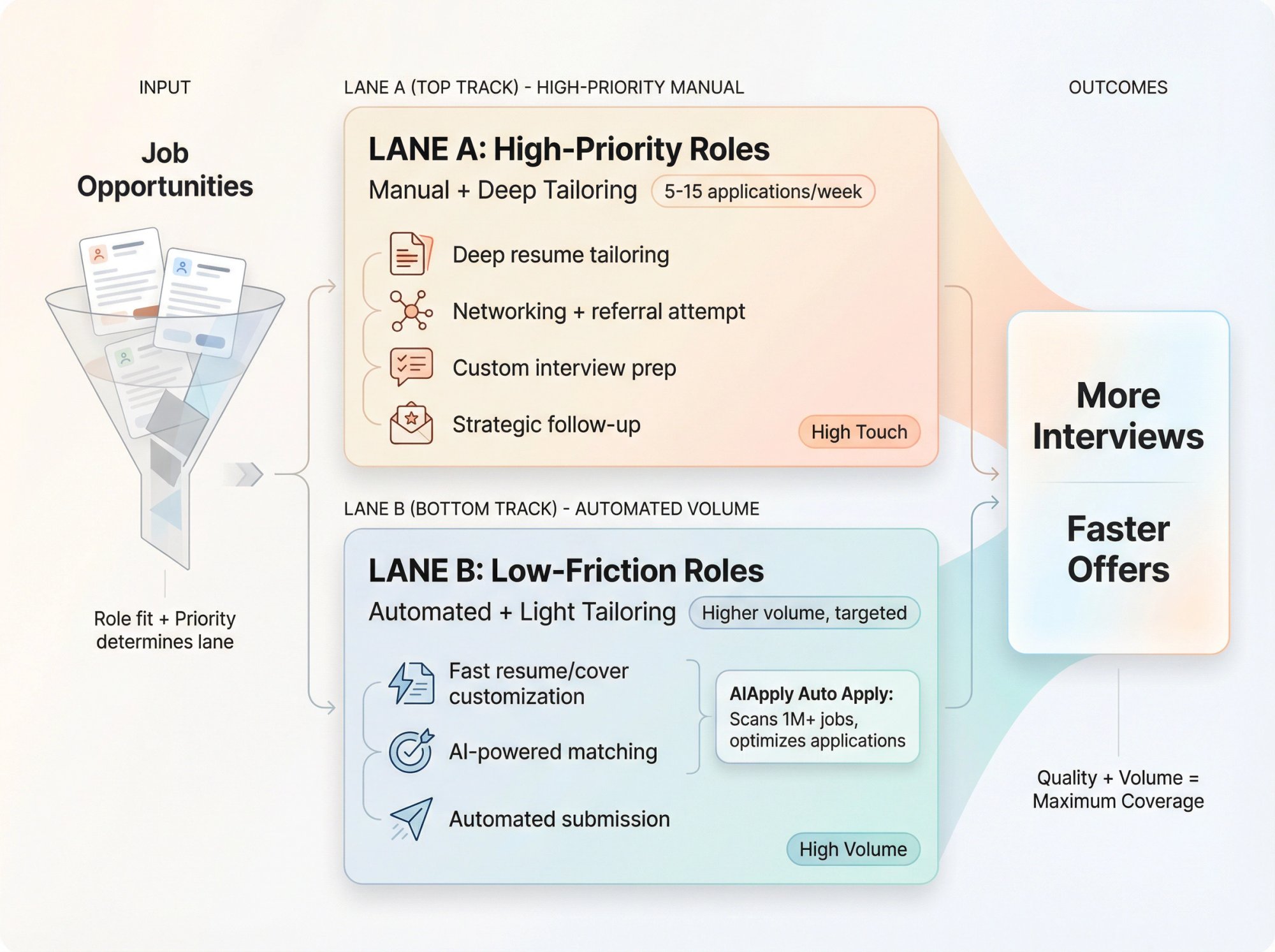
A smart approach is to run a two-lane pipeline:
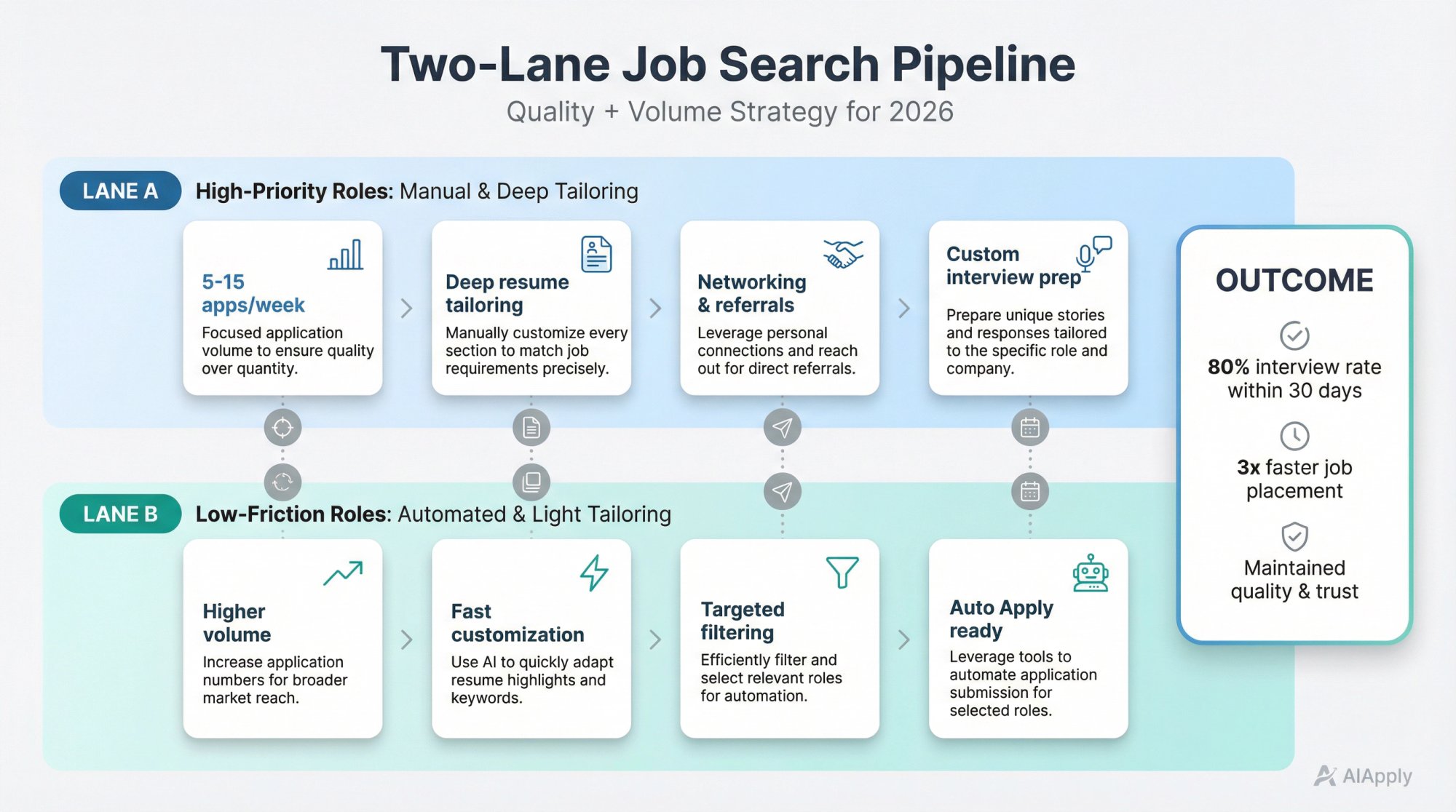
Lane A: High-priority roles (manual and deep tailoring)
5 to 15 applications per week
Deep resume tailoring
Networking and referral attempt
Custom interview prep
Lane B: Low-friction roles (automated and light tailoring)
Higher volume, but still targeted
Fast resume/cover letter customization
No overthinking
AIApply's Auto Apply is designed around this idea: it handles the repetitive parts (finding matches and submitting applications) so you can focus on interviews. AIApply Auto Apply scans job postings at scale and optimizes resumes and cover letters to match job descriptions. The platform scans over 1 million job postings and can submit applications to major job boards and company career sites.
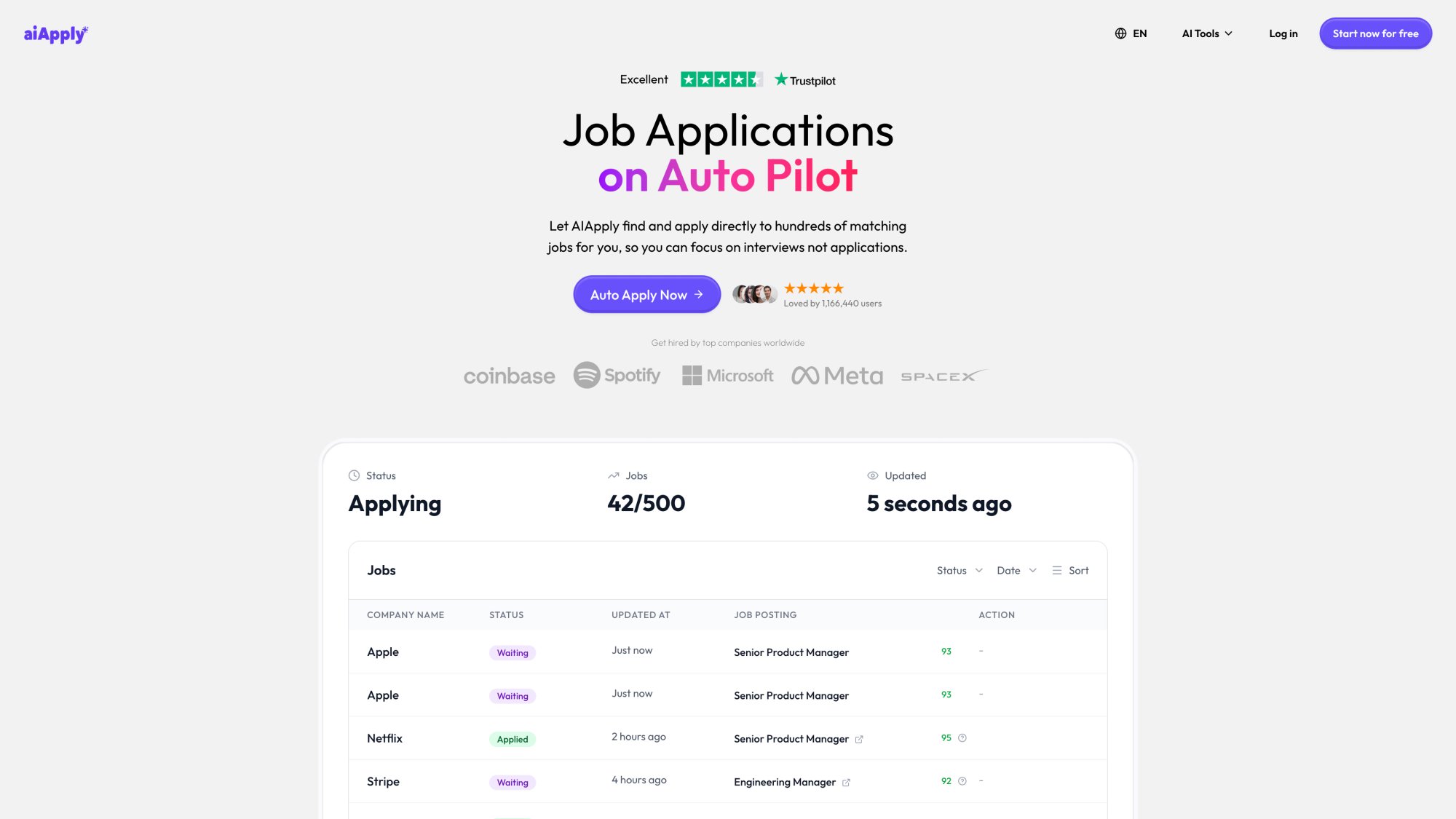
Auto Apply lets you set your preferences (job titles, industries, locations) and the system finds matching opportunities, customizes your application materials, and tracks status in a unified dashboard. You control the pace with credit packs, and credits never expire, so you can run high-volume campaigns when needed without losing Lane A precision.
Step 8: Use AI for Networking Without Sounding Like AI
Networking isn't "asking for a job." It's reducing uncertainty for the hiring team.
AI can help you identify who to talk to (team members, hiring manager, adjacent roles), draft outreach messages that are short, specific, and respectful, generate smart questions that signal you understand the work, and follow up without being annoying.
But you must add the human layer:
A real reason you chose them
A real question
A real appreciation of their time
Step 9: Use AI for Interview Prep (Best Practices)
Interview success is mostly pattern recognition (understanding what questions really mean), storytelling (clear, structured answers), proof (results, reasoning, decisions), and calm delivery (managing pressure effectively).
LinkedIn reported that 48% of people say AI tools boost their interview confidence.
You can use AI to generate a role-specific question bank, turn your proof bank into STAR answers, practice with a mock interviewer, and improve clarity, concision, and structure.
AIApply's Interview Buddy provides real-time on-screen coaching during live video interviews, offering instant, personalized answers to challenging questions while remaining discreet to the interviewer. For practice sessions, AIApply's Mock Interview tool simulates realistic interview scenarios and provides detailed feedback on your responses, helping you refine your answers before the actual interview.
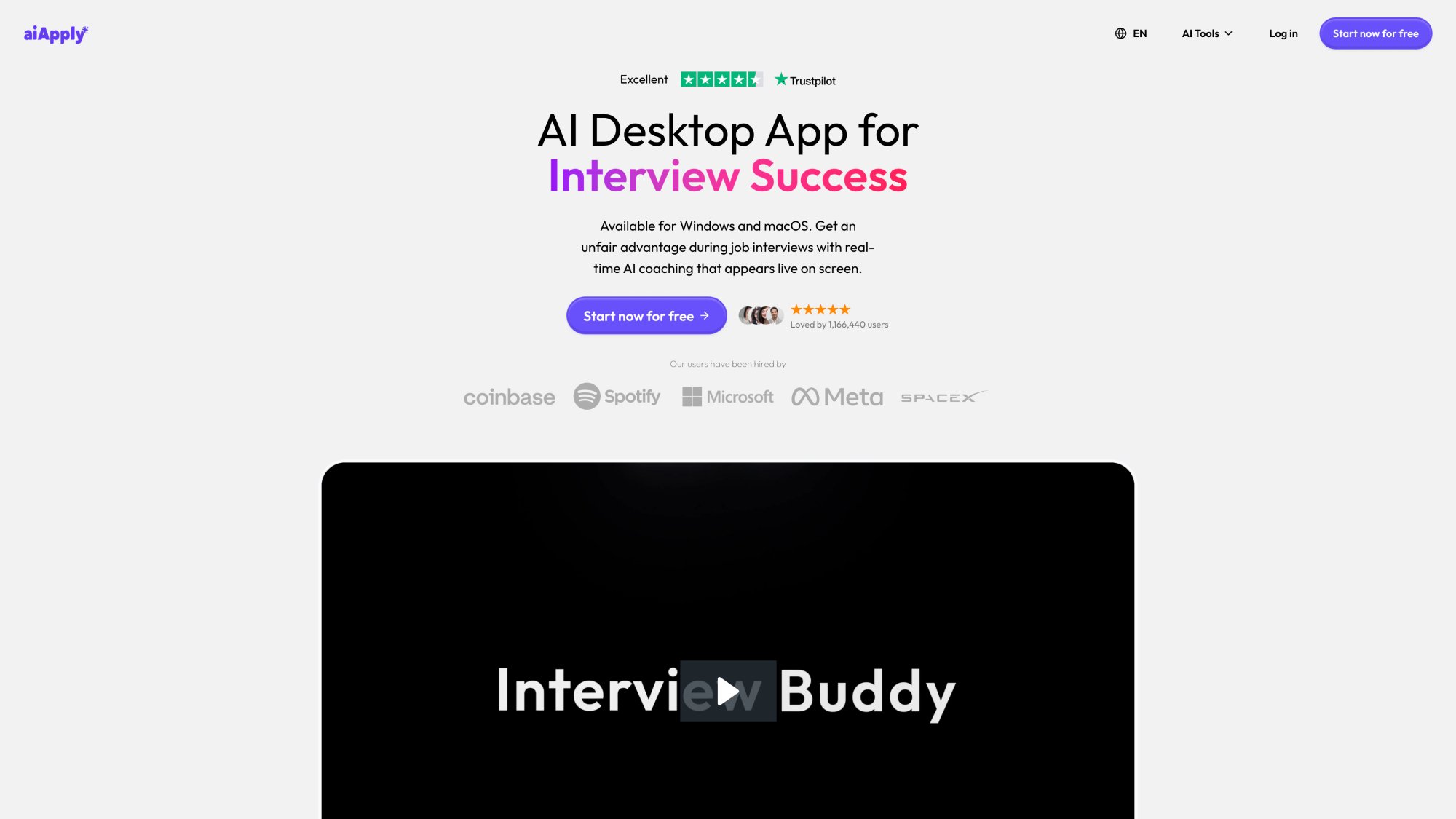
Interview Buddy operates as a Chrome extension that listens to questions via your browser and displays suggested answers on your screen (invisible to the interviewer). The tool analyzes your resume and the job description to provide personalized, context-aware responses. Use the one-click hide feature before screen sharing to maintain discretion.
About real-time interview assistance:
Some employers may consider real-time answer tools unacceptable (especially in proctored interviews or skills assessments). Recruiters also report concern about AI tools being used live in interviews and assessments. Use any live coaching ethically: follow instructions, don't misrepresent, and don't treat AI as a substitute for competence.
Step 10: Track Your Applications and Improve Over Time
If you're not tracking, you're guessing. A minimal tracker should include company/role/link, date applied, channel (referral, LinkedIn, company site, recruiter outreach, Auto Apply), resume version used, status (applied, screening, interview, rejected, offer), and notes (what worked, what didn't).
Why this matters: A LiveCareer survey covered by CFO Dive found 57% of job seekers aborted an application mid-way due to complexity, and only 10% believed nearly all their applications were reviewed by a human recruiter. Trust is eroding, and the process is cognitively expensive. A tracker helps you stay rational and consistent.
AI Job Search Prompts You Can Copy and Use Today
These are designed to produce usable outputs, not vague advice.
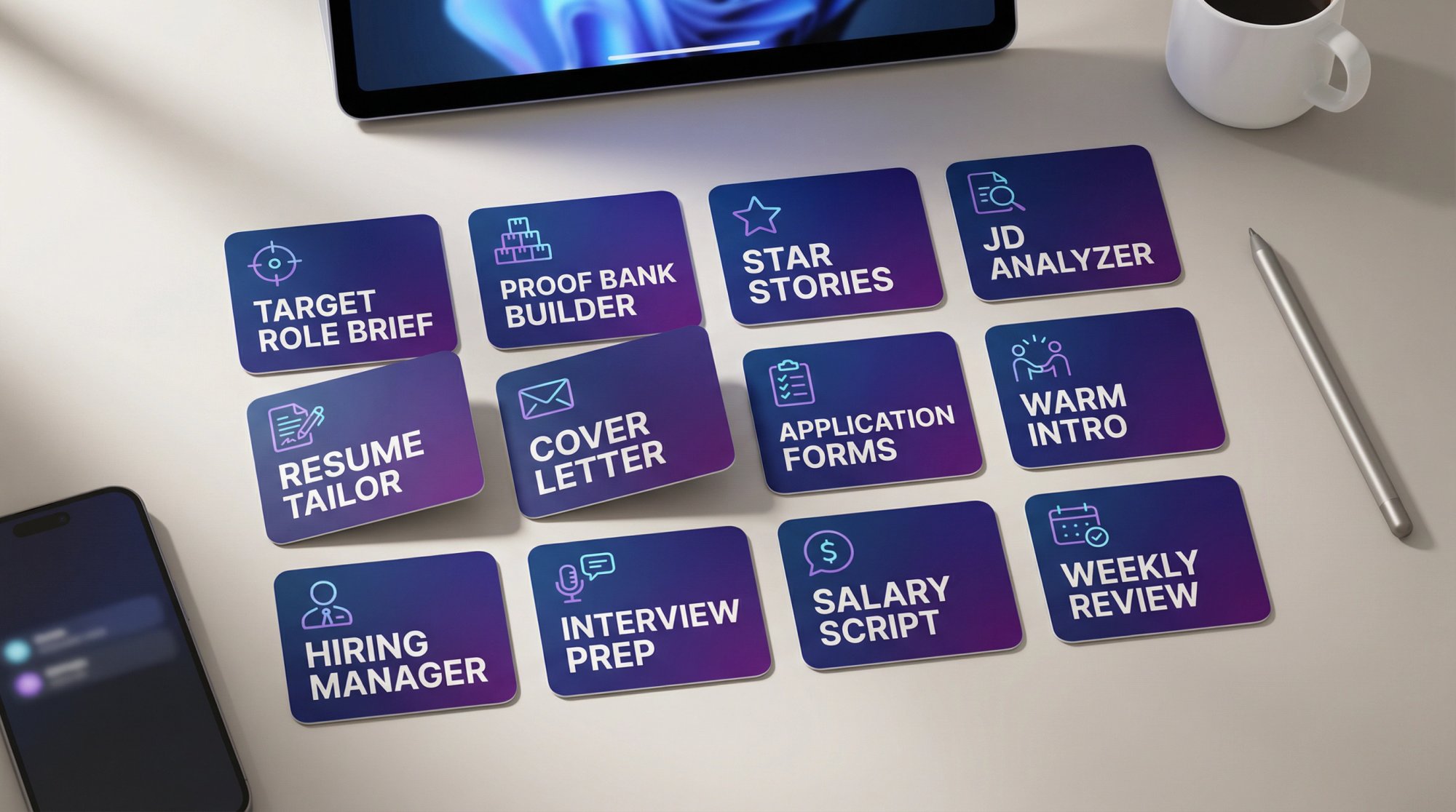
Prompt 1: Build a target role brief
Act as a career strategist. Ask me 10 questions to define my target role (job title(s), seniority, industries, constraints, salary, remote/hybrid, values, dealbreakers). Then produce a 1-page Target Role Brief with: (1) target titles, (2) target industries, (3) must-have responsibilities, (4) must-have skills, (5) keywords recruiters will search, (6) top 10 companies, (7) "roles to avoid."
Prompt 2: Turn your work history into a proof bank
Here is my raw work history (paste). Extract 20 accomplishments using the format: Action + Tool/Method + Outcome + Metric/Scope. If metrics are missing, suggest truthful proxies I can validate (e.g., volume, time saved, conversion lift, cost reduction). Do not invent numbers.
Prompt 3: Create STAR stories for interviews
Using my accomplishments below, create 8 STAR stories tailored to these competencies: (1) ownership, (2) stakeholder management, (3) problem-solving, (4) communication, (5) dealing with ambiguity, (6) technical depth, (7) leadership, (8) learning fast. Keep each story to 60 to 90 seconds spoken.
Prompt 4: Job description to skills map
Analyze this job description. Output:
Top 10 hard skills/tools (ranked)
Top 8 responsibilities (ranked)
Top 6 "signals" (what they probably care about most)
Keywords/phrases that appear multiple times
A shortlist of 6 bullets I should include in my resume to match (must be truthful; use placeholders for metrics if unknown).
Prompt 5: Resume tailoring plan (minimal edits)
I will paste (A) my master resume and (B) a job description.
Your task: propose edits ONLY in these zones: Summary, Skills, and the top 5 bullets in Experience.
Constraints: keep formatting ATS-friendly; no fluff; use specific verbs; do not invent experience.
Output: a revised version plus a "change log" explaining what changed and why.
Prompt 6: Cover letter that doesn't sound generic
Draft a cover letter for this role and company. Requirements:
220 to 320 words
2 proof points with metrics or scope
1 company-specific paragraph (use real product/strategy details I provide below)
Avoid clichés ("passionate," "I'm excited," "fast-paced environment")
Tone: confident, human, concise
Inputs: Job description: … / My proof points: … / Company notes: …
Prompt 7: "Application form killer" (short answers)
I'm filling out an application form. For each question below, propose:
A 120 to 180 word answer
A 40 to 70 word answer
Use STAR or CAR structure. Keep truthful.
Questions: (paste)
Prompt 8: Networking message (warm intro request)
Write 3 versions of a networking message to a mutual connection:
Version A: 55 to 75 words
Version B: 90 to 120 words
Version C: 1 to 2 sentences
Each must include: (1) specific role, (2) specific reason I'm a fit, (3) respectful ask, (4) easy opt-out.
My context: … / Company: … / Role link: …
Prompt 9: Hiring manager message (direct)
Write a message to the hiring manager that:
references 1 specific company initiative (I'll paste notes)
offers a 1-sentence value proposition
includes 2 proof bullets
ends with a low-pressure question
Keep it under 120 words.
Prompt 10: Interview question bank (role-specific)
Generate 25 interview questions likely for this job based on the job description. Group by: role skills, stakeholder, metrics, scenario, culture, leadership. Then generate "great answer outlines" using my proof points below.
Prompt 11: Salary negotiation script
Create a negotiation script for this offer. Inputs: role, location, base, bonus, equity, benefits, my target range, competing options. Output:
email version
phone call version (talk track)
3 fallback concessions (extra PTO, sign-on, review cycle, remote terms)
Prompt 12: Weekly job search review (the feedback loop)
Act as my job search analyst. Here is my weekly tracker summary (paste: number of apps, number of referrals, number of recruiter replies, number of interviews, number of rejections and notes).
Diagnose bottlenecks and give me the highest-leverage changes for next week. Provide a 7-day plan.
How to Avoid AI Detection and Common Application Mistakes
Here are the failure modes that get people rejected in 2026 (and how to fix them).
How to Avoid "AI Wrote This" Tone
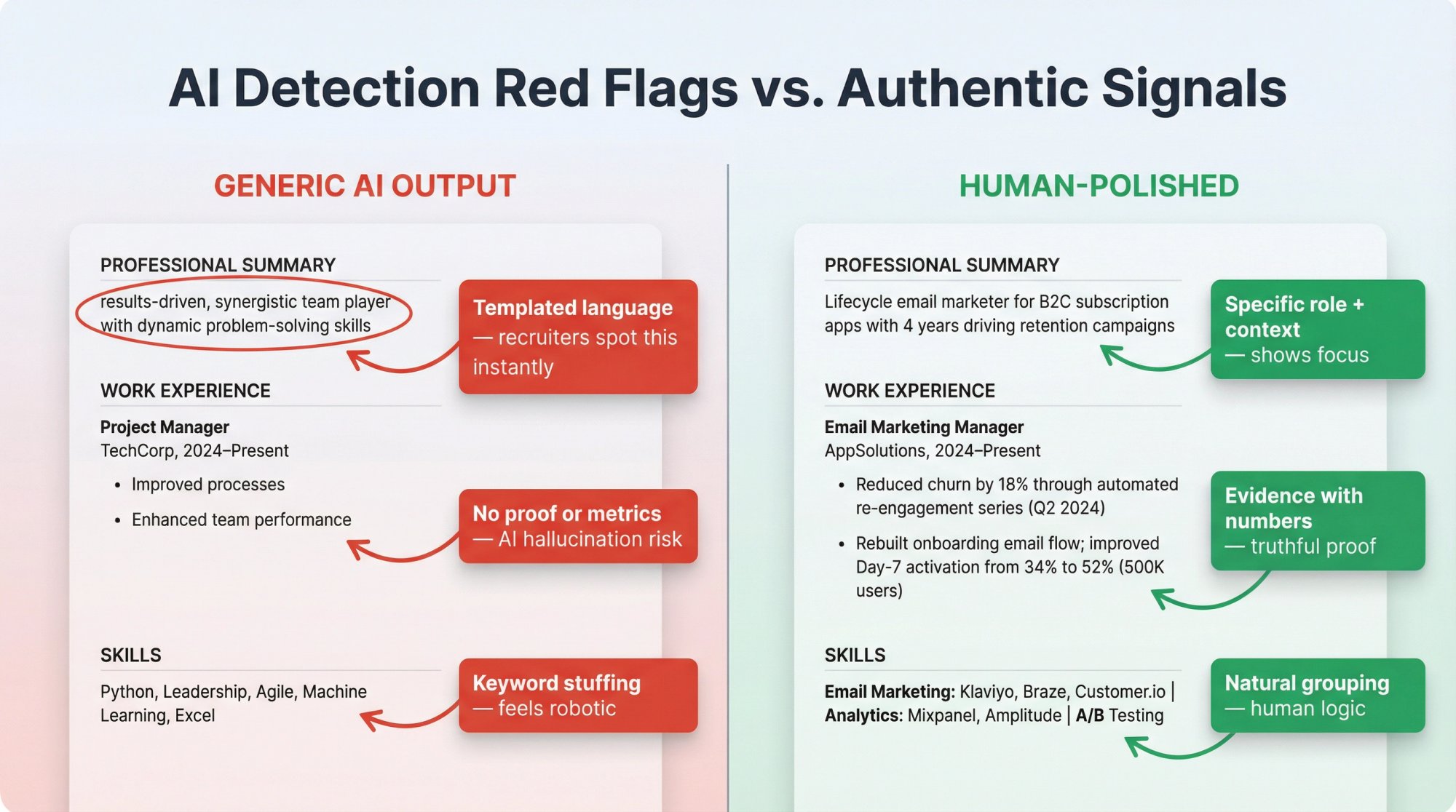
Recruiters say they can spot templated language quickly, and there's documented skepticism toward AI-generated applications.
Fix: Replace adjectives with evidence ("improved onboarding time by 30%"), remove buzzword clusters ("results-driven, synergistic, dynamic"), and add one specific detail that could only be true for you.
AIApply's AI Resume Checker analyzes your resume for generic AI patterns and suggests specific, evidence-based improvements that make your application stand out.
How to Prevent AI Hallucinations and False Claims
AI will happily "help" you lie by accident.
Fix: Create a hard rule.
If it's not in your proof bank, it doesn't go in your resume.
Why Over-Automation Hurts Your Job Search
If you apply everywhere, you look like you apply nowhere.
Fix: Two-lane pipeline (high-priority manual and low-friction automated), and track outcomes.
Why Keyword Stuffing Doesn't Work Anymore
Modern systems and humans both dislike this.
Fix: Use keywords naturally inside proof bullets, not as a list of nouns.
Why Human Connection Still Matters
Even when systems rank candidates, humans still decide. CFO Dive's coverage of job seeker skepticism highlights the emotional cost and trust gap; your job is to restore trust with clarity and professionalism.
AI Job Search Privacy and Legal Compliance in 2026
You don't need to become a lawyer. But you should know the basics because hiring tech is becoming regulated.
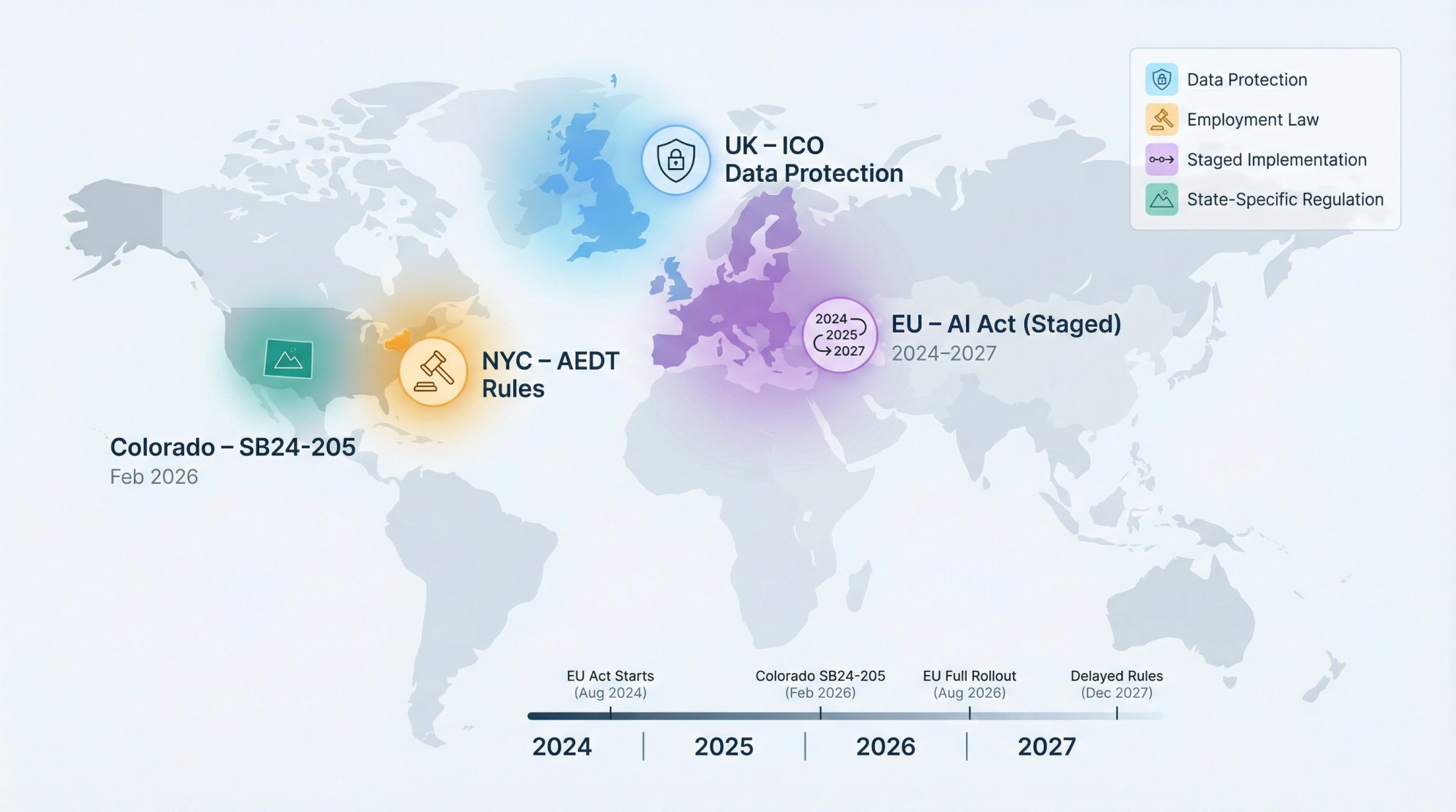
UK: AI recruitment tools and data protection
The UK Information Commissioner's Office (ICO) published recommendations after auditing AI recruitment tools, emphasizing protection of job seekers' information rights and better data protection practices. (ICO news, Nov 6, 2024.)
Practical takeaway for job seekers: Be mindful about where you upload your CV and personal data. Use reputable tools, and don't overshare sensitive information unless necessary.
NYC: rules for automated employment decision tools
New York City has a complaint process related to employers' use of Automated Employment Decision Tools (AEDTs), including requirements around bias audits and candidate notices.
Practical takeaway: If you're applying to NYC roles, employers using certain tools may have disclosure obligations. Know you can ask questions.
EU: AI Act timeline (and potential changes)
The EU's official AI Act page explains the Act entered into force 1 August 2024, with staged applicability and major milestones (including general-purpose AI obligations applying from 2 August 2025 and broader applicability from 2 August 2026, with some extended timelines). Separately, Reuters reported (Nov 2025) that the European Commission proposed delaying some "high risk" AI rules until December 2027.
Practical takeaway: If you're job searching in the EU, expect more transparency requirements around AI screening tools over time (and evolving rules).
Colorado: AI Act goes into effect Feb 1, 2026
Colorado's SB24-205 sets obligations for deployers of "high-risk" AI systems starting Feb 1, 2026, including taking reasonable care to protect consumers from risks of algorithmic discrimination.
Practical takeaway: More jurisdictions are regulating employment-related AI. Transparency and accountability are increasing (slowly, but clearly).
AIApply Complete Job Search Workflow (Start to Finish)
We built AIApply to be a full-stack job search companion: build tailored resumes and cover letters, apply faster, and prepare for interviews. Here's a practical, ethical way to use it end-to-end.
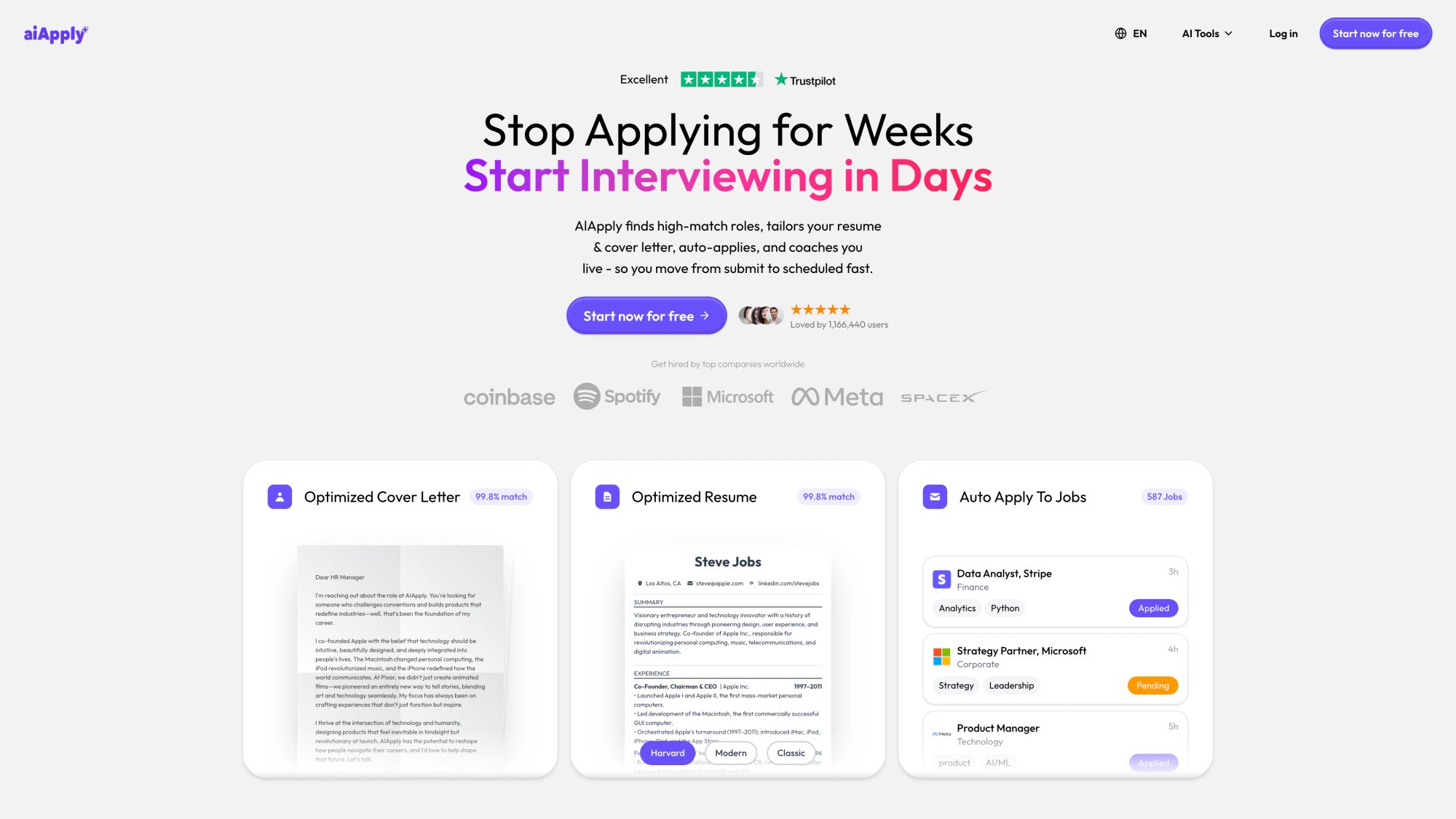
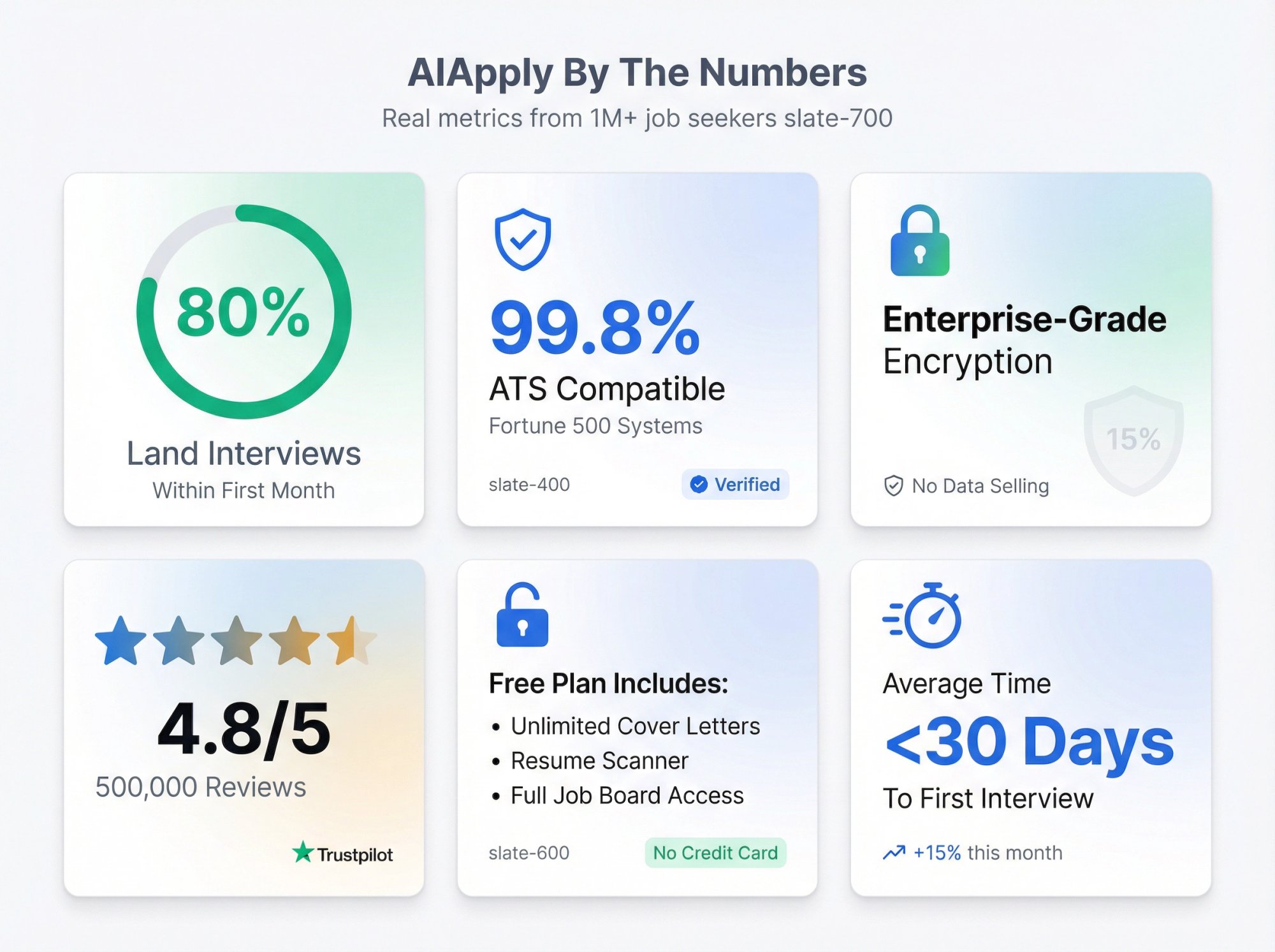
AIApply's platform integrates every stage of the job search: from discovering roles on the job board, to tailoring materials with the Resume and Cover Letter Builders, to automating applications with Auto Apply, to preparing for interviews with Mock Interview and Interview Buddy. Over 1 million job seekers use the platform, with 80% reporting they're more likely to get hired faster when using the full workflow.
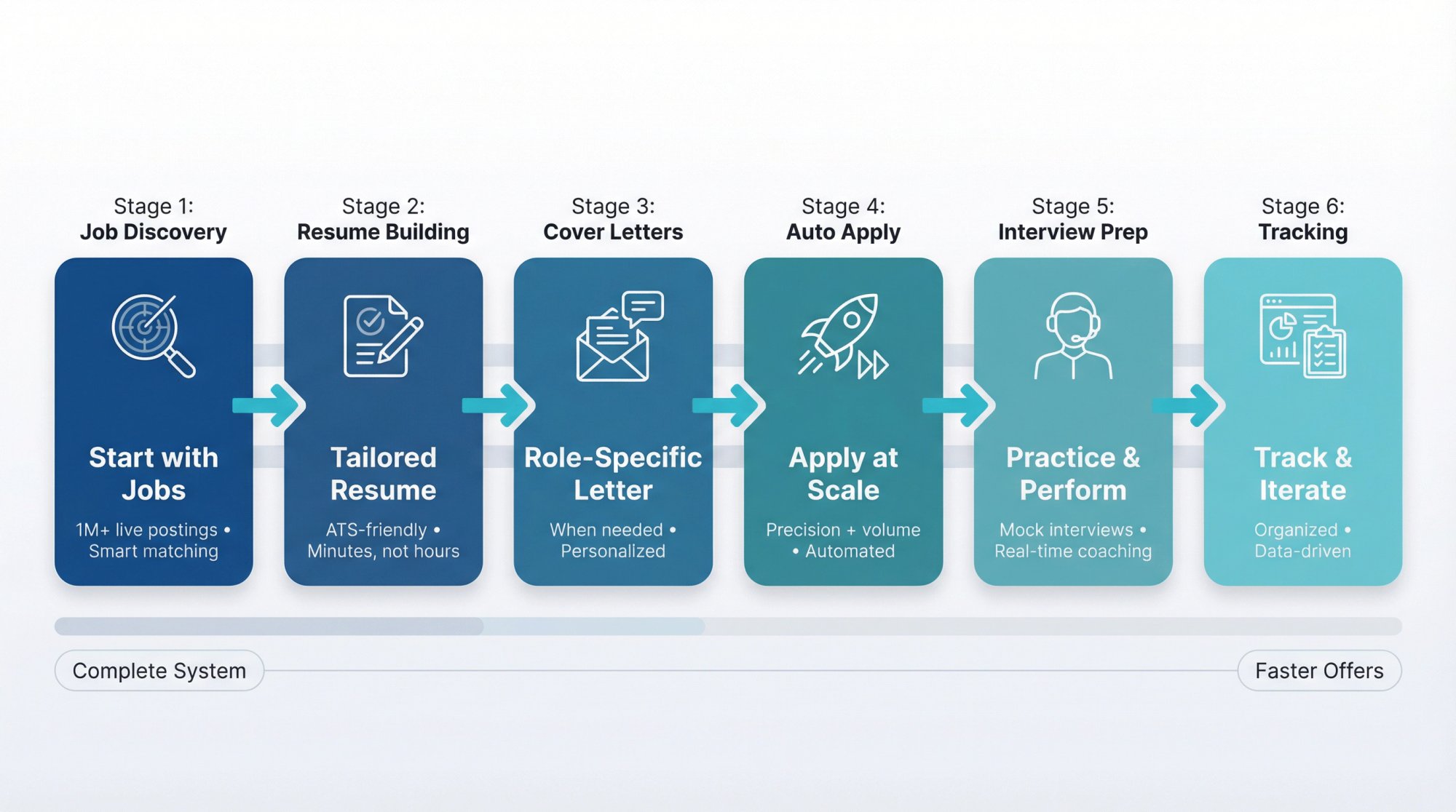
1) Start with jobs (keep the funnel full)
Use AIApply's job discovery and matching workflow to keep a steady stream of relevant roles. Decide which roles are Lane A (high priority) vs Lane B (low friction). Browse AIApply's Job Board with over 1 million live job postings, filtered by your preferences and skills to find opportunities that match your target role brief.
2) Build your tailored resume in minutes, not hours
Create (or upload) a master resume using AIApply's Resume Builder. For each job, generate a tailored version that mirrors the role's priorities while staying ATS-friendly. AIApply's ecosystem is built around tailoring materials to job descriptions and ATS flows.
For a deeper resume workflow, check out our guide on how to use AI to write a resume that walks through using AI to write resumes in a structured way. You can also import your existing resume from LinkedIn to speed up the initial setup.
3) Generate a role-specific cover letter (when needed)
Use AIApply's Cover Letter Builder to create role-specific drafts, then personalize the company-specific paragraph so it's genuinely true and non-generic. Browse cover letter examples for your role to see how others in your field structure their applications.
4) Apply at scale without losing precision
AIApply Auto Apply is built to take the repetitive application work off your plate (finding and applying to matching jobs) so you can spend time on interviews and networking. AIApply Auto Apply scans over 1 million job postings and can submit applications to major job boards and company career sites.
5) Practice interviews (this is where most offers are won)
You can use AI to generate likely questions, build STAR stories, practice out loud, and improve clarity and confidence. AIApply's interview prep ecosystem includes Mock Interview and Interview Buddy features to help you practice and perform.
6) Keep a tracker (the compounding advantage)
AIApply and related workflows emphasize tracking applications and staying organized so you can iterate.
Common Questions About AI Job Search (Answered)
Is it okay to use AI in job applications?
In practice, many candidates do, and many recruiters are also using AI. LinkedIn reported 81% of people have used or plan to use AI in job search, and recruiters are increasing their AI usage. The key is how you use it: support drafting, clarity, structure, and preparation (without deception).
Will ATS reject AI-generated resumes?
ATS typically doesn't "detect AI." It parses structure and matches relevance. The bigger risk is generic content, missing keywords, or formatting that doesn't parse well (plus recruiter skepticism when the writing is templated). Use AIApply's AI Resume Scanner to verify your resume passes ATS checks before submitting.
Should I use AI during interviews?
Use AI heavily before interviews (practice, story bank, question prep). During interviews, follow the employer's rules. Recruiters have raised concerns about real-time AI assistance; misuse can harm trust. If you do use AIApply's Interview Buddy during live interviews, use it ethically as a backup confidence tool, not as a crutch that replaces genuine preparation.
How many applications should I submit?
There isn't one number. In 2026, the best approach is two-lane: Lane A (fewer, deeply tailored, network-supported) and Lane B (higher volume, still targeted). And you track results weekly to adjust.
Can I use AIApply for free?
Yes. AIApply's Free plan includes unlimited cover letters, resume scanner, and full job board access. The Pro plan adds unlimited resumes and letters, Interview Buddy, Auto Apply credits, and resume hosting.
Does AIApply work with all ATS systems?
AIApply is designed to be ATS-friendly. Our templates use single-column layouts, standard section headings, and clean formatting that parses well with major ATS platforms used by Fortune 500 companies.
How fast can I land interviews with AIApply?
According to our data, 80% of AIApply users land interviews within the first month. Success depends on your target role, experience level, and how consistently you apply the two-lane pipeline approach.
Is my data safe with AIApply?
Yes. AIApply uses data encryption and doesn't sell or transfer personal information. Resume data processes locally by default, and we're committed to privacy-first processing.
What's the difference between manual tailoring and Auto Apply?
Manual tailoring (Lane A) is best for high-priority roles where you want deep customization and networking. Auto Apply (Lane B) handles higher volume applications with light tailoring, freeing you to focus on interviews. Most successful candidates use both.
Can I edit AIApply-generated resumes and cover letters?
Absolutely. All materials generated by AIApply are fully editable before submission. We recommend personalizing company-specific sections and adding unique details that only you would know.
What makes this approach "$10,000 valuable"
If you take nothing else, take this:
The job search winners in 2026 are building a signal engine.
AI helps you clarify your target, translate your experience into evidence, tailor faster, apply consistently, practice more, and iterate scientifically.
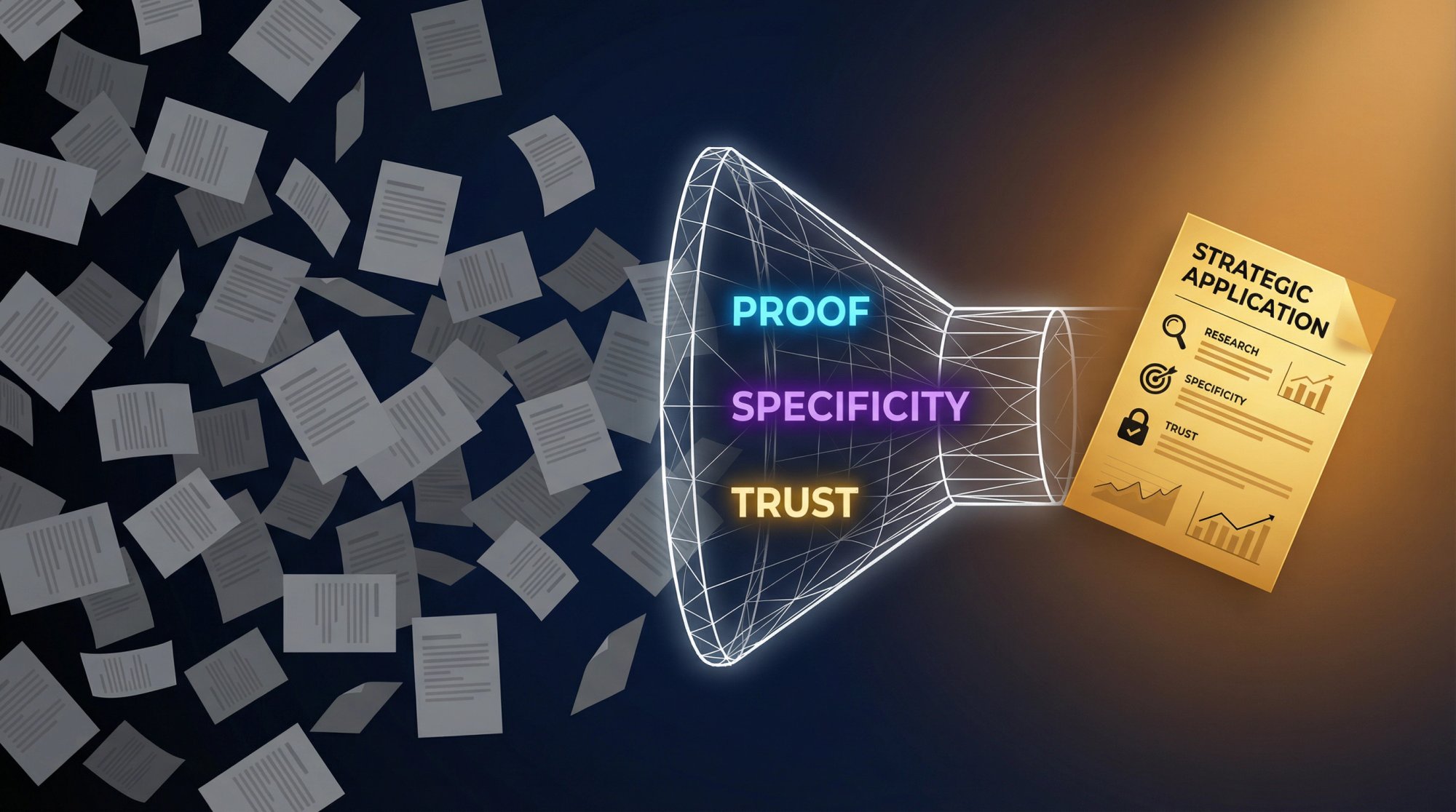
But the differentiator is proof, specificity, and trust.
If you're searching "how to use AI for job search," you're not really looking for a list of tools. You're trying to achieve outcomes: more interviews (without sending 200 generic applications), faster applications (without losing quality), less guesswork ("Am I a fit? Why am I getting ghosted?"), higher confidence in interviews (and better answers under pressure), and a repeatable system you can run until you land the offer.
In 2026, AI can absolutely help, but only if you use it like a strategist, not like a spam cannon.
Why? Because recruiters and companies are using AI too. LinkedIn reported that 93% of recruiters plan to increase their use of AI in 2026, and two-thirds (66%) plan to increase AI for pre-screening interviews. On the candidate side, LinkedIn reported 81% of people have used or plan to use AI in their job search. Meanwhile, ATS software is still everywhere. Jobscan's 2025 ATS Usage Report found 97.8% of Fortune 500 companies had a detectable ATS in 2025 (with 2024 at 98.4%).
So the win isn't "use AI." The win is: use AI to send stronger signals than everyone else, faster, without breaking trust.
This guide shows you exactly how.
Table of contents
→ How AI Changed Job Search in 2026 (And What Still Matters)
→ How to Build Your AI Job Search System
→ How to Use AI at Every Stage of Job Search
→ AI Job Search Prompts You Can Copy and Use Today
→ How to Avoid AI Detection and Common Application Mistakes
→ AI Job Search Privacy and Legal Compliance in 2026
→ AIApply Complete Job Search Workflow (Start to Finish)
→ Common Questions About AI Job Search (Answered)
→ Data currency note (important)
How AI Changed Job Search in 2026 (And What Still Matters)
What AI Changed in Job Search (2026)
1) Keyword guessing is dying; "semantic matching" is growing
Recruiters are increasingly using AI to find candidates based on skills they might not have surfaced before. LinkedIn reported 59% of recruiters say AI is already helping them discover candidates with skills they wouldn't have found otherwise.
2) The application bar went up
When everyone can generate a "perfect" resume in 30 seconds with AI resume builders, a perfect-looking resume isn't a differentiator anymore. Evidence is.
3) Screening is getting earlier and more automated
SHRM's 2025 Talent Trends report on AI in HR says just over half of organizations (51%) use AI to support recruiting, with 44% using it for screening resumes.
4) "Trust" is now a competitive advantage
According to SHRM, an estimated 40% to 80% of job applicants use AI for resumes, cover letters, and interview prep, which contributes to recruiter skepticism and sameness. At the same time, a U.S. Chamber of Commerce piece summarizing a TopResume survey reported nearly 20% of recruiters would reject a candidate who used an AI-generated resume or cover letter (and many are OK with AI for proofreading rather than wholesale writing).
You can't control how every recruiter feels, but you can control whether your application reads like mass-produced fluff.
What Still Matters in Job Search (AI Can't Replace This)
Hiring still rewards:
• Clear role fit
• Proof of impact
• Strong communication
• Social proof (referrals, warm intros, credible online presence)
• Consistent follow-through
AI should amplify those, not replace them.
How to Build Your AI Job Search System
Most job seekers fail because they treat job search like a set of random tasks. Instead, run it like an operating system with clear inputs and outputs.
Critical mindset shift: Your AI-assisted job search should produce consistent deliverables every week, not random bursts of activity.
Your AI Job Search OS (simple and brutally effective)
Each week, your AI-assisted job search should produce:
① A target list (roles, companies, constraints)
② A proof bank (accomplishments, metrics, mini case studies, portfolio links)
③ A master resume (your full inventory, not tailored yet)
④ A tailored resume for each high-priority role
⑤ A tailored cover letter only when it helps (yes, sometimes it does)
⑥ A networking pipeline (5 to 15 targeted touches per week)
⑦ An interview story bank (STAR stories mapped to the role)
⑧ A tracking board (what you sent, what worked, what didn't)
AI is the engine for speed and clarity. You are the source of truth (and the one who closes the loop).
How to Use AI at Every Stage of Job Search
Step 1: Define Your Target Job Search (Be Specific)
If you apply to "marketing roles," AI will generate generic outputs. Instead, define your target precisely.
You need:
→ Role archetype: "Lifecycle email marketer for B2C subscription apps"
→ Seniority: "mid-level"
→ Industry: "fintech / consumer apps"
→ Constraints: remote, UK time zone, salary floor, etc.
AI use: turn your messy preferences into a clear target role spec.
Output you want: a 1-page "Target Role Brief" you can reuse.
Step 2: Build Your Proof Bank (Your Secret Weapon)
AI can generate words. It can't generate credible proof.
Your proof bank should include:
→ 10 to 20 quantified accomplishments (before/after metrics)
→ 5 to 10 "pain, action, result" mini case studies
→ 6 to 12 STAR stories (Situation, Task, Action, Result)
→ Your strongest projects, portfolios, presentations, GitHub, writing, etc.
AI use: pull achievements out of your history, tighten bullets, and convert vague work into measurable impact.
Rule: If the metric isn't real, don't use it. Replace it with a truthful proxy ("reduced manual effort by automating X; saved approximately 2 hours per week for team") or remove it.
Step 3: Create an ATS-Friendly Master Resume
ATS isn't your enemy. It's just a database, parser, and workflow. Jobscan's analysis shows ATS usage remains dominant in large companies. That means formatting still matters.
ATS-safe formatting rules (still true in 2026):
AI use: rewrite bullets for clarity and impact while keeping structure stable.
Use AIApply's AI Resume Scanner to check your resume against ATS requirements and get a detailed compatibility score before submitting.
The Resume Scanner analyzes your resume against ATS parsing rules, identifies keyword gaps, and provides specific recommendations to improve your compatibility score before you hit submit.
Step 4: Turn Job Descriptions into Keyword Maps
Your goal isn't "stuff keywords." Your goal is match the employer's priorities in their language.
For each job, extract:
① Must-have hard skills/tools
② Must-have domain knowledge
③ Nice-to-have skills
④ Responsibilities that repeat (signals priority)
⑤ "Soft skills" that are actually behaviors (stakeholder management, ambiguity, etc.)
AI use: summarize, cluster, and rank these requirements.
Output you want: a short map you can paste into your resume tailoring workflow.
Step 5: Tailor Your Resume Without Sounding Generic
This is where most AI-generated resumes fail: they read "correct," but empty. The fix is simple.
For each job, tailor only 3 zones:
• Zone 1: Headline / summary (2 to 3 lines)
• Zone 2: Skills section (re-ordered to match job priorities)
• Zone 3: Top 3 to 5 bullets across your most relevant roles/projects
Leave the rest stable. This preserves truth and avoids "resume drift." SHRM notes recruiters are dealing with floods of applications and sameness as candidates use AI to tailor to job descriptions. Your resume has to feel specific, not mass-produced.
AIApply's Resume Builder streamlines this process by automatically analyzing job descriptions and suggesting targeted modifications to your resume while maintaining your authentic voice and achievements.
The Resume Builder provides professionally designed templates, real-time preview as you edit, and one-click tailoring that mirrors the role's priorities while keeping your resume ATS-compliant. Every section remains fully editable so you can add the specific details that only you would know.
Step 6: Write Cover Letters That Actually Help
Cover letters help most when you're changing industries or functions, you have a non-obvious story (gap, relocation, unusual path), the role is writing-heavy or stakeholder-heavy, or the company explicitly values them.
If you do write one, the structure that wins is:
1) Why this role (1 to 2 lines, specific)
2) Why you (2 to 3 proof points mapped to their priorities)
3) Why this company (something real: product, strategy, mission, constraints)
4) Close (clear call to action)
AI use: draft, then you personalize, then AI tightens.
AIApply's AI Cover Letter Generator creates role-specific drafts that you can customize with company-specific details, ensuring your cover letter sounds authentic while maintaining professional quality.
The Cover Letter Generator analyzes the job description and creates a targeted draft with proof points mapped to the employer's priorities. You then personalize the company-specific paragraph with real product or strategy details so the final letter feels genuinely researched, not templated.
Step 7: Use Automation Strategically (Quality + Volume)
The brutal truth: sometimes you need volume. But volume without strategy becomes noise.
A smart approach is to run a two-lane pipeline:
Lane A: High-priority roles (manual and deep tailoring)
5 to 15 applications per week
Deep resume tailoring
Networking and referral attempt
Custom interview prep
Lane B: Low-friction roles (automated and light tailoring)
Higher volume, but still targeted
Fast resume/cover letter customization
No overthinking
AIApply's Auto Apply is designed around this idea: it handles the repetitive parts (finding matches and submitting applications) so you can focus on interviews. AIApply Auto Apply scans job postings at scale and optimizes resumes and cover letters to match job descriptions. The platform scans over 1 million job postings and can submit applications to major job boards and company career sites.
Auto Apply lets you set your preferences (job titles, industries, locations) and the system finds matching opportunities, customizes your application materials, and tracks status in a unified dashboard. You control the pace with credit packs, and credits never expire, so you can run high-volume campaigns when needed without losing Lane A precision.
Step 8: Use AI for Networking Without Sounding Like AI
Networking isn't "asking for a job." It's reducing uncertainty for the hiring team.
AI can help you identify who to talk to (team members, hiring manager, adjacent roles), draft outreach messages that are short, specific, and respectful, generate smart questions that signal you understand the work, and follow up without being annoying.
But you must add the human layer:
A real reason you chose them
A real question
A real appreciation of their time
Step 9: Use AI for Interview Prep (Best Practices)
Interview success is mostly pattern recognition (understanding what questions really mean), storytelling (clear, structured answers), proof (results, reasoning, decisions), and calm delivery (managing pressure effectively).
LinkedIn reported that 48% of people say AI tools boost their interview confidence.
You can use AI to generate a role-specific question bank, turn your proof bank into STAR answers, practice with a mock interviewer, and improve clarity, concision, and structure.
AIApply's Interview Buddy provides real-time on-screen coaching during live video interviews, offering instant, personalized answers to challenging questions while remaining discreet to the interviewer. For practice sessions, AIApply's Mock Interview tool simulates realistic interview scenarios and provides detailed feedback on your responses, helping you refine your answers before the actual interview.
Interview Buddy operates as a Chrome extension that listens to questions via your browser and displays suggested answers on your screen (invisible to the interviewer). The tool analyzes your resume and the job description to provide personalized, context-aware responses. Use the one-click hide feature before screen sharing to maintain discretion.
About real-time interview assistance:
Some employers may consider real-time answer tools unacceptable (especially in proctored interviews or skills assessments). Recruiters also report concern about AI tools being used live in interviews and assessments. Use any live coaching ethically: follow instructions, don't misrepresent, and don't treat AI as a substitute for competence.
Step 10: Track Your Applications and Improve Over Time
If you're not tracking, you're guessing. A minimal tracker should include company/role/link, date applied, channel (referral, LinkedIn, company site, recruiter outreach, Auto Apply), resume version used, status (applied, screening, interview, rejected, offer), and notes (what worked, what didn't).
Why this matters: A LiveCareer survey covered by CFO Dive found 57% of job seekers aborted an application mid-way due to complexity, and only 10% believed nearly all their applications were reviewed by a human recruiter. Trust is eroding, and the process is cognitively expensive. A tracker helps you stay rational and consistent.
AI Job Search Prompts You Can Copy and Use Today
These are designed to produce usable outputs, not vague advice.
Prompt 1: Build a target role brief
Act as a career strategist. Ask me 10 questions to define my target role (job title(s), seniority, industries, constraints, salary, remote/hybrid, values, dealbreakers). Then produce a 1-page Target Role Brief with: (1) target titles, (2) target industries, (3) must-have responsibilities, (4) must-have skills, (5) keywords recruiters will search, (6) top 10 companies, (7) "roles to avoid."
Prompt 2: Turn your work history into a proof bank
Here is my raw work history (paste). Extract 20 accomplishments using the format: Action + Tool/Method + Outcome + Metric/Scope. If metrics are missing, suggest truthful proxies I can validate (e.g., volume, time saved, conversion lift, cost reduction). Do not invent numbers.
Prompt 3: Create STAR stories for interviews
Using my accomplishments below, create 8 STAR stories tailored to these competencies: (1) ownership, (2) stakeholder management, (3) problem-solving, (4) communication, (5) dealing with ambiguity, (6) technical depth, (7) leadership, (8) learning fast. Keep each story to 60 to 90 seconds spoken.
Prompt 4: Job description to skills map
Analyze this job description. Output:
Top 10 hard skills/tools (ranked)
Top 8 responsibilities (ranked)
Top 6 "signals" (what they probably care about most)
Keywords/phrases that appear multiple times
A shortlist of 6 bullets I should include in my resume to match (must be truthful; use placeholders for metrics if unknown).
Prompt 5: Resume tailoring plan (minimal edits)
I will paste (A) my master resume and (B) a job description.
Your task: propose edits ONLY in these zones: Summary, Skills, and the top 5 bullets in Experience.
Constraints: keep formatting ATS-friendly; no fluff; use specific verbs; do not invent experience.
Output: a revised version plus a "change log" explaining what changed and why.
Prompt 6: Cover letter that doesn't sound generic
Draft a cover letter for this role and company. Requirements:
220 to 320 words
2 proof points with metrics or scope
1 company-specific paragraph (use real product/strategy details I provide below)
Avoid clichés ("passionate," "I'm excited," "fast-paced environment")
Tone: confident, human, concise
Inputs: Job description: … / My proof points: … / Company notes: …
Prompt 7: "Application form killer" (short answers)
I'm filling out an application form. For each question below, propose:
A 120 to 180 word answer
A 40 to 70 word answer
Use STAR or CAR structure. Keep truthful.
Questions: (paste)
Prompt 8: Networking message (warm intro request)
Write 3 versions of a networking message to a mutual connection:
Version A: 55 to 75 words
Version B: 90 to 120 words
Version C: 1 to 2 sentences
Each must include: (1) specific role, (2) specific reason I'm a fit, (3) respectful ask, (4) easy opt-out.
My context: … / Company: … / Role link: …
Prompt 9: Hiring manager message (direct)
Write a message to the hiring manager that:
references 1 specific company initiative (I'll paste notes)
offers a 1-sentence value proposition
includes 2 proof bullets
ends with a low-pressure question
Keep it under 120 words.
Prompt 10: Interview question bank (role-specific)
Generate 25 interview questions likely for this job based on the job description. Group by: role skills, stakeholder, metrics, scenario, culture, leadership. Then generate "great answer outlines" using my proof points below.
Prompt 11: Salary negotiation script
Create a negotiation script for this offer. Inputs: role, location, base, bonus, equity, benefits, my target range, competing options. Output:
email version
phone call version (talk track)
3 fallback concessions (extra PTO, sign-on, review cycle, remote terms)
Prompt 12: Weekly job search review (the feedback loop)
Act as my job search analyst. Here is my weekly tracker summary (paste: number of apps, number of referrals, number of recruiter replies, number of interviews, number of rejections and notes).
Diagnose bottlenecks and give me the highest-leverage changes for next week. Provide a 7-day plan.
How to Avoid AI Detection and Common Application Mistakes
Here are the failure modes that get people rejected in 2026 (and how to fix them).
How to Avoid "AI Wrote This" Tone
Recruiters say they can spot templated language quickly, and there's documented skepticism toward AI-generated applications.
Fix: Replace adjectives with evidence ("improved onboarding time by 30%"), remove buzzword clusters ("results-driven, synergistic, dynamic"), and add one specific detail that could only be true for you.
AIApply's AI Resume Checker analyzes your resume for generic AI patterns and suggests specific, evidence-based improvements that make your application stand out.
How to Prevent AI Hallucinations and False Claims
AI will happily "help" you lie by accident.
Fix: Create a hard rule.
If it's not in your proof bank, it doesn't go in your resume.
Why Over-Automation Hurts Your Job Search
If you apply everywhere, you look like you apply nowhere.
Fix: Two-lane pipeline (high-priority manual and low-friction automated), and track outcomes.
Why Keyword Stuffing Doesn't Work Anymore
Modern systems and humans both dislike this.
Fix: Use keywords naturally inside proof bullets, not as a list of nouns.
Why Human Connection Still Matters
Even when systems rank candidates, humans still decide. CFO Dive's coverage of job seeker skepticism highlights the emotional cost and trust gap; your job is to restore trust with clarity and professionalism.
AI Job Search Privacy and Legal Compliance in 2026
You don't need to become a lawyer. But you should know the basics because hiring tech is becoming regulated.
UK: AI recruitment tools and data protection
The UK Information Commissioner's Office (ICO) published recommendations after auditing AI recruitment tools, emphasizing protection of job seekers' information rights and better data protection practices. (ICO news, Nov 6, 2024.)
Practical takeaway for job seekers: Be mindful about where you upload your CV and personal data. Use reputable tools, and don't overshare sensitive information unless necessary.
NYC: rules for automated employment decision tools
New York City has a complaint process related to employers' use of Automated Employment Decision Tools (AEDTs), including requirements around bias audits and candidate notices.
Practical takeaway: If you're applying to NYC roles, employers using certain tools may have disclosure obligations. Know you can ask questions.
EU: AI Act timeline (and potential changes)
The EU's official AI Act page explains the Act entered into force 1 August 2024, with staged applicability and major milestones (including general-purpose AI obligations applying from 2 August 2025 and broader applicability from 2 August 2026, with some extended timelines). Separately, Reuters reported (Nov 2025) that the European Commission proposed delaying some "high risk" AI rules until December 2027.
Practical takeaway: If you're job searching in the EU, expect more transparency requirements around AI screening tools over time (and evolving rules).
Colorado: AI Act goes into effect Feb 1, 2026
Colorado's SB24-205 sets obligations for deployers of "high-risk" AI systems starting Feb 1, 2026, including taking reasonable care to protect consumers from risks of algorithmic discrimination.
Practical takeaway: More jurisdictions are regulating employment-related AI. Transparency and accountability are increasing (slowly, but clearly).
AIApply Complete Job Search Workflow (Start to Finish)
We built AIApply to be a full-stack job search companion: build tailored resumes and cover letters, apply faster, and prepare for interviews. Here's a practical, ethical way to use it end-to-end.
AIApply's platform integrates every stage of the job search: from discovering roles on the job board, to tailoring materials with the Resume and Cover Letter Builders, to automating applications with Auto Apply, to preparing for interviews with Mock Interview and Interview Buddy. Over 1 million job seekers use the platform, with 80% reporting they're more likely to get hired faster when using the full workflow.
1) Start with jobs (keep the funnel full)
Use AIApply's job discovery and matching workflow to keep a steady stream of relevant roles. Decide which roles are Lane A (high priority) vs Lane B (low friction). Browse AIApply's Job Board with over 1 million live job postings, filtered by your preferences and skills to find opportunities that match your target role brief.
2) Build your tailored resume in minutes, not hours
Create (or upload) a master resume using AIApply's Resume Builder. For each job, generate a tailored version that mirrors the role's priorities while staying ATS-friendly. AIApply's ecosystem is built around tailoring materials to job descriptions and ATS flows.
For a deeper resume workflow, check out our guide on how to use AI to write a resume that walks through using AI to write resumes in a structured way. You can also import your existing resume from LinkedIn to speed up the initial setup.
3) Generate a role-specific cover letter (when needed)
Use AIApply's Cover Letter Builder to create role-specific drafts, then personalize the company-specific paragraph so it's genuinely true and non-generic. Browse cover letter examples for your role to see how others in your field structure their applications.
4) Apply at scale without losing precision
AIApply Auto Apply is built to take the repetitive application work off your plate (finding and applying to matching jobs) so you can spend time on interviews and networking. AIApply Auto Apply scans over 1 million job postings and can submit applications to major job boards and company career sites.
5) Practice interviews (this is where most offers are won)
You can use AI to generate likely questions, build STAR stories, practice out loud, and improve clarity and confidence. AIApply's interview prep ecosystem includes Mock Interview and Interview Buddy features to help you practice and perform.
6) Keep a tracker (the compounding advantage)
AIApply and related workflows emphasize tracking applications and staying organized so you can iterate.
Common Questions About AI Job Search (Answered)
Is it okay to use AI in job applications?
In practice, many candidates do, and many recruiters are also using AI. LinkedIn reported 81% of people have used or plan to use AI in job search, and recruiters are increasing their AI usage. The key is how you use it: support drafting, clarity, structure, and preparation (without deception).
Will ATS reject AI-generated resumes?
ATS typically doesn't "detect AI." It parses structure and matches relevance. The bigger risk is generic content, missing keywords, or formatting that doesn't parse well (plus recruiter skepticism when the writing is templated). Use AIApply's AI Resume Scanner to verify your resume passes ATS checks before submitting.
Should I use AI during interviews?
Use AI heavily before interviews (practice, story bank, question prep). During interviews, follow the employer's rules. Recruiters have raised concerns about real-time AI assistance; misuse can harm trust. If you do use AIApply's Interview Buddy during live interviews, use it ethically as a backup confidence tool, not as a crutch that replaces genuine preparation.
How many applications should I submit?
There isn't one number. In 2026, the best approach is two-lane: Lane A (fewer, deeply tailored, network-supported) and Lane B (higher volume, still targeted). And you track results weekly to adjust.
Can I use AIApply for free?
Yes. AIApply's Free plan includes unlimited cover letters, resume scanner, and full job board access. The Pro plan adds unlimited resumes and letters, Interview Buddy, Auto Apply credits, and resume hosting.
Does AIApply work with all ATS systems?
AIApply is designed to be ATS-friendly. Our templates use single-column layouts, standard section headings, and clean formatting that parses well with major ATS platforms used by Fortune 500 companies.
How fast can I land interviews with AIApply?
According to our data, 80% of AIApply users land interviews within the first month. Success depends on your target role, experience level, and how consistently you apply the two-lane pipeline approach.
Is my data safe with AIApply?
Yes. AIApply uses data encryption and doesn't sell or transfer personal information. Resume data processes locally by default, and we're committed to privacy-first processing.
What's the difference between manual tailoring and Auto Apply?
Manual tailoring (Lane A) is best for high-priority roles where you want deep customization and networking. Auto Apply (Lane B) handles higher volume applications with light tailoring, freeing you to focus on interviews. Most successful candidates use both.
Can I edit AIApply-generated resumes and cover letters?
Absolutely. All materials generated by AIApply are fully editable before submission. We recommend personalizing company-specific sections and adding unique details that only you would know.
What makes this approach "$10,000 valuable"
If you take nothing else, take this:
The job search winners in 2026 are building a signal engine.
AI helps you clarify your target, translate your experience into evidence, tailor faster, apply consistently, practice more, and iterate scientifically.
But the differentiator is proof, specificity, and trust.
.webp)
%20(1).webp)
.webp)
Don't miss out on
your next opportunity.
Create and send applications in seconds, not hours.


